

Indexing website for Google
Easily index your website pages in Google, Yandex, and Bing. 2Index Page Indexer uses the 2index.ninja API.
Plugin info
Maintenance & Compatibility
Maintenance score
Stale • Last updated 246 days ago • 2 reviews
Is Indexing website for Google abandoned?
Likely maintained (last update 246 days ago).
Compatibility
Similar & Alternatives
Explore plugins with similar tags, and compare key metrics like downloads, ratings, updates, support, and WP/PHP compatibility.
Description
Features:
It uses the 2index.ninja API to automatically submit pages for indexing. You can upload pages via a sitemap, list or text file. The plugin supports multiple sites with one account, provides automatic processing of new pages and displays the indexing status: “Indexed” or “Not indexed”.
External services
This plugin uses the 2index.ninja API to submit website pages for indexing by search engines like Google, Yandex, and Bing. This service is necessary for the core functionality of the plugin, allowing it to automate the submission and tracking of page indexing.
The following data is sent to 2index.ninja when a user initiates an indexing request:
- Administrator email address: For authentication in the 2index.ninja service
- Website URL(s): The URL(s) of the pages submitted for indexing, either individually, via a sitemap, or from a text file.
- User Agent (optional): The plugin may send a user agent string for identification purposes.
The plugin does not automatically submit data without user interaction. Indexing requests are triggered manually by the user.
This service is provided by 2index.ninja:
- Terms of Use: https://2index.ninja/files/terms_of_use_en.pdf
- Privacy Policy: https://2index.ninja/files/privacy_policy_en.pdf
FAQ:
1. How to start using the plugin?
First, install the plugin on your WordPress site. After activation, go to the settings to enter the API key from the 2index.ninja service and configure the indexing parameters.
2. Which search engines are supported?
The plugin supports indexing in Google, Yandex and Bing.
3. How to add pages for indexing?
Pages can be uploaded via a sitemap, a text file, or by manually specifying a list of pages.
4. What to do if the pages are not indexed?
If the page is not indexed, check the status via the plugin and make sure that it meets the requirements of search engines for indexing.
5. Can I use the plugin on multiple sites?
Yes, the plugin supports working on multiple sites with one 2index.ninja account.
6. How does automatic indexing work?
The plugin allows you to automatically send new pages for indexing if they are added to the sitemap.
7. Which languages does the plugin support?
The plugin is available in English, Russian, Urkainian, Chinese and 14 others.
8. How to change indexing settings?
The settings can be changed on the plugin settings page in your WordPress.
9. Can I submit pages for indexing for free?
Yes, you can submit up to 100 pages for indexing for free in all three search engines (Google, Yandex, and Bing) via the 2index.ninja service.
Support:
You can get support at https://2index.ninja/contacts
Installation
Frequently Asked Questions
Review feed
Screenshots
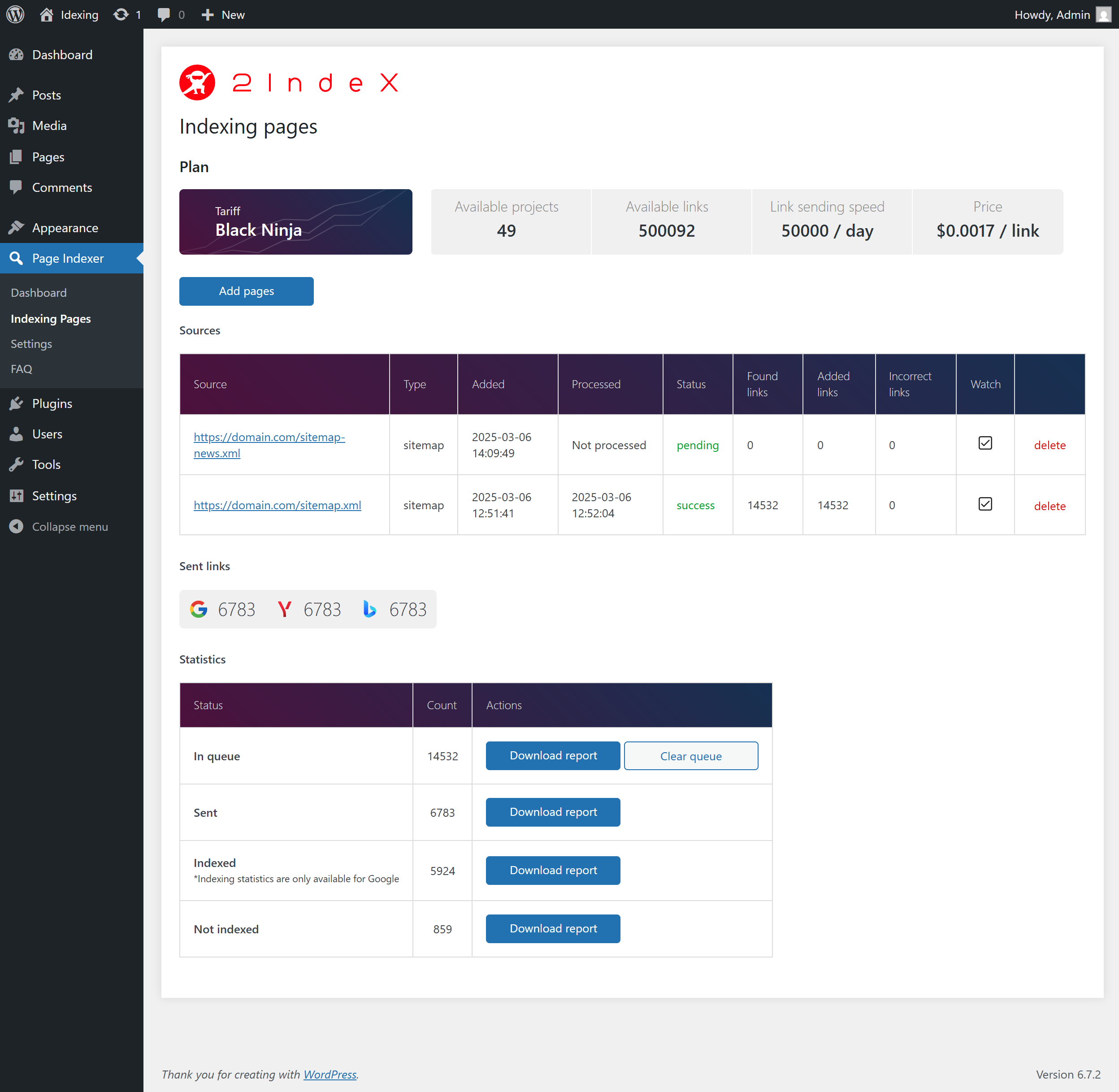
Indexing Status Page – Displays the indexing status of submitted pages.

Main Dashboard – Provides an overview of the plugin and its features.

FAQ Page – Contains common questions and answers about the plugin and service.

Settings Page – Allows you to configure the API key and other options.
Changelog
1.0.21
- ADD: Persian language.
1.0.20
- ADD: Vietnamese language.
1.0.19
- ADD: Polish language.
1.0.18
- ADD: Korean language.
1.0.17
- ADD: Italian language.
1.0.16
- ADD: Japanese language.
1.0.15
- ADD: German language.
1.0.14
- ADD: French language.
1.0.13
- ADD: Portuguese language.
1.0.12
- ADD: Indonesian language.
1.0.11
- ADD: Arabic language.
1.0.10
- ADD: Bengali language.
1.0.9
- ADD: Hindi language.
1.0.8
- ADD: Turkish language.
1.0.7
- ADD: Chinese language.