

ACF: Better Search
This plugin adds to default WordPress search engine the ability to search by content from selected fields of Advanced Custom Fields plugin.
Plugin info
Maintenance & Compatibility
Maintenance score
Maintained • Last updated 158 days ago • Support resolved 100% • 162 reviews
Is ACF: Better Search abandoned?
Likely maintained (last update 158 days ago).
Compatibility
Similar & Alternatives
Explore plugins with similar tags, and compare key metrics like downloads, ratings, updates, support, and WP/PHP compatibility.
Description
This plugin adds to default WordPress search engine the ability to search by content from selected fields of Advanced Custom Fields plugin.
Everything works automatically, no need to add any additional code. The plugin does not create a search results page, but modifies the SQL database query to make your search engine work better.
Additionally you can search for whole phrases instead of each single word of phrase. As a result, search will be more accurate than before.
New search core
We modified the code of search engine. Content search is now faster by about 75% (depending on the level of complexity of searched phrase)!
Support to the development of plugin
We spend hours working on the development of this plugin. Technical support also requires a lot of time, but we do it because we want to offer you the best plugin. We enjoy every new plugin installation.
If you would like to appreciate it, you can provide us a coffee. If every user bought at least one, we could work on the plugin 24 hours a day!
Please also read the FAQ below. Thank you for being with us!
Installation
- Upload the plugin files to
/wp-content/plugins/acf-better-searchdirectory, or install plugin through the WordPress plugins screen directly. - Activate plugin through
Pluginsscreen in WordPress Admin Panel. - Use
Settings -> ACF: Better Searchscreen to configure the plugin.
Frequently Asked Questions
Advanced Custom Fields in version 5 (also free). ACF below version 5 has a different data structure in database and is not supported.
Our plugin supports the following fields: Text, Text Area, Number, Email, Url, File, Wysiwyg Editor, Select, Checkbox and Radio Button.
All these fields may be located in both the Repeater or Flexible Content field.
Plugin changes all SQL queries by extending the standard search to selected fields of Advanced Custom Fields.
The plugin in admin panel works same as for the search page.
It works for WP_Query class.
Everythings works automatically. For custom WP_Query loop and get_posts() function also if you add Search Parameter.
Sometimes it happens that the data in your database is incorrectly arranged. This happens when you import or duplicate posts.
You can use Incorrect Mode. This is a slower search, but it does not take into account the order of records in the _postmeta table. This solution should help in this situation. Use of this mode is allowed without restrictions. This does not mean any problems with your website.
The default search in WordPress is to search for each of words listed. An additional option in the plugin settings allows you to search for occurrences of the whole phrase entered in the search field without word division.
You can enable it at any time.
In this mode, the plugin does not check the field types. Phrases are searched in all ACF fields. Thanks to this, the query to the database is smaller and faster by about 25%. However, we do not have control over which fields are taken into account when searching.
Yes. The plugin is completely free.
However, working on plugins and technical support requires many hours of work. If you want to appreciate it, you can provide us a coffee. Thanks everyone!
Thank you for all the ratings and reviews.
If you are satisfied with this plugin, please recommend it to your friends. Every new person using our plugin is valuable to us.
This is all very important to us and allows us to do even better things for you!
Review feed
Responsive and help support
Makes the complex simple
It's a must if you use ACF
Screenshots
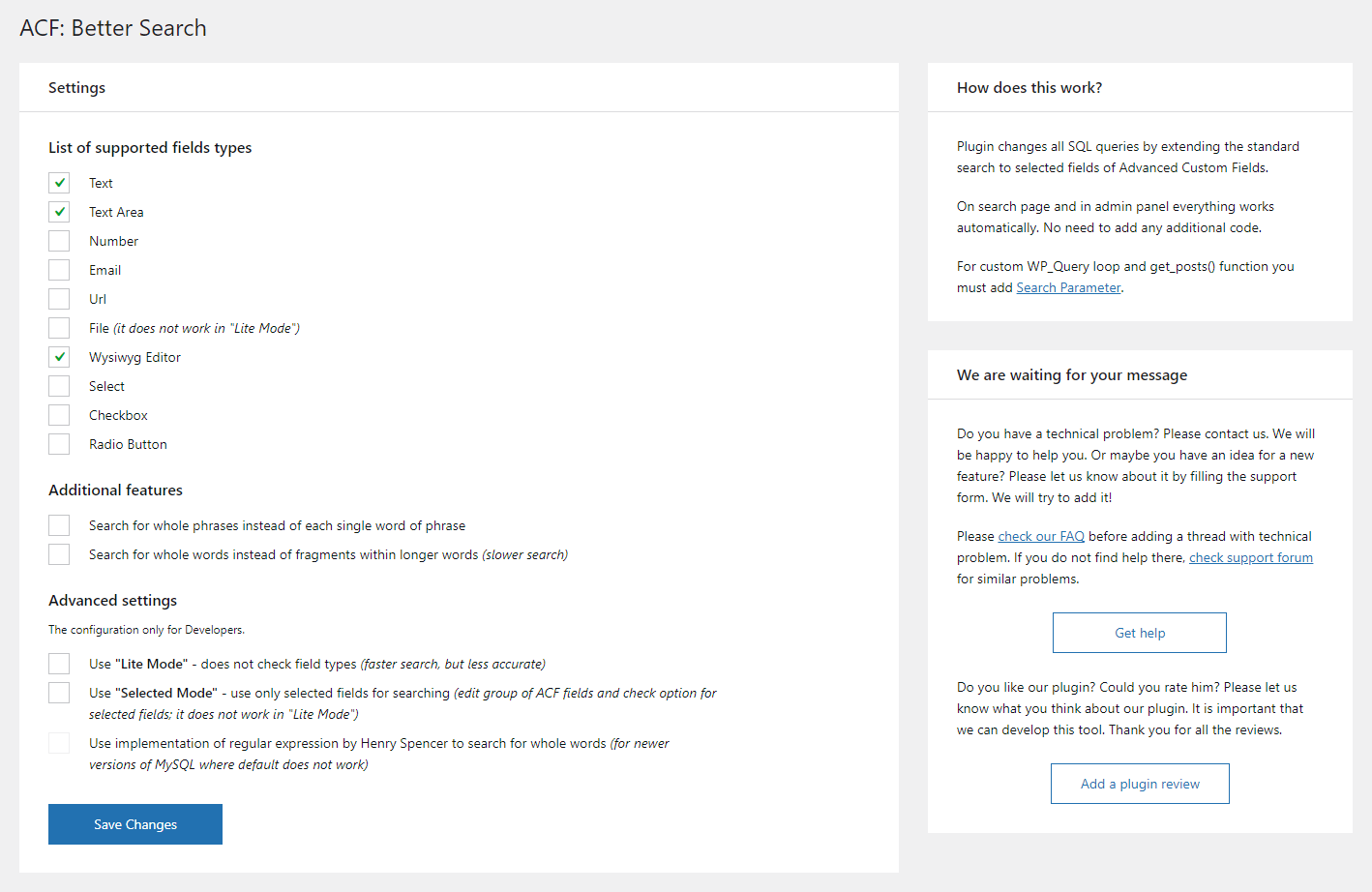
Screenshot of the options panel
Changelog
4.4.0 (2025-10-28)
[Added]Support for WordPress 6.9
4.3.1 (2025-05-29)
[Removed]Filteracfbs_search_post_object_fieldsto select post fields using to search[Added]Filterpost_search_columnsto change the columns to search in a WP_Query search
4.3.0 (2025-04-29)
[Security]Update of Axios HTTP client[Added]Support for WordPress 6.8
4.2.1 (2024-04-12)
[Fixed]Searching for content in file field when Lite Mode is active[Fixed]UX of plugin settings page[Added]Support for WordPress 6.5
4.2.0 (2023-09-11)
[Fixed]Duplicated search results for modified SQL query
4.1.1 (2023-06-29)
[Added]Filteracfbs_field_typesto add new supported field types
4.1.0 (2023-03-02)
[Changed]Appearance of plugin settings page[Added]Support for Table field type generated by Advanced Custom Fields: Table Field plugin[Added]Support for WordPress 6.2
See changelog.txt for previous versions.