

ACL Floating Cart for WooCommerce
ACL Floating Cart is an instant cart solution for WooCommerce store with a flying cart, drawer cart, sidebar fixed cart, add an item, update & rem …
Plugin info
Maintenance & Compatibility
Maintenance score
Possibly abandoned • Last updated 2306 days ago
Is ACL Floating Cart for WooCommerce abandoned?
Possibly abandoned (last update 2306 days ago).
Compatibility
Similar & Alternatives
Explore plugins with similar tags, and compare key metrics like downloads, ratings, updates, support, and WP/PHP compatibility.
Description
ACL Floating Cart is an instant cart solution for WooCommerce store with a flying cart, drawer cart, sidebar fixed cart, add an item, update & remove features. Two awesome templates will help you to enhance the WooCommerce cart into floating or Drawer flavor.
= ACL Floating Cart for WooCommerce Plugin Free Version Features=
👉Instant Floating/Drawer Cart.
👉Flying product to cart after adding to cart operation.
👉Built-in two different templates.
👉Floating cart template.
👉WooCommerce Drawer cart template.
👉Ajax-based cart item add.
👉Ajax-based cart item remove.
👉Ajax-based cart item update.
👉Custom cart icons options.
👉Language configuration for major cart labels.
👉Translation option for backend & front, MO/Port files are included.
👉100% mobile-friendly.
👉Custom CSS support to adjust own design and branding.
= Two Awesome Cart Templates=
🎈Floating Template for WooCommerce Cart.
🎈Drawer Template for WooCommerce Cart.
Support, Bug Fix, Feature Request
- You are always welcome for your feedback and new feature requests for this ACL Floating Cart for WooCommerce Plugin! *
Don’t worry to contact us for any problem or need help with ACL Floating Cart for WooCommerce Plugin through WordPress support center or Help & Info page in the plugin backend panel.
Installation
- Download the plugin acl-floating-cart.zip file. Extract and upload in your wp-content/plugins folder.
- Activate the plugin through the ‘Plugins’ screen in WordPress by clicking the ‘Activate’ button below ‘ACL Floating Cart for WooCommerce’.
- Use the ACL Floating Cart->Settings screen to configure your cart options.
- You are done.
Frequently Asked Questions
Review feed
Screenshots

ACL Floating Cart for WooCommerce.
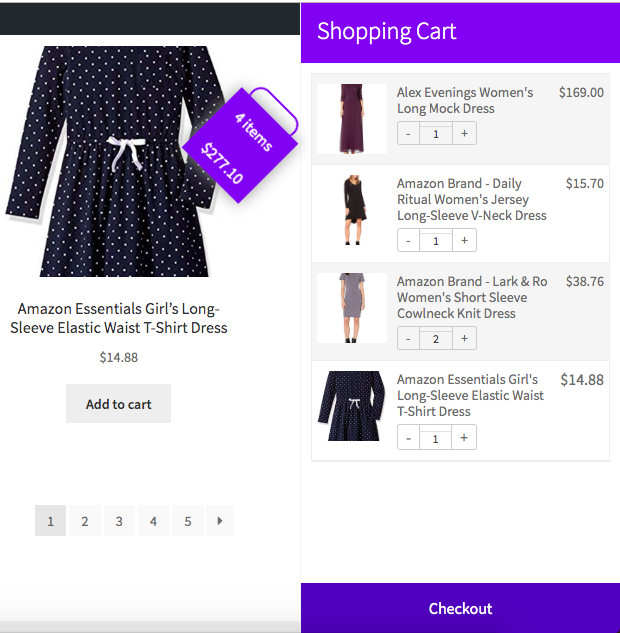
ACL Drawer Cart Template for WooCommerce.

ACL Floating Cart General Settings.

ACL Floating Cart Templates.

ACL Floating Cart Icons Upload Options.

ACL Floating Cart Language Center.

ACL Floating Cart Help Page.
Changelog
= 0.9=
*The initial version.