

Acronym Manager
A plugin to define acronyms in pages, posts and comments site-wide. Defined acronyms are underlined, and the definition appears as a tool-tip.
Plugin info
Maintenance & Compatibility
Maintenance score
Possibly abandoned • Last updated 4712 days ago • 1 reviews
Is Acronym Manager abandoned?
Possibly abandoned (last update 4712 days ago).
Compatibility
Similar & Alternatives
Explore plugins with similar tags, and compare key metrics like downloads, ratings, updates, support, and WP/PHP compatibility.
Description
A plugin to define acronyms in pages, posts and comments using or mark-up. Defined acronyms are underlined, and the definition appears as a tool-tip if the cursor is placed over the acronym. The list of acronyms is managed through an Admin interface.
This plugin is based on Chris Cox’s Acronyms-2, which was itself based on Joel Bennett’s Acronym Replacer plugin (http://www.huddledmasses.org/), ported to Nucleus CMS by Joel Pan as the NP_Acronym plugin and now ported back to WordPress.
Installation
- Download the zip file
- Extract folder acronym-manager
- Upload acronym-manager folder to wp-content/plugins directory
- Log in to your WordPress blog
- Click on “Plugins”
- Locate the “Acronym Manager” plugin and click “Activate”
- Go to “Tools” > “Acronym Manager” to modify your list of acronyms
Frequently Asked Questions
Review feed
Screenshots
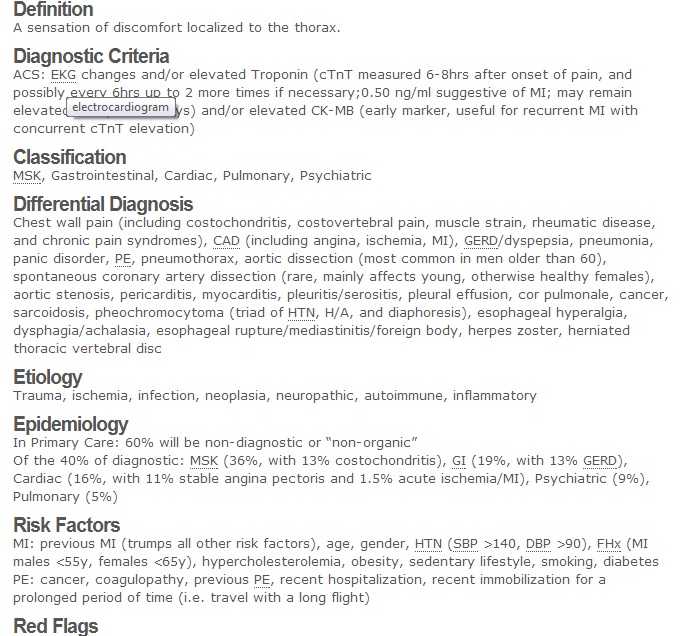
The basic tool: when an acronym used in the website appears in the acronym library, it is underlined. If the user scrolls over the acronym, it is defined in the tooltip under the mouse cursor.
![The glossary printout. Can be included on any page or post using the shortcode [glossary].](https://ps.w.org/acronym-manager/assets/screenshot-2.png?rev=687257)
The glossary printout. Can be included on any page or post using the shortcode [glossary].

Widget for adding acronyms to the library.

View of the management page, which is found under Tools>Acronym Manager.
Changelog
1.0
- First version, basically just the Acronyms-2 plugin with some convenient features added:
- A shortcode for adding a glossary page to your site
- Defined mark-up and an input box on the admin page for adding acronyms in bulk
- An export function that can be used in conjunction with the bulk import to transfer acronym collections from one site to another
- When adding an acronym that is already in your collection, the acronym definition textbox will be auto-filled with this previous definition so that you can decide if you want to overwrite it or append the new acronym definition
- A simple widget for adding acronyms to the collection quickly