

Add Custom Fields to Media
Add custom fields to media uploader and access them in template files. Great for copyrights, image meta etc.
Plugin info
Maintenance & Compatibility
Maintenance score
Stale • Last updated 277 days ago • 2 reviews
Is Add Custom Fields to Media abandoned?
Likely maintained (last update 277 days ago).
Compatibility
Similar & Alternatives
Explore plugins with similar tags, and compare key metrics like downloads, ratings, updates, support, and WP/PHP compatibility.
Description
Allows users to add custom fields to the media uploader and access those fields in posts or template files. Great for adding copyrights, image meta etc.
To display the custom fields in your theme, use the following shortcode in post/pages:
[acfm id="123" field="my_custom_field"]
Where id is the ID of the media item and field is the name of the custom field.
For PHP templates, use the following code:
echo get_post_meta( 123, 'my_custom_field', true );
To use this plugin effectively, download and intall it on your WordPress blog. Next, access “Media Custom Fields” page in your admin Settings and create a new custom field for your media uploads.
- Unique ID – The unique variable name for this item. It may not contain special characaters or spaces
- Field Title – The name you want to appear in the media uploader
- Field Help – A descriptive message you want to appear in the media uploader
Once you’ve added a custom field, you can access it via the Media Library or during the Add Media process of uploading a new item.
This plugin was originally developed by Christopher Ross. The plugin has been adopted and refactored by George Pattichis who will continue development and maintenance.
Installation
- In your WordPress admin panel, go to Plugins > New Plugin, search for “Add Custom Fields To Media” and click “Install now”
- Alternatively, download the plugin and upload the contents of add-custom-fields-to-media.zip to your plugins directory, which usually is /wp-content/plugins/
- Activate the plugin
- Go to “Media Custom Fields” page in your admin Settings
Frequently Asked Questions
[acfm id="123" field="my_custom_field"]– Shortcodeecho get_post_meta( 123, 'my_custom_field', true );– PHP code
You can post in the support forum or contact me.
Review feed
Screenshots
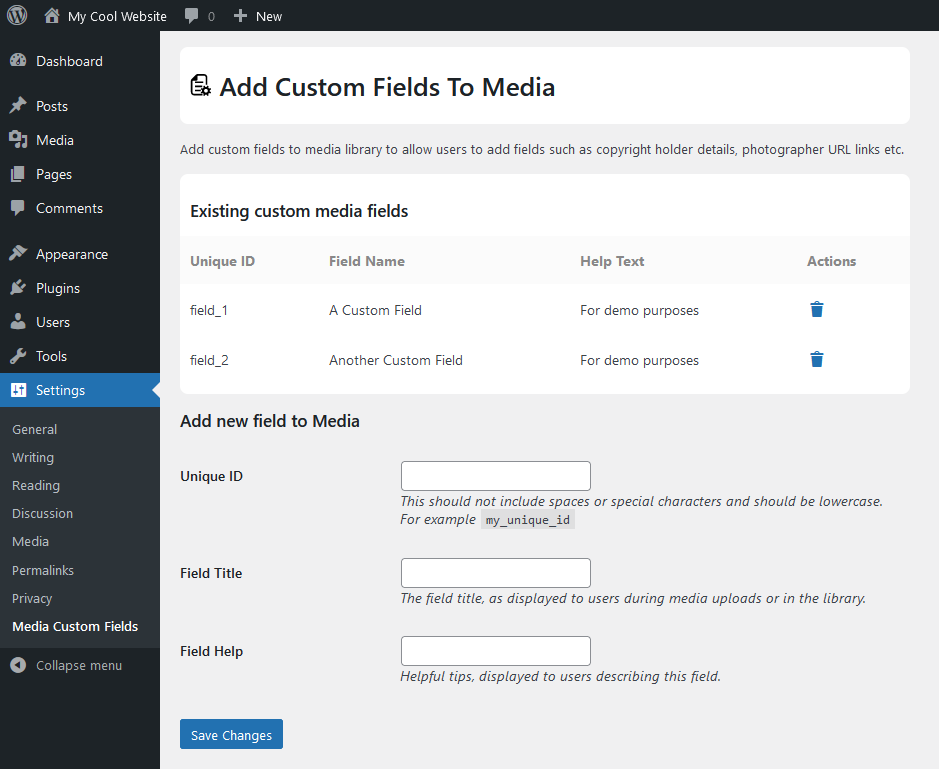
Plugin settings page

The custom fields in media library
Changelog
2.0.3
- Full compliance with WordPress Coding Standards (PHPCS)
- Improved file docblocks and inline comments for standards
- Enhanced security and sanitization review
- Compatibility with WordPress v6.8
2.0.2
- Compatibility with WordPress v6.7
2.0.1
- Add links in plugins page
- Fix Typo about URLs
- Update Readme.txt
- Update translations
2.0.0 (January, 2024)
- Major Update
- Compatibility refactoring
- WP Coding Standards
- Added shortcode [acfm]
1.2.5 (March 31, 2013)
- fixed incorrectly named categories
- removed link to website from plugin links
- encoded and removed icon
- added support link
1.2.1 (September 13. 2012)
- language customization
- renamed function for compatibility
1.2.0 (September 13. 2012)
Added functions:
* thisismyurl_has_custom_media_field( $attachment_id, $unique_field_id ) – Returns boolean value
* thisismyurl_custom_media_field( $attachment_id, $unique_field_id ) – Displays the value
1.0.1
- fixed a bug in the fetch function
1.0.0
- initial release