

Add Email Signature
This plugin adds a configurable signature to all outgoing emails from your WordPress site.
Plugin info
Maintenance & Compatibility
Maintenance score
Maintained • Last updated 141 days ago • 2 reviews
Is Add Email Signature abandoned?
Likely maintained (last update 141 days ago).
Compatibility
Languages
Similar & Alternatives
Explore plugins with similar tags, and compare key metrics like downloads, ratings, updates, support, and WP/PHP compatibility.
Description
This plugin adds a configurable signature to all outgoing emails from your WordPress site.
License
Copyright 2012- David Anderson
MIT License:
Permission is hereby granted, free of charge, to any person obtaining
a copy of this software and associated documentation files (the
“Software”), to deal in the Software without restriction, including
without limitation the rights to use, copy, modify, merge, publish,
distribute, sublicense, and/or sell copies of the Software, and to
permit persons to whom the Software is furnished to do so, subject to
the following conditions:
The above copyright notice and this permission notice shall be
included in all copies or substantial portions of the Software.
THE SOFTWARE IS PROVIDED “AS IS”, WITHOUT WARRANTY OF ANY KIND,
EXPRESS OR IMPLIED, INCLUDING BUT NOT LIMITED TO THE WARRANTIES OF
MERCHANTABILITY, FITNESS FOR A PARTICULAR PURPOSE AND
NONINFRINGEMENT. IN NO EVENT SHALL THE AUTHORS OR COPYRIGHT HOLDERS BE
LIABLE FOR ANY CLAIM, DAMAGES OR OTHER LIABILITY, WHETHER IN AN ACTION
OF CONTRACT, TORT OR OTHERWISE, ARISING FROM, OUT OF OR IN CONNECTION
WITH THE SOFTWARE OR THE USE OR OTHER DEALINGS IN THE SOFTWARE.
Installation
Standard WordPress plugin installation:
- Upload add-email-signature/ into wp-content/plugins/ (or use the built-in installers)
- Activate the plugin via the ‘Plugins’ menu.
- Go to the ‘Add Email Signature’ option under ‘Settings’.
- Follow the instructions.
Frequently Asked Questions
This probably means that the plugin sending the mail is using its own mechanism to send it, instead of calling wp_mail as it should. Request the plugin author to instead use WordPress’s official mechanism.
That’s right. If you have some code that’s capable of delving inside the HTML to do this correctly, then I’ll be pleased to use it. But I couldn’t think of a way.
Review feed
Screenshots
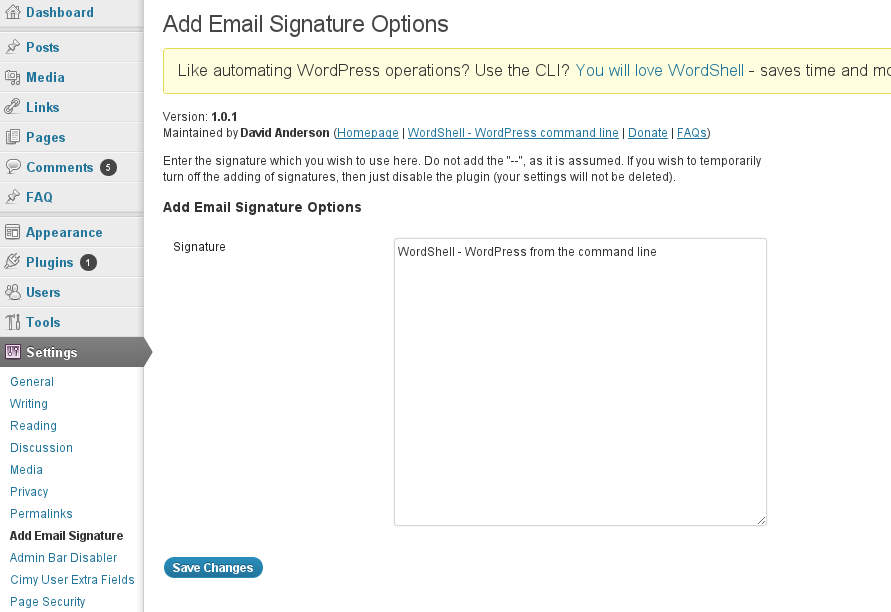
Configuring a signature
Changelog
1.0.4 02/Jun/2016
- TWEAK: Minor clean-up
1.0.3 12/03/2012
- Added links to other useful WordPress resources
1.0.2 11/19/2012
- Added a screenshot
1.0.1 11/13/2012
- Fixed a typo
1.0 10/29/2012
- First version