

Add Link to Copied Text
Add a link to the page/website when users copy and paste text from your website or prevent users from copying content.
Plugin info
Maintenance & Compatibility
Maintenance score
Possibly abandoned • Last updated 1939 days ago • 12 reviews
Is Add Link to Copied Text abandoned?
Possibly abandoned (last update 1939 days ago).
Compatibility
Similar & Alternatives
Explore plugins with similar tags, and compare key metrics like downloads, ratings, updates, support, and WP/PHP compatibility.
Description
Add Link to Copied Text plugin is capable to add a link to the page whenever a user copies content from your website. Alternatively, you can either stop the visitor from copying your content or replace copied text with your custom text.
You can visit documentation page to check available options with this powerful plugin. A GitHub repo is also available for contribution.
We have tested this plugin with all major browsers including Chrome, Firefox, Opera. However, please know, the plugin is made on a best-efforts basis. Submit a support request first in case of any trouble rather than leaving a negative review.
The plugin is available in the following languages:
- English
- Spanish (Not all translations are available for version 2.0+)
If you have a translation, please send it to us and we would be glad to include it for everyone to use.
In case of version upgrade or making any change in Add Link to Copied Text plugin’s settings, follow these steps before you copy text to see it in action:
- Purge any caching plugin installed
- Refresh the page
- Clear browser cache if it doesn’t work as expected
For users upgrading from version 1+ to 2.0 or above: You’re required to follow steps mentioned above.
Installation
This section describes how to install the plugin and get it working.
e.g.
- Install Add Link to Copied Text plugin either via the WordPress.org plugin directory or by uploading the add-link-to-copied-text folder to
/wp-content/plugins/directory at your server - Activate the plugin through the ‘Plugins’ menu in WordPress Dashboard
- Go to ‘Settings’ => ‘Add Link’ menu under your Dashboard
- Customize the setting as per your requirement and you’re ready
Frequently Asked Questions
Where is plugin options page?
Options are available under ‘Settings’ => ‘Add Link’ menu in your Dashboard.
Where to find more information related to options?
Options are self-explanatory and you can visit documentation page for more information
Does this plugin work with Internet Explorer?
We have tested this plugin with Internet Explorer versions 7, 8, 9, 10, 11 and other browsers like Chrome, Opera, Firefox as well
Review feed
Screenshots
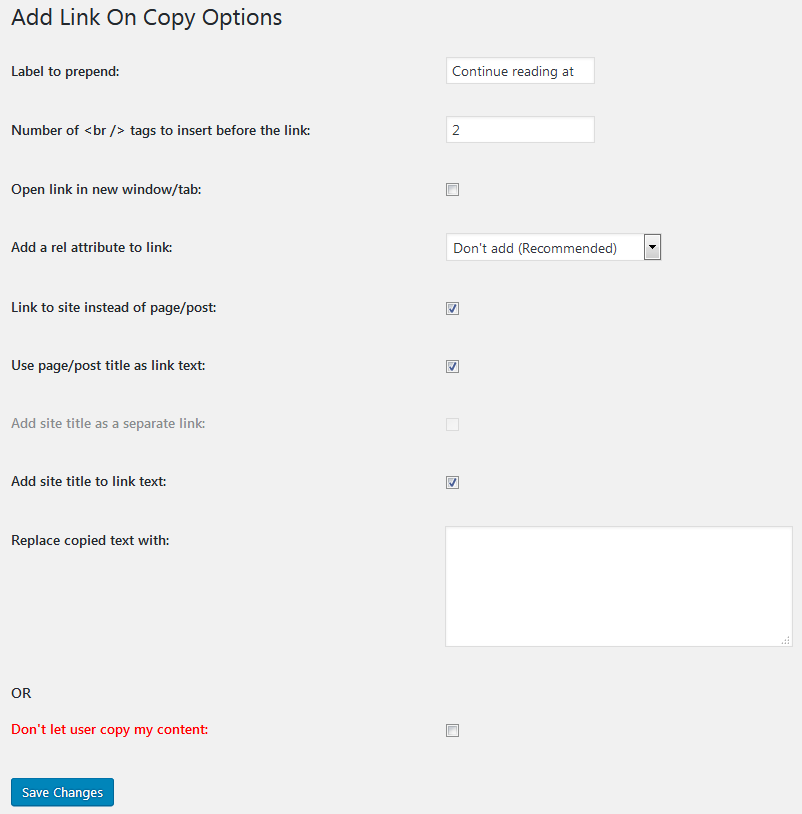
Plugin options
Changelog
2.0
- Major release
- Sanitization moved to JS
- Variable name changed
- A rel parameter is added
- Admin script in jQuery
- Security improvements
1.4
- Code updated for WordPress version 4.9
1.3
- Added language: Spanish
1.2
- Option added to open link in new window/tab
- Bugfix: Link appears twice when text is copied from home page. Issue fixed
1.1
- Added option to let site title to appear as a separate link
1.0
- Let you enable to control when a visitor copy content from your website