
AddFunc IDs
Adds two convenient buttons to easily add/remove an id attribute to any element.
Plugin info
Maintenance & Compatibility
Maintenance score
Possibly abandoned • Last updated 2669 days ago • 1 reviews
Is AddFunc IDs abandoned?
Possibly abandoned (last update 2669 days ago).
Compatibility
Languages
Similar & Alternatives
Explore plugins with similar tags, and compare key metrics like downloads, ratings, updates, support, and WP/PHP compatibility.
Description
Adds two convenient buttons to easily add/remove an id attribute to any element when editor a Post, Page or custom post type that uses a standard TinyMCE editor. Uses the text contained within the element, cleaned up, to formulate a URL-friendly id.
Installation
- Upload the entire
/addfunc-idsfolder to the/wp-content/plugins/directory or download it from the WordPress repository. - Activate the plugin through the Plugins menu in WordPress.
- Use the Add ID and Remove ID buttons as needed.
Frequently Asked Questions
What does the Add ID button do?
It adds an id attribute to the selected element (or the element with the cursor in it) using the text within. Note: not recommended for use on paragraphs.
What does the Remove ID button do?
It removes any id attributes from the selected element (or the element with the cursor in it). Note: recommended for removing ridiculously long id attributes.
Where can I see the ID/id attribute?
You can see it in Text view. Example:
This is rad
Will AddFunc work in Text view?
Nope. It’s a TinyMCE thang.
Does AddFunc IDs work on custom content types, the same as they do on Posts and Pages?
It works in any custom content type that has a standard TinyMCE editor.
Does it really require WordPress 3.0.1 or later?
I have not tested it on earlier versions. I suspect it depends on the version of TinyMCE included with your WordPress install. Feel free to try it out and let us know if it works! 🙂
Does AddFunc have a website?
Yes. addfunc.com
Review feed
id="done" class="easy"
Screenshots
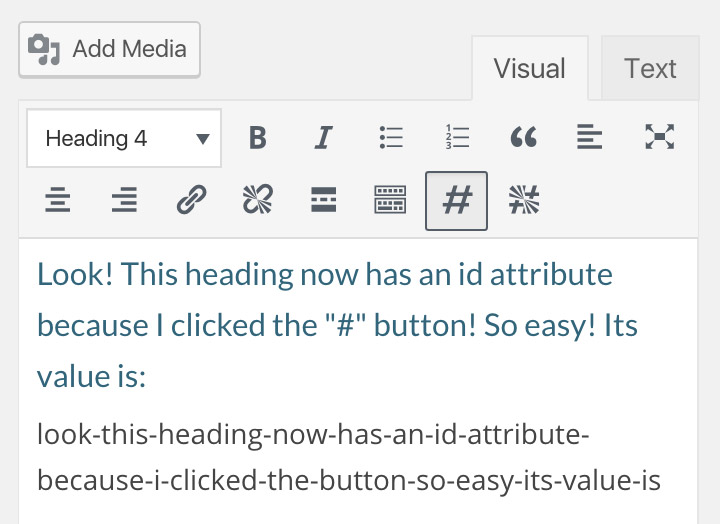
Look! This heading now has an id attribute because I clicked the "#" button!... You get the idea.
Changelog
0.1
27 Jun 2017
- Released plugin on WordPress Repository
0.4
23 Jun 2017
- Improves cleanup of string used for id attribute
- Removes HTML tags
- Removes instances of multiple consecutive hyphens
_ Removes hyphens at beginning and end of string
- Adds button highlighting (button is highlighted if the selected element has an id attribute)
- Submitted plugin to WordPress repository as version 1.0
0.3
18 Jul 2016
- Improves TinyMCE button icons, using font instead of SVGs
0.2
?? ??? 201?
- Adds “Add ID” button to Tiny MCE
- Adds “Remove ID” button to Tiny MCE
0.1
29 Sep 2015
- Adds a button to TinyMCE