

Address AutoSuggest for WooCommerce
Enable Google Places API on the checkout page to make address fields in WooCommerce checkout autofill automatically.
Plugin info
Maintenance & Compatibility
Maintenance score
Possibly abandoned • Last updated 398 days ago • Support resolved 0% • 4 reviews
Is Address AutoSuggest for WooCommerce abandoned?
Possibly abandoned (last update 398 days ago).
Compatibility
Similar & Alternatives
Explore plugins with similar tags, and compare key metrics like downloads, ratings, updates, support, and WP/PHP compatibility.
Description
Enable Google Places Autocomplete for WooCommerce checkout address fields. This plugin simplifies the checkout process, reduces errors, and enhances the user experience by autofilling address details in real time.
This plugin uses the Google Places API to provide address autocomplete functionality. It requires a valid Google API key.
External Services
This plugin relies on the Google Places API for address autocomplete functionality.
- Data sent: Address search queries entered by the user during checkout.
- Purpose: To fetch address suggestions from the Google Places API and autofill the WooCommerce address fields.
- Terms of Service: Google Cloud Terms of Service
- Privacy Policy: Google Privacy Policy
Installation
- Upload the plugin files to the
/wp-content/plugins/address-autosuggest-for-woocommerce/directory, or install the plugin through the WordPress plugins screen directly. - Activate the plugin through the ‘Plugins’ screen in WordPress.
- Navigate to WooCommerce > Settings > Address AutoSuggest to configure the plugin.
- Enter your Google API key to enable the autocomplete functionality.
Frequently Asked Questions
Follow these steps to obtain your API key:
- Go to the Google Cloud Console.
- Create or select a project.
- Enable the “Places API”.
- Generate an API key under “Credentials”.
- Restrict the API key to prevent unauthorized use.
Yes, the plugin supports autocompletion for both billing and shipping address fields on the WooCommerce checkout page.
Review feed
Screenshots
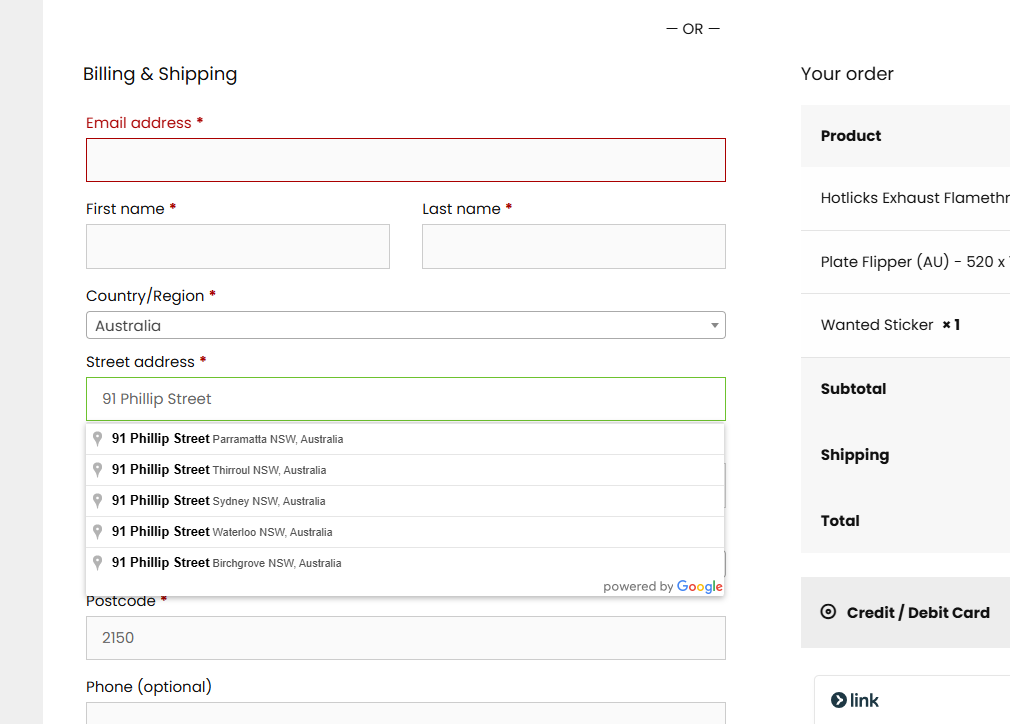
Checkout Page with Autocomplete: Demonstrates the address autocomplete feature in action on the checkout page.

Settings Page: Shows the plugin settings where you configure the Google API key and other options.
Changelog
1.5
- Added support for WooCommerce Block-Based Checkout.
- Improved script enqueue logic for better performance.
1.4.1
- Added Step-by-Step Guide in the Settings Page.
1.4
- Replaced hardcoded country list with WooCommerce’s built-in country list.
- Improved performance by removing redundant file reads.
- Enhanced security with stricter URL escaping.
- Converted JavaScript API wait logic into a Promise-based function.
- Minified JavaScript for faster execution.
- Fixed frontend issue where Google Places list was not appearing.