
Admin Bar Fix
Fix broken layout when too many items are displayed in the admin bar, remove annoying top margin, hide some unnecessary items from your admin bar
Maintenance 52/100123d since update
Active installs
400
Downloads
3,745
Reviews
2
Age
3.7y
Plugin info
Total downloads: 3,745
Active installs: 400
Total reviews: 2
Average rating: 5
Support threads opened: 0
Support threads resolved: 0 (0%)
Available in: 1 language(s)
Contributors: 2
Last updated: 12/1/2025 (123 days ago)
Added to WordPress: 7/7/2022 (3 years old)
Minimum WordPress version: 3.0.1
Tested up to WordPress version: 6.9
Minimum PHP version: f
Maintenance & Compatibility
Maintenance score
Maintained • Last updated 123 days ago • 2 reviews
52/100
Is Admin Bar Fix abandoned?
Likely maintained (last update 123 days ago).
Compatibility
Requires WordPress: 3.0.1
Tested up to: 6.9
Requires PHP: f
Similar & Alternatives
Explore plugins with similar tags, and compare key metrics like downloads, ratings, updates, support, and WP/PHP compatibility.
No similar plugins found yet.
Description
Fix the broken layout when too many items are displayed in your admin bar, remove the annoying top margin, hide some unnecessary items from your admin bar
- fix multiline admin bar
- remove 32px margin inserted by WordPress
- hide admin bar for any user role
- hide admin bar on smaller screens
- hide admin bar items that you do not need
-
select from 3 admin bar styles:
- ghost – set lower opacity and smaller height and expand it on hover
- vertical – show admin bar as icons in a vertical panel and expand it on hover
- icon – hide admin bar into a single small icon and expand it on hover
- bottom – move admin bar to the bottom of your screen, you can also set similar things like in the ghost style
-
settings:
- Position
- Inactive opacity
- Inactive size
- Animation duration
- Mouse enter delay
- Mouse leave delay
Installation
- Upload the plugin files to the
/wp-content/plugins/directory, or install the plugin through the WordPress plugins screen directly. - Activate the plugin through the ‘Plugins’ screen in WordPress
- Manage your settings in ‘Settings >> Admin Bar Fix’
Frequently Asked Questions
No FAQ available
Review feed
No reviews available
Screenshots
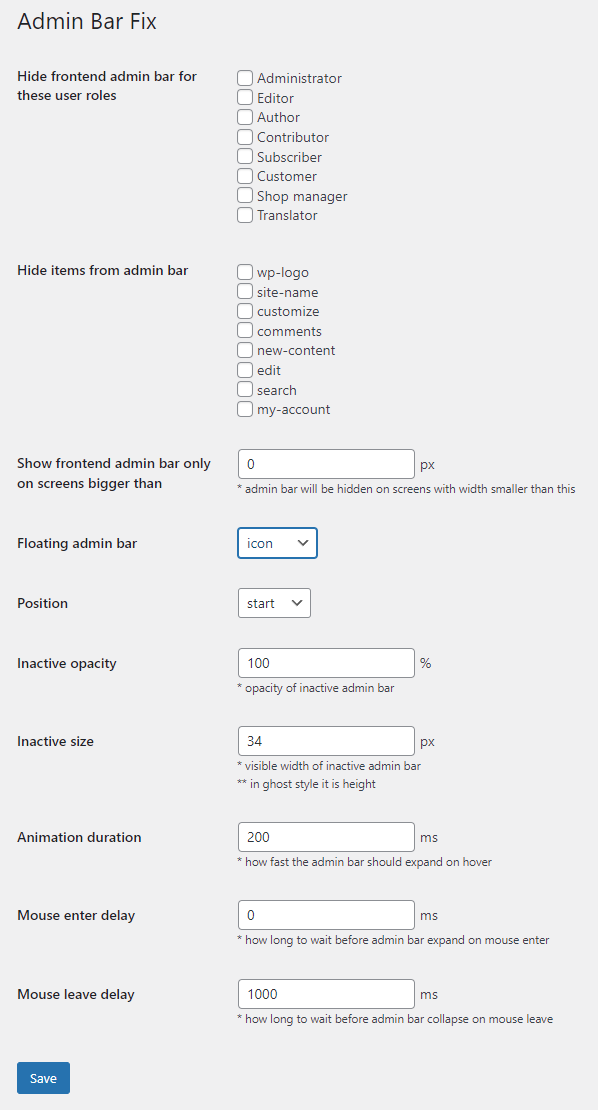
Plugin settings

Fixed multiline admin bar

Hidden not needed admin bar items

Ghost style

Vertical style

Icon style

Bottom style
Changelog
2.5
- Tested on WordPress 6.9
2.4
- Tested on WordPress 6.5
2.3
- fixed PHP 8 deprecation notice
2.2
- Tested on WordPress 6.3
- new bottom position
2.1
- add option to remove
admin-barclass from body
2.0
- Tested on WordPress 6.1
- Fix for multisites/network
1.0
- First version