

Post Category Filter
Filter post categories and taxonomies live in the WordPress admin area
Maintenance 24/1003043d since update
Active installs
2,000
Downloads
40,096
Reviews
24
Age
12.2y
Plugin info
Total downloads: 40,096
Active installs: 2,000
Total reviews: 24
Average rating: 5
Support threads opened: 0
Support threads resolved: 0 (0%)
Available in: 6 language(s)
Contributors: 1
Last updated: 12/1/2017 (3043 days ago)
Added to WordPress: 1/24/2014 (12 years old)
Minimum WordPress version: 3.5.0
Tested up to WordPress version: 4.9.28
Minimum PHP version: f
Maintenance & Compatibility
Maintenance score
Possibly abandoned • Last updated 3043 days ago • 24 reviews
24/100
Is Post Category Filter abandoned?
Possibly abandoned (last update 3043 days ago).
Compatibility
Requires WordPress: 3.5.0
Tested up to: 4.9.28
Requires PHP: f
Developers
Similar & Alternatives
Explore plugins with similar tags, and compare key metrics like downloads, ratings, updates, support, and WP/PHP compatibility.
Beautiful taxonomy filters
Rating 4.9/5 (68 reviews) • Active installs 3,000
Taxonomy Chain Menu
Rating 0.0/5 (0 reviews) • Active installs 100
Filter Custom Fields & Taxonomies Light
Rating 5.0/5 (18 reviews) • Active installs 500
Hmu – Woocommerce ajax filter
Rating 0.0/5 (0 reviews) • Active installs 0
MB Custom Post Types & Custom Taxonomies
Rating 4.7/5 (13 reviews) • Active installs 10,000
Post Types Unlimited
Rating 5.0/5 (9 reviews) • Active installs 10,000
Description
Post Category Filter allows you to filter through your post categories and custom taxonomies by adding a search box on top of the term lists. The lists will update live as you type with only the relevant results based on your search query.
Want to contribute?
You can follow the Github repository and submit issues or pull requests.
Installation
Using The WordPress Dashboard
- Navigate to the ‘Add New’ in the plugins dashboard
- Search for ‘Admin Category Filter’
- Click ‘Install Now’
- Activate the plugin on the Plugin dashboard
Uploading in WordPress Dashboard
- Navigate to the ‘Add New’ in the plugins dashboard
- Navigate to the ‘Upload’ area
- Select
admin-category-filter.zipfrom your computer - Click ‘Install Now’
- Activate the plugin in the Plugin dashboard
Using FTP
- Download
admin-category-filter.zip - Extract the
admin-category-filterdirectory to your computer - Upload the
admin-category-filterdirectory to the/wp-content/plugins/directory - Activate the plugin in the Plugin dashboard
Frequently Asked Questions
Installation Instructions
Using The WordPress Dashboard
- Navigate to the ‘Add New’ in the plugins dashboard
- Search for ‘Admin Category Filter’
- Click ‘Install Now’
- Activate the plugin on the Plugin dashboard
Uploading in WordPress Dashboard
- Navigate to the ‘Add New’ in the plugins dashboard
- Navigate to the ‘Upload’ area
- Select
admin-category-filter.zipfrom your computer - Click ‘Install Now’
- Activate the plugin in the Plugin dashboard
Using FTP
- Download
admin-category-filter.zip - Extract the
admin-category-filterdirectory to your computer - Upload the
admin-category-filterdirectory to the/wp-content/plugins/directory - Activate the plugin in the Plugin dashboard
Does it work with custom taxonomies?
Yes.
Does it work with custom post types?
Yes.
Review feed
No reviews available
Screenshots
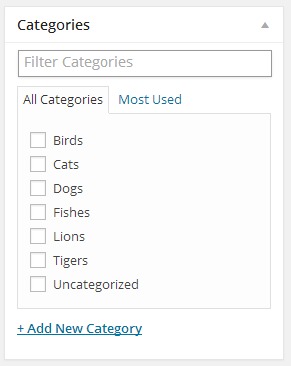
Regular filter view

Filtered results
Changelog
1.6.1
- Update for WordPress 4.9
1.6.0
- Replace search field placeholder with correct taxonomy name
1.5.1
- Update for WordPress 4.8
1.5.0
- Make sure filter is displayed in new posts screen
1.4.0
- Add filter functionality to quick edit section
1.3.0
- Change text domain to match plugin slug
1.2.10
- Update for WordPress 4.7
1.2.9
- Small fixes to translations functions
1.2.8
- Change translation strings to work with latest WordPress version
1.2.7
- Update for WordPress 4.6
1.2.6
- Update for WordPress 4.5
1.2.5
- Update for WordPress 4.4
1.2.4
- Update for WordPress 4.3
1.2.3
- Update for WordPress 4.2
1.2.2
- Update for WordPress 4.1
1.2.1
- Update for WordPress 4.0
1.2.0
- Simplify file structure
1.1.0
- Add support for custom post types
1.0.2
- Update readme
1.0.1
- Remove assets folder from plugin folder
1.0.0
- First version