

WP Admin Category Search
This plugin adds search functionality to category-like taxonomies and dropdowns like author on add / edit post / page admin pages.
Plugin info
Maintenance & Compatibility
Maintenance score
Possibly abandoned • Last updated 1059 days ago • 13 reviews
Is WP Admin Category Search abandoned?
Possibly abandoned (last update 1059 days ago).
Compatibility
Similar & Alternatives
Explore plugins with similar tags, and compare key metrics like downloads, ratings, updates, support, and WP/PHP compatibility.
Description
The search fields simply filter the lists in their current box.
Use the settings page to manage the location of search fields.
Simple as the sun, using easy JS.
Especially useful when there are a lot of categories, like in case of a shop.
It needs jQuery to run !
Trims beginning and ending spaces !
Works with the classic editor of WordPress 5, the new editor has this functionality included.
Installation
To install the plugin, simply install it from the directory, or use the following steps
- Upload the folder to the
/wp-content/plugins/directory - Activate the plugin through the ‘Plugins’ menu in WordPress
- Done
Frequently Asked Questions
Review feed
Works fine and solved my problem
Screenshots

Search field as a new tab. Click Go to go back to the filtered list.
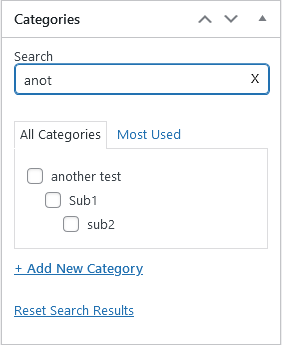
Search field below taxonomy title. Filters as you type.

Search field at author. Filters options as you type.

Settings page.
Changelog
0.2
- Made the input field look nicer
- Reset link now resets search field, too
0.3
- Made the plugin compatible with WP 4.2
0.4
- Made the plugin compatible with WP 4.4.1
- Added code that makes ENTER act like the go button on the search field
0.5
- Made the plugin compatible with WP 4.7.2
1.0
- Updated the plugin
- Added settings page so you can decide how to use this plugin
- Updated compatibility, updated code
1.1
- Added clear button to infield search
- Added option to show subcategories if found category has any
1.2
- Added translation support and EN and HU translations
1.3
- Fixed jQuery error
- Added styling changes
- Added focus on search field when opening search tab