

Admin Posts Navigation
Navigate between posts and pages without returning to the post list. Works with Classic Editor, Gutenberg, and all Custom Post Types.
Plugin info
Maintenance & Compatibility
Maintenance score
Stale • Last updated 232 days ago
Is Admin Posts Navigation abandoned?
Likely maintained (last update 232 days ago).
Compatibility
Similar & Alternatives
Explore plugins with similar tags, and compare key metrics like downloads, ratings, updates, support, and WP/PHP compatibility.
Description
Admin Posts Navigation solves a common WordPress admin workflow problem: having to go back to the post list every time you want to edit the next or previous post.
Key Features:
- Seamless Navigation: Navigate directly between posts without returning to the post list
- Customizable Sorting: Choose between Date Published, Alphabetical, or Post ID sorting
- User Preferences: Each user’s sort preferences are saved per post type
- Universal Support: Works with posts, pages, and all custom post types automatically
- Dual Editor Support: Full compatibility with both Classic Editor and Gutenberg Block Editor
- Smart Ordering: Uses appropriate default ordering (date for posts, alphabetical for pages)
- Position Tracking: Shows your current position (e.g., “Position: 3 of 15 posts”)
- Security First: Rate limiting, nonce verification, and capability checks
- Performance Optimized: Intelligent caching and optimized database queries
- Developer Friendly: Multiple filter hooks for customization
How It Works:
In the Classic Editor, navigation buttons appear below the post title with a sorting dropdown that lets you choose between Date Published, Alphabetical, or Post ID ordering.
In Gutenberg, a “Post Navigation” panel appears in the Document Settings sidebar with Previous/Next buttons and a sorting dropdown for customizing the navigation order.
Sorting Options:
- Date Published: Navigate by publication date (newest first for posts, oldest first for pages)
- Alphabetical: Navigate by post title in alphabetical order (A-Z)
- Post ID: Navigate by WordPress post ID in ascending order
Each user’s sorting preference is remembered per post type, so you can have different sorting for posts vs. pages vs. custom post types.
Perfect For:
- Content managers editing multiple posts in sequence
- Bloggers reviewing and updating existing content
- Developers working with custom post types
- Anyone who finds the default WordPress admin workflow tedious
The plugin automatically detects all your custom post types and provides navigation for any content type you can edit.
Developer Hooks
Filters:
twf_admin_posts_navigation_excluded_types– Exclude specific post types from navigationtwf_admin_posts_navigation_orderby– Customize ordering for specific post typestwf_admin_posts_navigation_order– Customize sort direction for specific post typestwf_admin_posts_navigation_query_args– Modify the query arguments for finding posts
Example Usage:
`php
// Exclude a custom post type
add_filter(‘twf_admin_posts_navigation_excluded_types’, function($excluded) {
$excluded[] = ‘my_private_post_type’;
return $excluded;
});
// Custom ordering for events
add_filter(‘twf_admin_posts_navigation_orderby’, function($orderby, $post_type) {
if ($post_type === ‘event’) {
return ‘meta_value’;
}
return $orderby;
}, 10, 2);
// Navigate only through featured posts
add_filter(‘twf_admin_posts_navigation_query_args’, function($args, $current_post) {
if ($current_post->post_type === ‘post’) {
$args[‘meta_query’] = array(
array(
‘key’ => ‘featured_post’,
‘value’ => ‘1’,
‘compare’ => ‘=’
)
);
}
return $args;
}, 10, 2);
`
Installation
- Upload the plugin files to the
/wp-content/plugins/admin-posts-navigationdirectory, or install the plugin through the WordPress plugins screen directly. - Activate the plugin through the ‘Plugins’ screen in WordPress.
- Start editing any post or page – navigation buttons will appear automatically.
Frequently Asked Questions
Yes! The plugin automatically detects and supports all public custom post types. No configuration needed.
Absolutely. In Classic Editor, buttons appear below the post title with an inline sorting dropdown. In Gutenberg, a navigation panel appears in the Document Settings sidebar with an integrated sorting control.
Yes! Choose from three sorting options: Date Published, Alphabetical, or Post ID. Your sorting preference is saved automatically for each post type.
Yes! Each user’s sorting preferences are saved individually per post type. For example, you can choose to sort posts by Date Published while sorting pages Alphabetically, and your preferences will be remembered across sessions.
No. The plugin only loads in the WordPress admin area and uses intelligent caching to minimize database queries.
Yes, use the twf_admin_posts_navigation_excluded_types filter to exclude specific post types.
Review feed
Screenshots
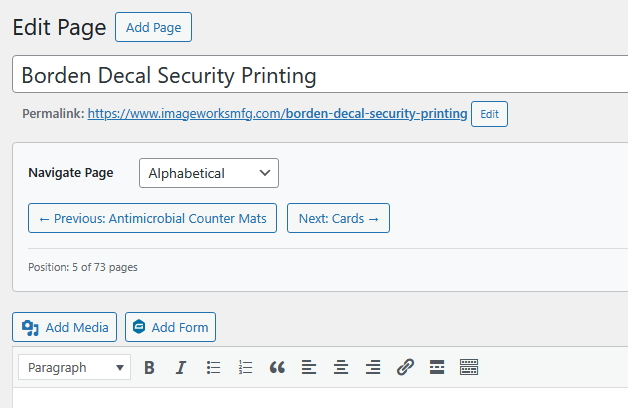
Classic Editor navigation buttons with sorting dropdown below the post title
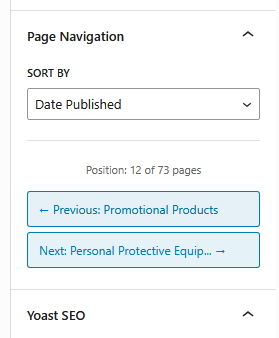
Gutenberg navigation panel with sorting control in the Document Settings sidebar
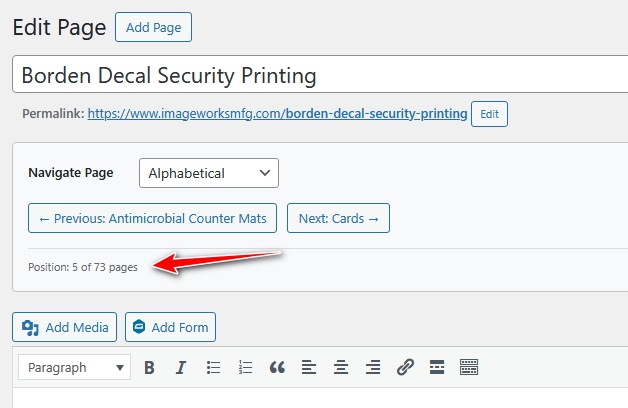
Position counter showing current location in post sequence
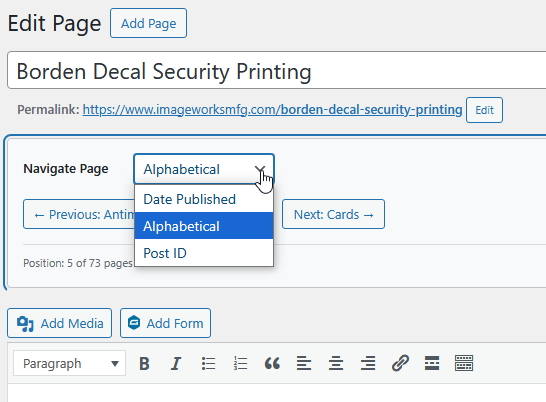
Sorting dropdown with Date Published, Alphabetical, and Post ID options
Changelog
1.4.1
- Improved security with better nonce verification
- Enhanced user permission checks
1.4.0
- Added customizable sorting dropdown with Date Published, Alphabetical, and Post ID options
- Added user preference storage – sort preferences saved per post type
- Enhanced Classic Editor with inline sorting dropdown
- Enhanced Gutenberg with sorting control in navigation panel
- Added AJAX functionality for real-time sort preference updates
- Improved caching system to include sort method in cache keys
- Added proper cleanup of user preferences on plugin uninstall
1.3.2
- Performance improvements – removed direct meta_query usage
1.3.1
- Fixed textdomain consistency issues
1.3.0
- Initial release
- Classic Editor and Gutenberg support
- Automatic custom post type detection
- Security features: rate limiting, nonce verification
- Performance optimization with intelligent caching