

Frontend Customizer for WooCommerce
Using Frontend Customizer for WooCommerce Plugin the admin can manage various front end settings like changing text, default image of products!
Maintenance 20/1002147d since update
Active installs
10
Downloads
1,261
Reviews
0
Age
7.4y
Plugin info
Total downloads: 1,261
Active installs: 10
Total reviews: 0
Average rating: 0
Support threads opened: 0
Support threads resolved: 0 (0%)
Available in: 1 language(s)
Contributors: 1
Last updated: 4/2/2020 (2147 days ago)
Added to WordPress: 9/21/2018 (7 years old)
Minimum WordPress version: 3.6.1
Tested up to WordPress version: 5.4.18
Minimum PHP version: f
Maintenance & Compatibility
Maintenance score
Possibly abandoned • Last updated 2147 days ago
20/100
Is Frontend Customizer for WooCommerce abandoned?
Possibly abandoned (last update 2147 days ago).
Compatibility
Requires WordPress: 3.6.1
Tested up to: 5.4.18
Requires PHP: f
Similar & Alternatives
Explore plugins with similar tags, and compare key metrics like downloads, ratings, updates, support, and WP/PHP compatibility.
No similar plugins found yet.
Description
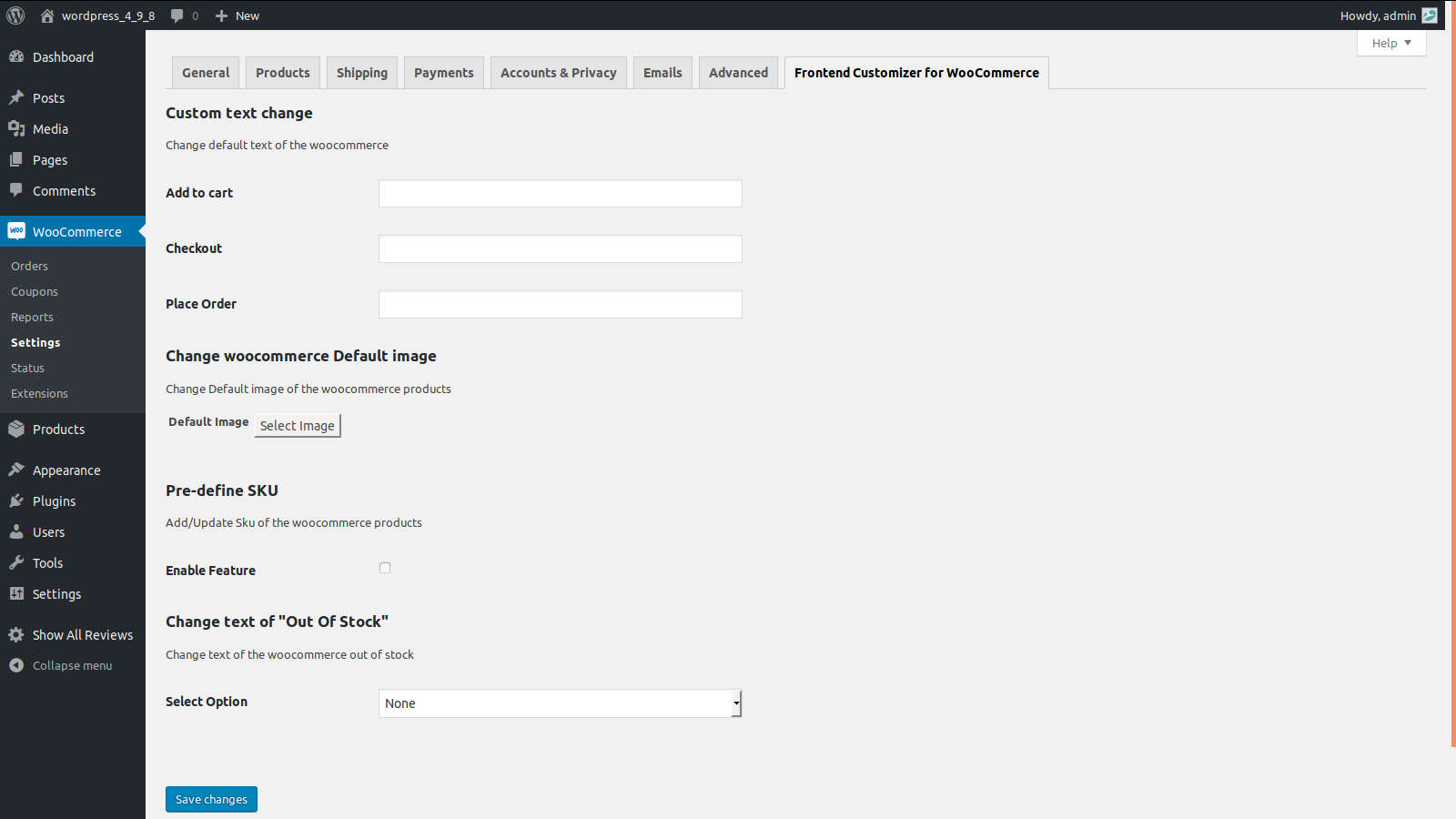
- Using Frontend Customizer for WooCommerce Plugin, admin can manage settings to change default texts, Default Product Image, pre-define SKU and text for Out of Stock.
- On installing this plugin, tab named Frontend Customizer for WooCommerce will appear under settings section.
- Navigating to Frontend Customizer for WooCommerce Tab, admin can change the default text for Add to Cart, Checkout as well as place order.
- Admin can change default image for products that are added without image.
- Admin can pre define SKU code for all WooCommerce products. This feature can be enabled/disabled based on admin needs.
- Admin can also change label name for Out of Stock, globally as well as for each product manually.
- In order to change label name for Out of Stock manually for each product, it has to be managed under inventory tab found in Product edit page.
Installation
- Copy the entire /woo-frontend-customizer/ directory into your /wp-content/plugins/ directory.
- Activate the plugin.
- New Tab “Frontend Customizer for WooCommerce” will generate.
- Perform Action.
Frequently Asked Questions
Is this plugin prepared for multisites? Yes.
Review feed
No reviews available
Screenshots
screenshot-1.png
Changelog
No changelog available