

Advanced Category Excluder
The No.1 content separator, content manager, content excluder, sidebar widget manager plugin to enable CMS like functionality.
Plugin info
Maintenance & Compatibility
Maintenance score
Possibly abandoned • Last updated 4578 days ago • 16 reviews
Is Advanced Category Excluder abandoned?
Possibly abandoned (last update 4578 days ago).
Compatibility
Similar & Alternatives
Explore plugins with similar tags, and compare key metrics like downloads, ratings, updates, support, and WP/PHP compatibility.
Description
This plugin was born because there was a no other real alternative to enable content sparationd and some CMS like functionalities in WordPress.
The main goal was, to enhance WordPress’s functionalities, to hide some unwanted categories, from defined parts of the blog.
Today, ACE can override your search results, your RSS feed listing, your category listing, your recent post, and recent post widgets and also your entry page, or even hide whole categories of posts from web crawlers if you want to.
This is great, for SEO reasons, for content separation, for grouping information, and handle them as real sub pages.
Support |
FAQ |
DjZoNe |
Donate
Some functions:
- Integration with Google (XML) Sitmap Generator plugin
- Effective category management
- Effective content separation
- Enables CMS-like functionality
- RSS feed manipulation
- Search result manipulation
- Category list manipulation
- Support for Event Calendar
- Handles multiple link categories
- noindex, nofollow web crawler options for robots – great for SEO
- Own Recent Comments, Recent Posts and Categories widgets have been added
- Backward SQL compatibility with MySQL 4.0
- Nice control panel, called ACE Dashboard
- Localization added (swedish, french and hungarian translation included)
- Bundeled POT file for translators
- WordPress 2.7 UI
Installation
- Upload the contents of the ZIP file to
/wp-content/plugins/advanced-category-excluder/directory - Activate the plugin through the ‘Plugins’ menu in WordPress
- Set customize the settings, under ACE root menu
Frequently Asked Questions
I’ve got 404 pages in the admin while browsing ACE submenus
Check the plugin folder location.
It should be ‘wp-content/plugins/advanced-category-excluder’.
Does this plugin affect my category listing on the sidebar?
Let’s say yes, and no.
It can affect if you want to.
Does this plugin support widgets ?
Well, yes and no again 🙂
We does not support the genuine the calendar, and the recent comments widgets. Thus there is our own recent comments widget. And the calendar is on the way.
Does this plugin works with the newest versions of WordPress ?
We, who update, patch, and develope this plugin alway using the latest stable version, so as far as we are active ( I hope we’ll until we reach world domination… 😀 ) the newest versions will support the most current version of WordPress.
Does this plugin works with older versions of WordPress ?
First of all, I suggest you to take the effort, and upgrade, due to security reasons.
But yes we have the older WP users in our mind, while we develope this plugin.
Does this plugin works for tags?
Not yet 😉
But in the future it will 🙂
Review feed
Screenshots
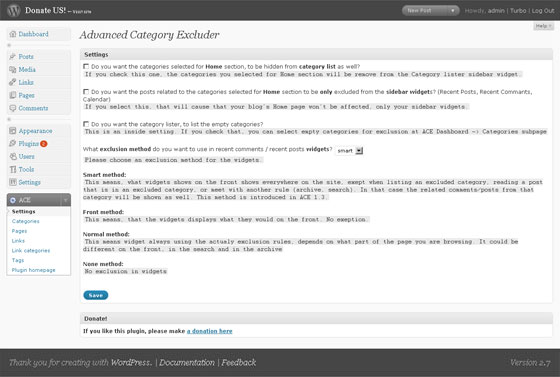
ACE Dashboard - Settings screen

ACE Dashboard - Categories screen