

Advanced Country Blocker
An advanced security plugin that blocks website visitors by country, with additional features like blacklisting, logging blocked attempts, admin bypas …
Plugin info
Maintenance & Compatibility
Maintenance score
Maintained • Last updated 168 days ago • Support resolved 60% • 7 reviews
Is Advanced Country Blocker abandoned?
Likely maintained (last update 168 days ago).
Compatibility
Similar & Alternatives
Explore plugins with similar tags, and compare key metrics like downloads, ratings, updates, support, and WP/PHP compatibility.
Description
Advanced Country Blocker helps you secure your WordPress site by restricting access based on the visitor’s geolocation (country) or IP address. Upon activation, the plugin detects the activating admin’s country and automatically sets that as the only allowed country. All other visitors from different countries are blocked, unless they use a secret key parameter to temporarily whitelist their IP. Country detection uses the privacy-friendly ip-api.com service by default but can be switched to a fully offline MaxMind GeoLite2 (or compatible) database file once you configure a local copy.
Key Features:
- Automatically allows the admin’s country on plugin activation.
- Flexible IP-to-country lookups – start with the built-in ip-api.com integration and optionally switch to an offline MaxMind GeoLite2 Country (or compatible)
.mmdbdatabase file. - Allowlist or blacklist mode – choose whether the country list acts as an allowlist or blocklist without re-entering countries.
- Temporary access via a customizable secret URL parameter (e.g.,
?MySecretKey=1). - Manual blacklisting and safelisting of IPs for added security and to accommodate uptime monitors.
- Optional email alerts when new visitors are blocked.
- Admin bypass so logged-in admins can always access the site (toggleable in the code).
- Detailed logging of blocked attempts in a custom database table, displayed in the WP admin.
- Custom response controls – personalise the block page title/message, choose the HTTP status (403, 410, 451) or redirect to any URL.
- Automatic log cleanup with configurable retention plus a one-click “Clear Logs” button.
Use the plugin settings page (Country Blocker menu in WP admin) to configure the list of allowed countries, blacklisted countries, blacklisted IPs, and whether email alerts are enabled.
License
This plugin is open-sourced software licensed under the GPLv3 or later.
External Services
By default this plugin contacts the ip-api.com geolocation service to detect visitor countries. You can disable all external lookups by switching the IP lookup method to the local MaxMind database in the settings.
Installation
- Upload the plugin folder to the
/wp-content/plugins/directory, or install via the WordPress “Add Plugin” feature. - Download the GeoLite2 Country database (or another compatible MaxMind DB format country database) from MaxMind and place the
.mmdbfile somewhere on your server where PHP can read it (optional but recommended for offline mode). - Activate the plugin through the “Plugins” menu in WordPress.
- Upon activation, the plugin will:
- Detect the activating admin’s IP.
- Determine the corresponding country using your selected lookup method (remote API by default).
- Set that country as the only allowed country in the plugin settings.
- Go to Country Blocker Settings in your WordPress admin menu to adjust configurations (e.g., secret key, blacklisted countries, blacklisted IPs, etc.), choose the IP lookup method, and (optionally) provide the absolute path to your
.mmdbfile for offline lookups.
Frequently Asked Questions
You can download the free GeoLite2 Country database from MaxMind (requires a free account). Upload the .mmdb file to a readable location on your server (for example, inside wp-content/uploads/) and paste the absolute file path into the GeoIP Database Path field on the plugin settings page.
Local GeoIP databases occasionally have outdated entries. MaxMind updates GeoLite2 weekly, so download the latest release when you notice inaccuracies. You can also manually add or remove countries on the settings page to adjust who is allowed or blocked.
You can add your IP manually to the temporary whitelist by using the URL parameter (?YourSecretKey=1), or log in as an admin (if admin bypass is enabled). Alternatively, you can deactivate the plugin via FTP or your hosting control panel and adjust settings.
The plugin stores IP addresses and (optionally) country codes in a custom log table when visitors are blocked. This is purely for security and administrative review. Remove or adjust this functionality as needed to comply with privacy regulations.
Yes, by default, if you are logged in with manage_options capability. You can change or remove this bypass in the plugin code.
Yes. The settings page lets you change the block page title/message (with placeholders for {ip}, {country_code}, and {reason}), choose the HTTP status code to send (403, 410, or 451) or redirect visitors to a custom URL with the status code of your choice.
Stay in the default allowlist mode when you want to permit just the countries you list. Switch to “Use Blacklist Mode” to list only the countries you want to block—everything else will be allowed automatically.
Use the “Clear Logs” button on the Block Logs screen to wipe all entries instantly. You can also configure automatic log cleanup from the settings page—set the retention to 0 days to keep everything indefinitely.
Review feed
Simply works
Screenshots
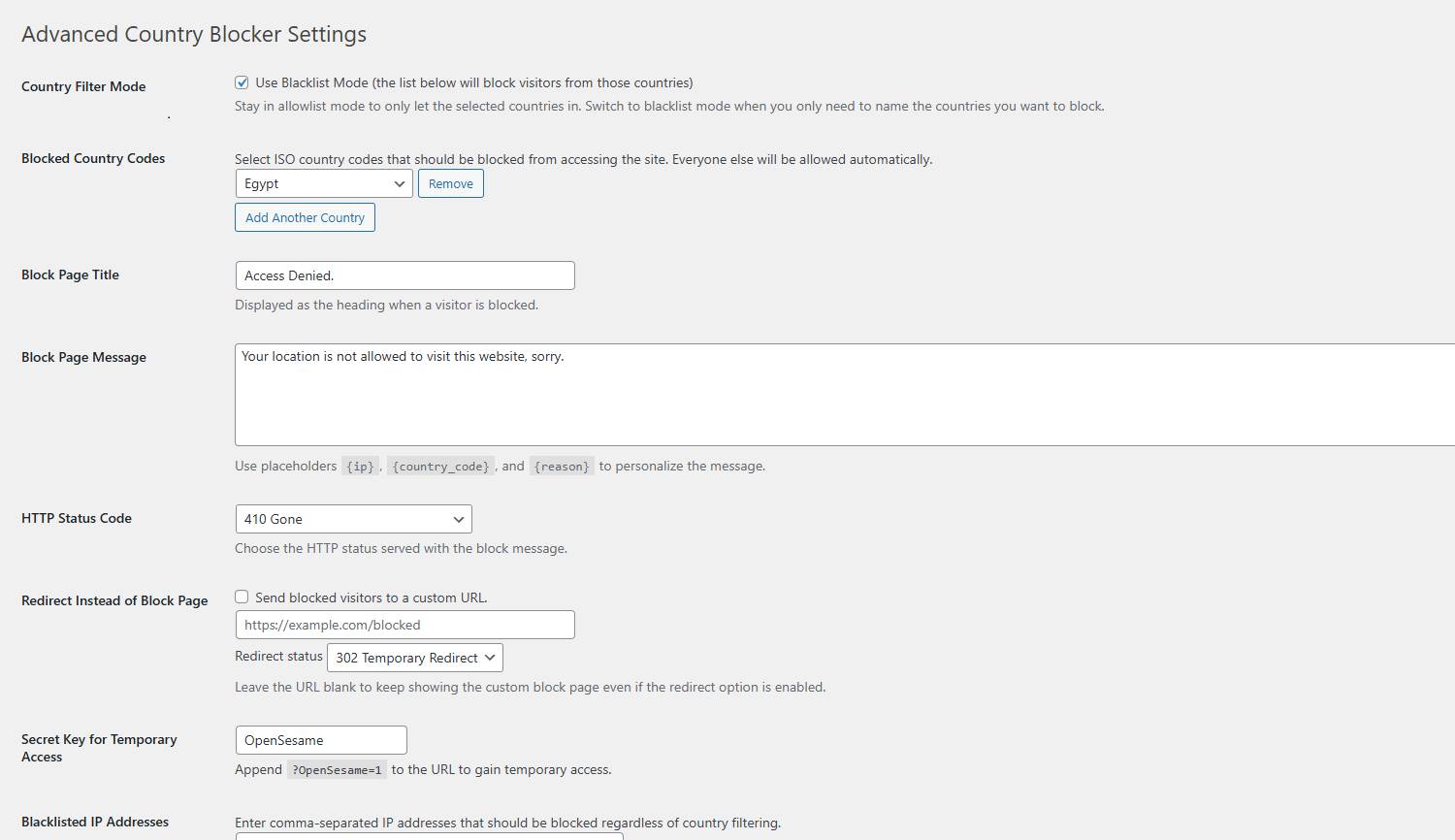
Settings Page – Configure allowed/blacklisted countries, IPs, and email alerts.
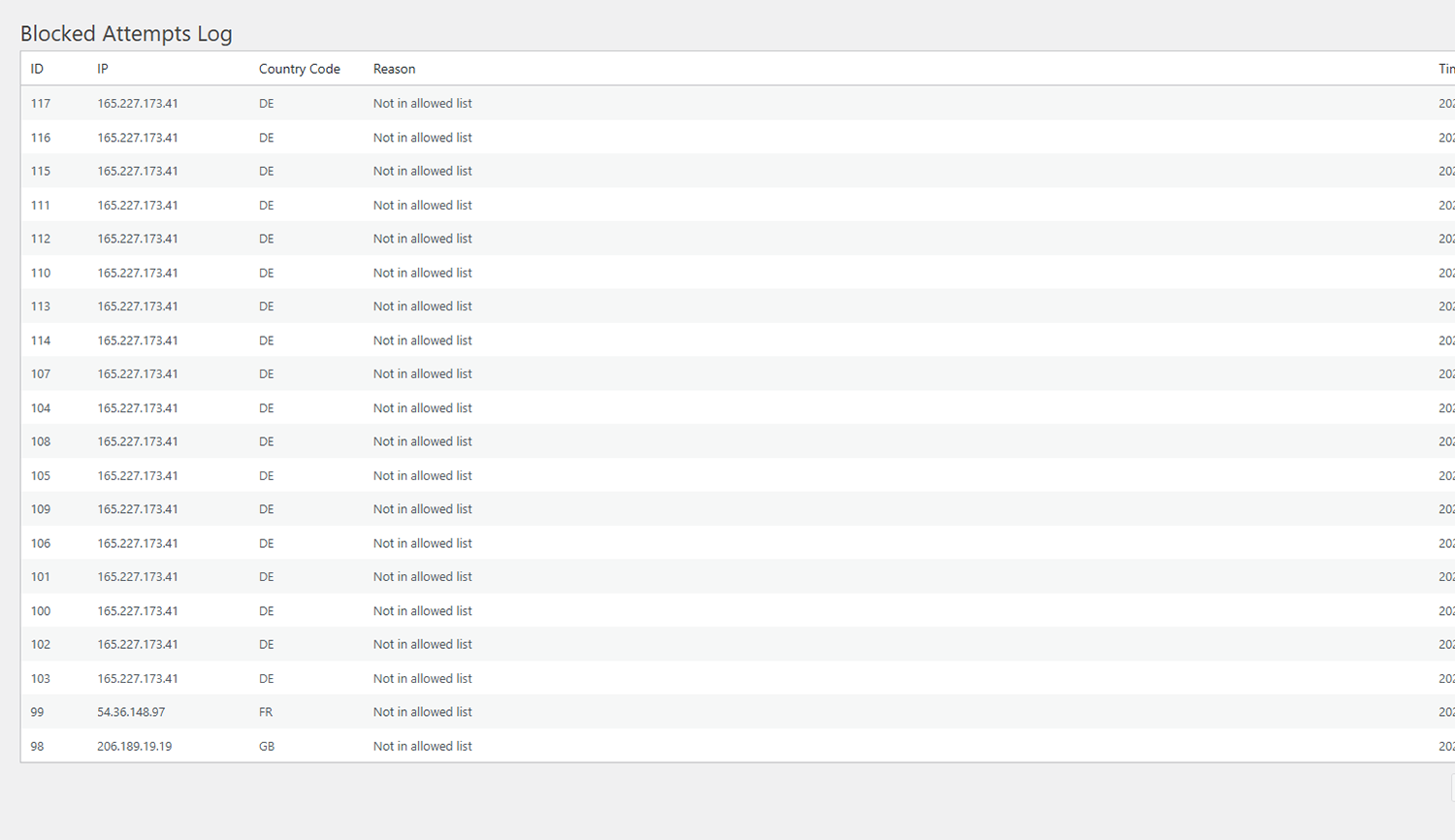
Blocked Attempts Log – View a list of recently blocked visitors.
Changelog
2.2.0
- Added an optional local MaxMind GeoLite2 (or compatible) database lookup while keeping the ip-api.com integration as the default method.
- Added settings fields to choose the lookup method, configure the path to the
.mmdbdatabase file, and display status messaging for admins.
2.1.0
- Added a fully customisable block page (title, message placeholders, and selectable HTTP status code).
- Added optional redirect behaviour with configurable status codes for blocked visitors.
- Added a trusted IP list to bypass the blocker (ideal for uptime monitoring services).
- Added automatic log cleanup with adjustable retention and admin notices.
- Improved settings guidance for switching between allowlist and blacklist modes.
2.0.4
- Tested with latest WordPress version
2.0.3
- Added feature to Clear Logs
- Added feature to Disable Logs
- Fixed pagination for Logs
2.0.2
- Added the blacklist mode
2.0.1
- Fixed WordPress Repo guideline issues
2.0.0
- Added logging to a custom database table.
- Added blacklisted country/IP feature.
- Added admin bypass for testing.
- Added email alerts.
1.1.0
- Defaulted to admin’s country on plugin activation.
- Introduced secret URL key for temporary IP whitelisting.
1.0.0
- Initial plugin release with basic country blocking and default country code.