

Advanced CSV Importer
Import posts, pages, custom fields, categories, tags and more from a CSV file.
Plugin info
Maintenance & Compatibility
Maintenance score
Possibly abandoned • Last updated 3996 days ago • 1 reviews
Is Advanced CSV Importer abandoned?
Possibly abandoned (last update 3996 days ago).
Compatibility
Languages
Similar & Alternatives
Explore plugins with similar tags, and compare key metrics like downloads, ratings, updates, support, and WP/PHP compatibility.
Description
The Advanced CSV Importer will import the following content from a CSV file.
Advanced CSV Importer is fully unit-tested. The plugin is stable and ready to be used in large projects like enterprise applications.
- Posts, pages and other custom post types
- Custom fields and post meta
- Categories, tags
https://github.com/miya0001/advanced-csv-importer
This plugin requires PHP 5.3 or later.
Default CSV field names
- ID
- post_content
- post_name
- post_title
- post_status
- post_type
- post_author
- ping_status
- post_parent
- menu_order
- to_ping
- pinged
- post_password
- guid
- post_content_filtered
- post_excerpt
- post_date
- post_date_gmt
- comment_status
- post_category
- tags_input
- page_template
You can change field name via acsv_post_object_keys hook like following.
add_filter( 'acsv_post_object_keys', function( $post_object_keys ){
    $post_object_keys['title'] = 'post_title';
    $post_object_keys['content'] = 'post_content';
    return $post_object_keys;
} );
Other columns will be saved to the custom field.
There is a sample of the CSV.
This file contains hidden or bidirectional Unicode text that may be interpreted or compiled differently than what appears below. To review, open the file in an editor that reveals hidden Unicode characters.
Learn more about bidirectional Unicode characters
| ID | post_name | post_author | post_date | post_type | post_status | post_title | post_content | post_category | tags_input | custom_field | |
|---|---|---|---|---|---|---|---|---|---|---|---|
| Import-test | admin | 2013/9/13 0:00 | post | publish | CSV Import Test | This is a post for csv import. Lorem ipsum dolor sit amet, consectetur adipisicing elit, sed do eiusmod tempor incididunt ut labore et dolore magna aliqua. Ut enim ad minim veniam, quis nostrud exercitation ullamco laboris nisi ut aliquip ex ea commodo consequat. Duis aute irure dolor in reprehenderit in voluptate velit esse cillum dolore eu fugiat nulla pariatur. Excepteur sint occaecat cupidatat non proident, sunt in culpa qui officia deserunt mollit anim id est laborum. |
fruits | apple,banana | this is custom field value. | ||
| editor | post | publish | define author test | ||||||||
| 2 | post | define author id test | |||||||||
| 1 | Hello-world-updated | post | Hello world! Updated! | Welcome to WordPress. This is your first post. Updated by RS CSV Importer! |
Action Hooks
- acsv_after_insert_post
Filter Hooks
- acsv_post_object_keys
- acsv_post_defaults
- acsv_import_upload_size_limit
- acsv_pre_get_post_objects
- acsv_after_get_post_objects
- acsv_csv_format
- acsv_csv_to_hash_array
- acsv_get_user_by_field
WP-CLI
Importing:
$ wp csv import tests/_data/wp/sample.csv
+------+-----------------------+------+---------+------------+---------------------+
| ID   | Title                 | Type | Status  | Author     | Date                |
+------+-----------------------+------+---------+------------+---------------------+
| 1720 | CSV Import Test       | post | publish | admin      | 2013-09-13 00:00:00 |
| 1721 | define author test    | post | publish | admin      | 2014-12-27 18:44:46 |
| 1722 | define author id test | post | publish | themedemos | 2014-12-27 18:44:46 |
| 1    | Hello world! Updated! | post | publish | admin      | 2014-12-27 18:44:46 |
+------+-----------------------+------+---------+------------+---------------------+
History:
$ wp csv log
+----------+-----------------------------+---------------------+---------+---------+
| ID       | Title                       | Date                | Success | Failure |
+----------+-----------------------------+---------------------+---------+---------+
| e0a66344 | Imported from WP-CLI.       | 2014-12-27 18:44:46 |       4 |       0 |
| 43c47af6 | Imported from admin screen. | 2014-12-27 16:53:17 |       4 |       0 |
| df0f140b | Imported from WP-CLI.       | 2014-12-27 16:21:42 |       4 |       0 |
+----------+-----------------------------+---------------------+---------+---------+
Details of the history:
$ wp csv log e0a66344
+------+-----------------------+------+---------+------------+---------------------+
| ID   | Title                 | Type | Status  | Author     | Date                |
+------+-----------------------+------+---------+------------+---------------------+
| 1720 | CSV Import Test       | post | publish | admin      | 2013-09-13 00:00:00 |
| 1721 | define author test    | post | publish | admin      | 2014-12-27 18:44:46 |
| 1722 | define author id test | post | publish | themedemos | 2014-12-27 18:44:46 |
| 1    | Hello world! Updated! | post | publish | admin      | 2014-12-27 18:44:46 |
+------+-----------------------+------+---------+------------+---------------------+
Installation
This section describes how to install the plugin and get it working.
e.g.
- Upload
plugin-name.phpto the/wp-content/plugins/directory - Activate the plugin through the ‘Plugins’ menu in WordPress
- Place
<?php do_action('plugin_name_hook'); ?>in your templates
Frequently Asked Questions
Review feed
Screenshots
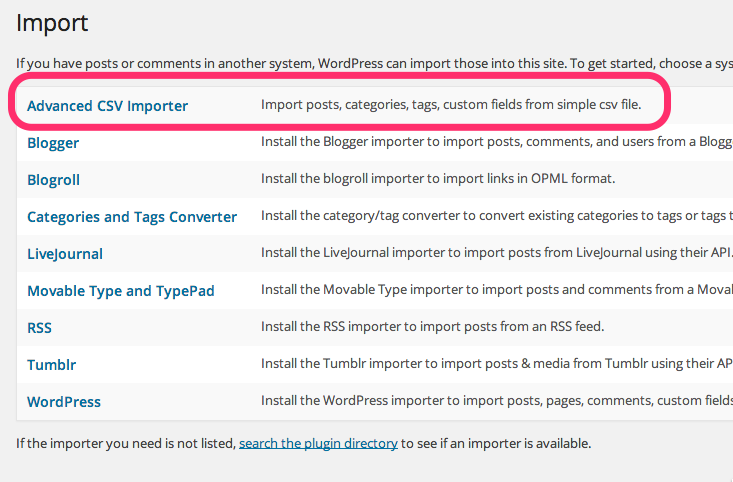
Tools Import Screen

The result of an importing

History of importing
Changelog
0.1.0
- Initial release.