

Advanced Custom Fields Migration Cleanup
Correct and prevent Advanced Custom Fields options migration autoload 'yes' to 'no'.
Plugin info
Maintenance & Compatibility
Maintenance score
Possibly abandoned • Last updated 4990 days ago
Is Advanced Custom Fields Migration Cleanup abandoned?
Possibly abandoned (last update 4990 days ago).
Compatibility
Similar & Alternatives
Explore plugins with similar tags, and compare key metrics like downloads, ratings, updates, support, and WP/PHP compatibility.
Description
Argh… it turn’s out that I was having problems with postmeta and options data being mixed. There went a day’s coding a migrator when I didn’t need it and doubt you either.
Anyways, just use the autoload cleanup and enforcer. That’s still quite valid.
~~Migrate left over Advanced Custom Fields fields from wp_postmeta to wp_options while correcting autoload settings.~~
Convert previous ACF value migrations from autoload = ‘yes’ to ‘no’. This is very handy for performance optimization when you’ve got tens of thousands of custom fields. Can help drastically improve website load times.
Thank you…
- MediaBurn.org for development funding.
- Advanced Custom Fields for making custom WordPress site easier
- Viper007Bond for Regenerate Thumbnails Ajax’d code base.
- Željko Aščić of Tourist Playground for the plugin banner
TODOs
- Implement ACF field migration
Installation
- Via Plugins > Install Plugins, Search for “advanced-custom-fields-migrator”
- Install “Advanced Custom Fields Migrator”
- Alternately, download
advanced-custom-fields-migrator.zipfrom https://wordpress.org/extend/plugins/advanced-custom-fields-migrator/ - Unzip
advanced-custom-fields-migrator.ziplocally - Upload the
advanced-custom-fields-migratorfolder to the/wp-content/plugins/directory - Activate the plugin through the ‘Plugins’ menu in WordPress
- Set options via Settings > ACF Migrator
- Migrate via Tools > ACF Migrator
Frequently Asked Questions
Can I sponsor …?
Yes. Any sponsoring would be greatly welcome. Please donate and let me know what’s wanted
Review feed
Screenshots
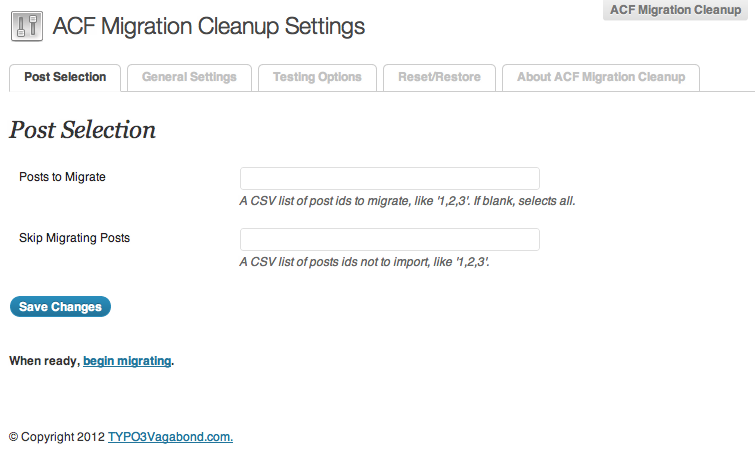
Settings - Post Selection

Settings - General Settings

ACF Migrator

ACF Migrator - In progress
Changelog
trunk
–
0.0.5
- Add plugin banner by Željko Aščić
- Argh… Options go to wp_options no Posts postmeta to wp_options
- Add in migration reversion routines for ACF data that’s actually part of posts
- Cleanup verbiage
0.0.4
- Number formatting
- Rename Migration to General
- Add setting – Force Autoload ‘no’?
- Split access for edit_posts and manage_options
- Only worry about autoload ‘no’ for add_option
- Show success or not messages
- Add update_option failover for add_option
- Update General Settings screenshot
0.0.3
- Settings autoload no by default
- Migration routines in place
- Only ACF fields migrated from wp_postmeta to wp_options
- Bail before deleting postmeta on any failures – data integrity
- Hide Delete… setting
- Add in posts_to_migrate & posts_to_skip to postmeta selection query
- Add language POT file
- Add ACF Migrator in progress screenshot
0.0.2
- Naming and verbiage corrections
- MediaBurn, Viper007Bond, ACF thanks
- Installation direction updates
- autoload performance fixer verbiage
- Post Selection – select all notice
- Add screenshots
- Validate readme.txt
0.0.1
- first release