

Advanced Email Filter for Elementor Forms
Enhance Elementor Pro Forms with advanced email filtering capabilities including global blocklists/whitelist and per-form controls.
Plugin info
Maintenance & Compatibility
Maintenance score
Stale • Last updated 271 days ago • Support resolved 0% • 1 reviews
Is Advanced Email Filter for Elementor Forms abandoned?
Likely maintained (last update 271 days ago).
Compatibility
Similar & Alternatives
Explore plugins with similar tags, and compare key metrics like downloads, ratings, updates, support, and WP/PHP compatibility.
Description
Advanced Email Filter for Elementor Forms adds enterprise-grade email validation to your Elementor pro forms. Protect against spam submissions while maintaining flexibility for legitimate users.
Features
- Global Blocklist/Whitelist management
- Per-form email filtering rules
- Wildcard support for domains and patterns
- Business email only filter (new feature)
- Disposable / temporary email blocking (new feature)
- Compatible with Elementor Pro forms only
Learn more about all features | Read Documentation
Configuration
There is two place where you can control email filter.
Global Settings
Navigate to Email Filter -> Settings to configure:
-
Blocklist: @spamdomain.com, *.ru, fake-user@
-
Whitelist: @yourcompany.com, admin@, *.trusted.org
Form-Specific Settings
- Edit Elementor Form widget
- Open Email Filtering section
- Add patterns:
- Blocklist (form-specific)
@temp-domain.com, *.xyz - Whitelist (form-specific)
@client-domain.com, manager@
- Blocklist (form-specific)
Hooks & Filters
Customize validation behavior using these hooks:
// Modify validation error message
add_filter('aefe_validation_error', function($message, $email) {
    return sprintf(__('Error: %s is blocked', 'text-domain'), $email);
}, 10, 2);
Installation
- Upload the plugin files to the
/wp-content/plugins/advanced-email-filter-for-elementor-formsdirectory - Activate the plugin through the ‘Plugins’ screen in WordPress
- Configure global settings under Email Filter -> Settings
- Set form-specific rules in Elementor Form widget settings
Frequently Asked Questions
Yes, This plugin extand Elementor pro form features. So you need install & active Elementor pro.
Separate patterns with commas. Both global and form rules apply cumulatively.
Allowlist rules always override blocklist. Form-specific settings combine with global rules using AND logic.
Review feed
Fantastic
Screenshots
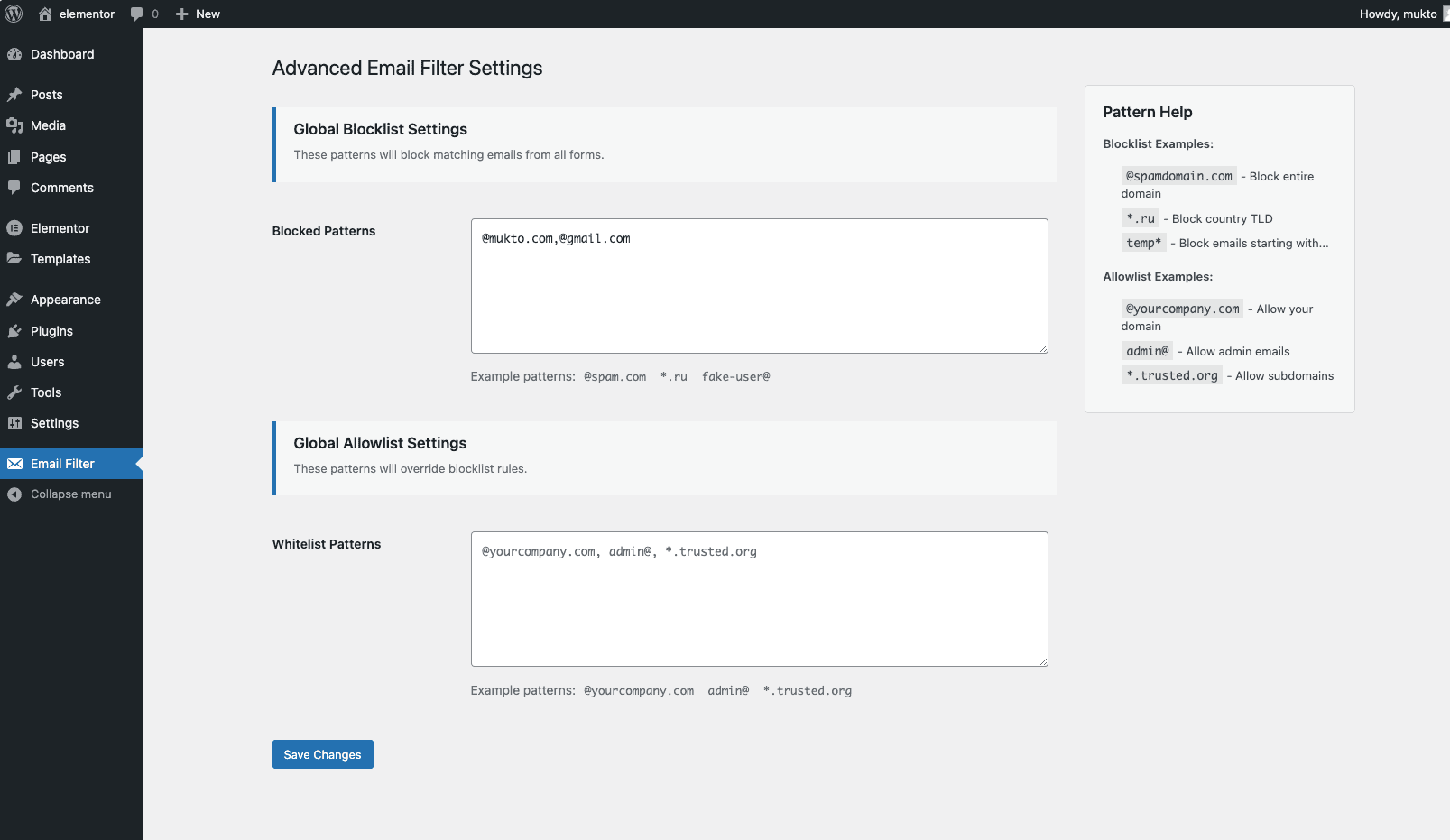
Global Blocklist/Whitelist management

Per-form email filtering rules
Changelog
1.2.0
- Minimize plugin size & update email list
1.1.1
- Personal & Disposable email list updated
1.1.0
- Added Business Email filter
- Added Disposable / temporary email blocking
- Improved validation error message
1.0.0
- Initial release with core filtering features
- Global blocklist/Whitelist functionality
- Elementor Form widget integration