

Advanced Random Posts Widget
Provides flexible and advanced random posts. Display it via shortcode or widget with thumbnails, post excerpt, and much more!
Plugin info
Maintenance & Compatibility
Maintenance score
Possibly abandoned • Last updated 971 days ago • 39 reviews
Is Advanced Random Posts Widget abandoned?
Possibly abandoned (last update 971 days ago).
Compatibility
Developers
Languages
Similar & Alternatives
Explore plugins with similar tags, and compare key metrics like downloads, ratings, updates, support, and WP/PHP compatibility.
Description
Notice
This plugin is no longer supported, please use Recent posts widget Extended instead.
This plugin will enable a custom, flexible and advanced random posts. It allows you to display a list of random posts via shortcode or widget with thumbnail, excerpt and post date, also you can display it from all or specific or multiple taxonomy.
Features Include
- Allow you to set title url.
- Display thumbnails, with customizable size and alignment.
- Display excerpt, with customizable length.
- Display from all, specific or multiple category.
- Display from all, specific or multiple tag.
- Display from all, specific or multiple taxonomy.
- Display post date.
- Display post modified date.
- Post types.
- Post status.
- Allow you to set custom css class per widget.
- Add custom html or text before and/or after random posts.
- Multiple widgets.
Support Me
- Purchase or download my WordPress themes.
- Purchase my Services.
- Try another WordPress plugin from me.
- Contribute on Github.
Shorcode Explanation
Explanation of shortcode options:
Basic shortcode
[arpw]
Display 10 random posts
[arpw limit="10"]
Display with thumbnail and set the size
[arpw thumbnail="true" thumbnail_size="arpw-thumbnail"]
Display posts based on category by id
[arpw thumbnail="true" cat="10"]
Display portfolio post type
[arpw post_type="portfolio"]
Here’s the full default shortcode arguments
title=""
offset=""
limit="5"
post_type="post"
post_status="publish"
ignore_sticky="1"
taxonomy=""
cat=""
tag=""
thumbnail="false"
thumbnail_size="arpw-thumbnail"
thumbnail_align="left"
excerpt="false"
excerpt_length="10"
date="false"
date_modified="false"
date_relative="false"
css_class=""
before=""
after=""
Installation
Through Dashboard
- Log in to your WordPress admin panel and go to Plugins -> Add New
- Type advanced random posts widget in the search box and click on search button.
- Find Advanced Random Posts Widget plugin.
- Then click on Install Now after that activate the plugin.
- Go to the widgets page Appearance -> Widgets.
- Find Random Posts widget.
Installing Via FTP
- Download the plugin to your hardisk.
- Unzip.
- Upload the advanced-random-posts-widget folder into your plugins directory.
- Log in to your WordPress admin panel and click the Plugins menu.
- Then activate the plugin.
- Go to the widgets page Appearance -> Widgets.
- Find Random Posts widget.
Frequently Asked Questions
Your theme needs to support Post Thumbnail, please go to https://codex.wordpress.org/Post_Thumbnails to read more info and how to activate it in your theme.
By default it uses arpw-thumbnail which have 50×50 size. If you want to use custom image size, you can install https://wordpress.org/plugins/simple-image-sizes/ then create new image size, it will appear in the Thumbnail Size selectbox in the widget option.
I have mentioned it in the plugin description. If you use images that were uploaded to the media library before you installed this plugin and/or you have your own custom image sizes, please install Regenerate Thumbnails plugin to fix the image size.
The plugin comes with a very basic style, if you want to add custom style please do wp_dequeue_style to remove the default stylesheet. Place the code below in your theme functions.php.
function prefix_remove_arpw_style() {
    wp_dequeue_style( 'arpw-style' );
}
add_action( 'wp_enqueue_scripts', 'prefix_remove_arpw_style', 10 );
Then you can add your custom style using Custom CSS plugin or in your theme style.css. Here’s the plugin selector
/* ul */
.arpw-ul {}

/* li */
.arpw-li {}

/* title */
.arpw-title {}

/* thumbnail */
.arpw-thumbnail {}

/* date */
.arpw-time {}

/* excerpt */
.arpw-summary {}
Review feed
Screenshots
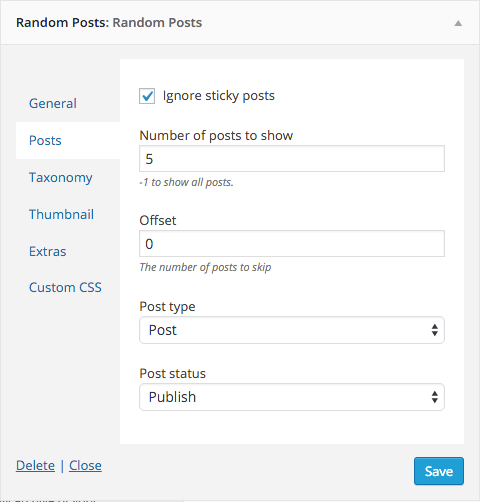
The widget settings
Changelog
2.2.0 – March 07, 2019
- Support WordPress 5.1
- Added: Display full post. props Rhys Wynne
- Added:
widthandheightattribute if using custom image size