

Advanced YouTube Widget
Widget that will enable visitors to give you/the site a virtual beer by clicking on the widget.
Plugin info
Maintenance & Compatibility
Maintenance score
Possibly abandoned • Last updated 6041 days ago
Is Advanced YouTube Widget abandoned?
Possibly abandoned (last update 6041 days ago).
Compatibility
Similar & Alternatives
Explore plugins with similar tags, and compare key metrics like downloads, ratings, updates, support, and WP/PHP compatibility.
Description
A widget that will enable visitors to add youtube account or return search results, with a custom number of maximum results per account/search. It’s easy to use , flexible, enables customization of picture sizes and has multiple displays by two(so far) types of content. More will be added in future versions..
DONATE!
DONATE HERE – (any ammount using paypal or credit card)
Installation
Upload the Advanced Youtube Widget plugin to your blog(in the wp-content/plugins directory) (be sure to upload the “advanced-youtube-plugin” directory or it will not work.
Activate it in the plugins menu in your wp-admin control panel and voila! you’re done!
Frequently Asked Questions
How do i place the widget where i want it to be?
Go in the admin panel under Appearance -> Widgets and place the widget in your desired sidebar, in a specific place.
(drag and drop if on wp 2.8) or drag and save if < wp 2.8
Review feed
Screenshots
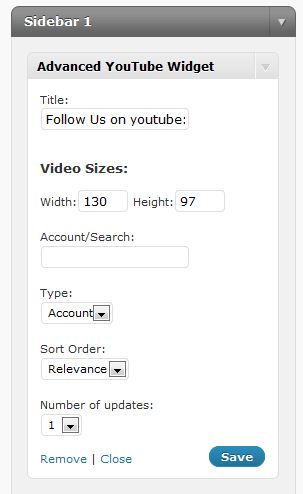
Example in Widget Admin

Example in Site
Changelog
1.0.3
#1 Sorting by relevance, published, view count and rating – curtesy of Kevin Krause . Thanks Kevin!
#2 A design problem fixed. Widget is now copatible with all well coded wordpress themes.
1.0.5
Fixed small link bug...