

Age Verify
A simple way to ask visitors for their age before viewing your content.
Maintenance 24/1003046d since update
Active installs
1,000
Downloads
74,283
Reviews
24
Age
13.4y
Plugin info
Total downloads: 74,283
Active installs: 1,000
Total reviews: 24
Average rating: 4.4
Support threads opened: 0
Support threads resolved: 0 (0%)
Available in: 8 language(s)
Contributors: 2
Last updated: 11/28/2017 (3046 days ago)
Added to WordPress: 11/14/2012 (13 years old)
Minimum WordPress version: 3.2
Tested up to WordPress version: 4.4.34
Minimum PHP version: f
Maintenance & Compatibility
Maintenance score
Possibly abandoned • Last updated 3046 days ago • 24 reviews
24/100
Is Age Verify abandoned?
Possibly abandoned (last update 3046 days ago).
Compatibility
Requires WordPress: 3.2
Tested up to: 4.4.34
Requires PHP: f
Developers
Similar & Alternatives
Explore plugins with similar tags, and compare key metrics like downloads, ratings, updates, support, and WP/PHP compatibility.
Verified Member for BuddyPress
Rating 4.7/5 (15 reviews) • Active installs 4,000
Verification SMS with TargetSMS
Rating 5.0/5 (1 reviews) • Active installs 50
SSL Verification Badge
Rating 2.0/5 (4 reviews) • Active installs 10
WP Factcheck
Rating 0.0/5 (0 reviews) • Active installs 10
Description
Whatever your reasons, you may need your site’s visitors to confirm their age before viewing the content of your site. Age Verify does just that. It’s a simple plugin that lets you specify a minimum age and add an age-gate between a potential visitor and your content, just to be safe. Enjoy!
Installation
- Upload the ‘age-verify’ folder to the ‘/wp-content/plugins/’ directory
- Activate the plugin through the ‘Plugins’ menu in WordPress
- Visit ‘Settings > Age Verify’ and adjust your configuration.
Frequently Asked Questions
Installation Instructions
- Upload the ‘age-verify’ folder to the ‘/wp-content/plugins/’ directory
- Activate the plugin through the ‘Plugins’ menu in WordPress
- Visit ‘Settings > Age Verify’ and adjust your configuration.
Review feed
Clicknathan
Would be better with Javascript
Like my review on another similar plugin, because this plugin uses PHP to check cookies, it doesn't work with cached pages...such as with the W3 Total Cache plugin or WP Engine.
Screenshots
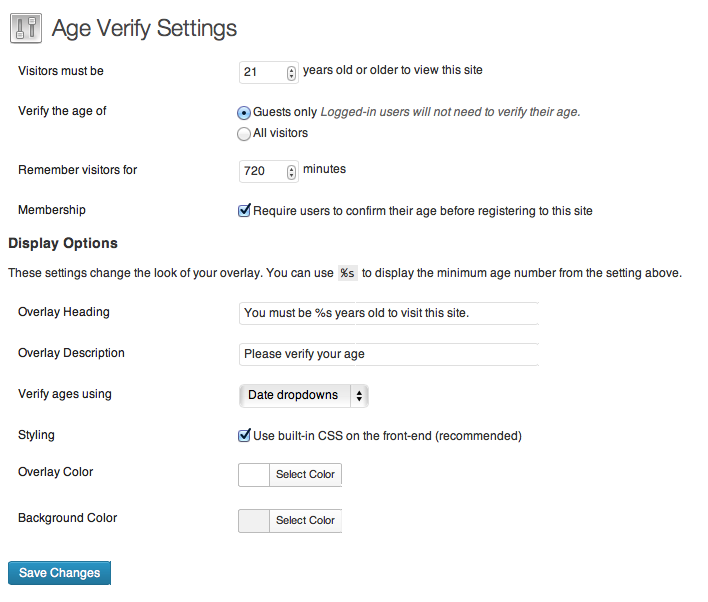
The settings screen.

This is what your visitors see, using the default styling.
Changelog
0.3.0
- New: French and Italian translations
- Tweak: Use strings for the textdomain and change to ‘age-verify’
0.2.10
- Fix: cookie duration now uses the corresponding setting
0.2.9
- Fix: Prevent add/remove_query_arg XSS vulnerability
0.2.8
- Fixes a bug that failed to load translations properly. Props to @Nukleo!
- Added the French translation. Props to @Nukleo!
0.2.7
- Fixes a bug that displayed the minimum age incorrectly in some cases
- Fixes some PHP warnings on activation
0.2.6
- Major code refactor
- Add W3 Total Cache compatibility
- Add WordPress 4.0 compatibility
- Documentation cleanup
0.2.5
- Added WordPress 3.8 compatibility
- Fixed a bit of text domain loading
- Added additional actions for further extensibility
- Adjusted some default modal styling
0.2.4
- Fixed a double slash when enqueueing the stylesheet
- Added some missing text domains
- Fixed a PHP warning
0.2.3
- Added Remember Me checkbox to all input types
- Escaped all strings for proper security
0.2.2
- Fixed the loading of language files
0.2.1
- Cleaned up folders filenames
0.2
- Added ability to age-restrict only specific content
- Security enhancements (nonces!)
- Squashed some PHP warnings
0.1.5
- Fixed support for PHP 5.2 and greater
0.1
- Just getting started…