

AI Block Editor
AI Editor adds an AI assistant in Gutenberg, capable of adding core blocks with content based on your prompts. Just tell AI Editor what you need and i …
Plugin info
Maintenance & Compatibility
Maintenance score
Stale • Last updated 242 days ago • 1 reviews
Is AI Block Editor abandoned?
Likely maintained (last update 242 days ago).
Compatibility
Similar & Alternatives
Explore plugins with similar tags, and compare key metrics like downloads, ratings, updates, support, and WP/PHP compatibility.
Description
AI Editor adds an AI assistant in Gutenberg, capable of adding core blocks with content based on your prompts. Just tell AI Editor what you need and it will add the blocks.
✨ Prompt Examples ✨
-
“Create a page layout featuring sections for a mission statement, team members with images, and contact information.”
-
“Add a pricing plan with three tiers.”
-
“Create a table comparing the superpowers, real names, first appearances, and arch-nemeses of popular superheroes.”
-
“Use the following text to create a hero section: [Your text]”
Features
- Natural language block creation: Describe what you need in plain language, and AI Editor will generate the content blocks for you.
- Supports the following core blocks: Columns, Heading, Paragraph, List, Image, Quote, Pullquote, Buttons, and Table.
- Powered by OpenAI: Choose from various OpenAI GPT models, with GPT-4o recommended for the best results (subject to access availability).
- BYOK: Use your own OpenAI API key.
- Language translation: Multilingual support.
Note
AI Editor is powered by OpenAI’s GPT technology. By using this plugin, data is sent to OpenAI’s servers for processing. For more information on the data handling and privacy aspects, please refer to OpenAI’s Privacy Policy and Terms of Service.
Requirements
PHP 7.0+ is recommended, WordPress 5.8+, with Gutenberg active. An OpenAI API key is required.
Installation
- From your WordPress dashboard, go to Plugins > Add New.
- Search for AI Editor in the Search Plugins box.
- Click Install Now to install the AI Editor Plugin.
- Click Activate to activate the plugin.
- In the WordPress menu, go to Settings -> AI Editor to add your OpenAI API key and select the desired GPT model.
- Open the Gutenberg editor for your post or page.
- Click on the three dots in the top-right corner to expand the options menu.
- Under the Plugins section, click on AI Editor to enable the AI sidebar.
- Once the AI Editor sidebar appears, you may click the star icon at the top of it. This action pins the AI Editor to the toolbar for quick access.
- Ask the AI to add blocks or layouts by providing descriptions.
Frequently Asked Questions
Gutenberg is the modern block-based editor in WordPress, allowing users to create content using a variety of blocks.
Once installed, go to the Gutenberg editor, enable the AI Editor sidebar, and start adding blocks by describing to the AI what you need.
Yes, an OpenAI API key is required to use the AI Editor. You can enter your API key in the plugin settings.
- AI Editor currently supports only the following core Gutenberg blocks: Columns, Heading, Paragraph, List, Image, Quote, Pullquote, Buttons, and Table.
- New blocks can be added, but existing blocks cannot be edited through the AI.
- On rare occasions, when adding complex block layouts, the AI model may generate invalid data for function calls. In such cases, you will be prompted to try again. Please report any such errors. These issues are expected to decrease as the OpenAI GPT models improve over time.
Review feed
Screenshots
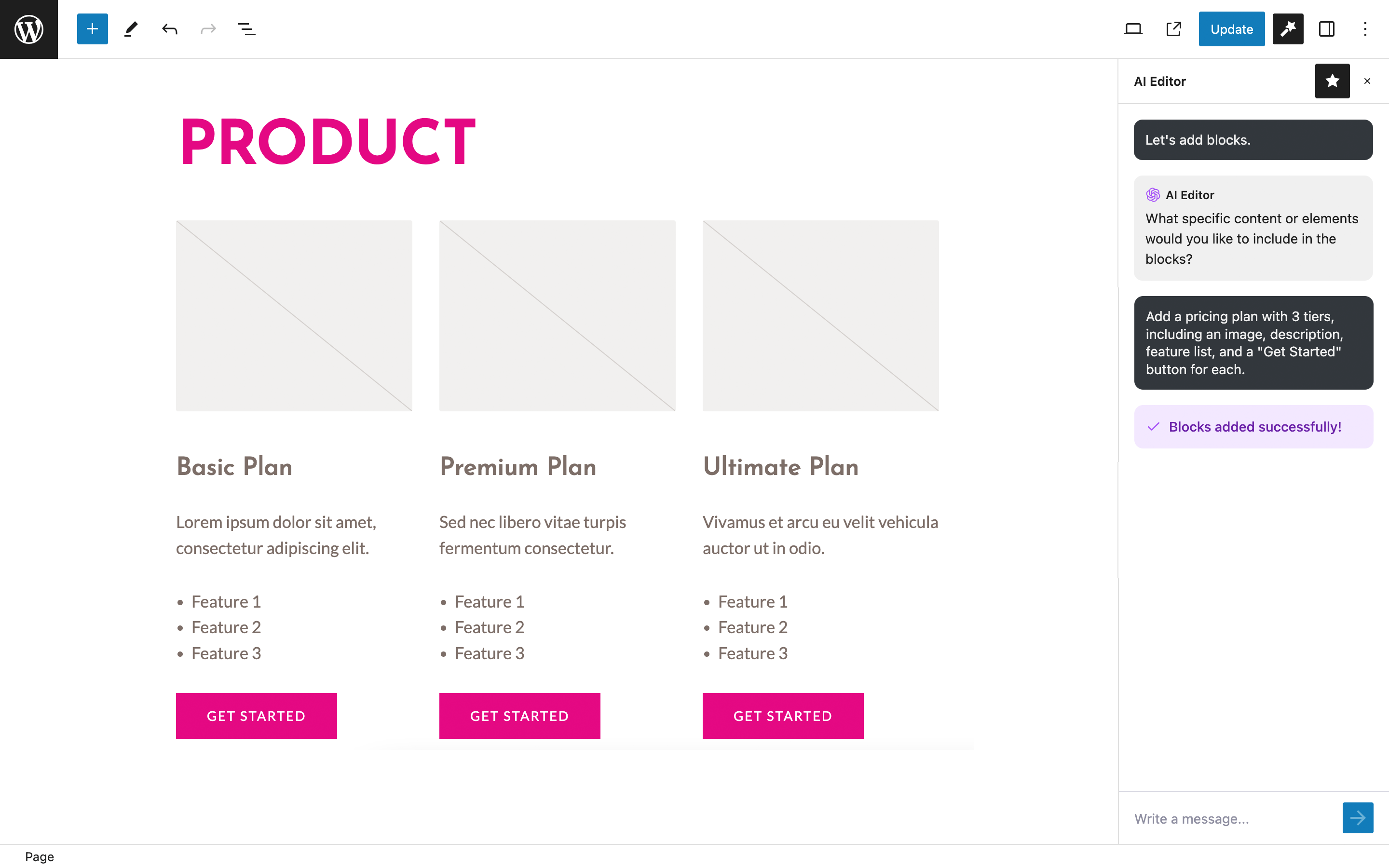
Pricing plan layout. Using GPT-4o.

Prompting AI Editor to create a layout. Using GPT-4o.

Quickly create a table block. Using GPT-4o.

Settings page.
Changelog
1.0.0
First release of the plugin.
1.0.1
Added GPT-4o model.
1.0.2
Small UI udpates.
1.0.3
Added GPT-4o mini model.
1.0.4
Added GPT-4.1 model.