

AI Scrape Protect
Protect your website from AI scraping by adding opt-out instructions to your robots.txt file and including meta tags in the HTML `` with this easy-to- …
Plugin info
Maintenance & Compatibility
Maintenance score
Actively maintained • Last updated 79 days ago • 4 reviews
Is AI Scrape Protect abandoned?
Likely maintained (last update 79 days ago).
Compatibility
Similar & Alternatives
Explore plugins with similar tags, and compare key metrics like downloads, ratings, updates, support, and WP/PHP compatibility.
Description
AI Scrape Protect is a WordPress plugin designed to protect your website from scraping for AI training purposes. It achieves this by adding opt-out instructions to the robots.txt file for the most common AI scraping bots and including meta tags to control how your content is used.
Simplicity first: This plugin is built to be as simple and user-friendly as possible. There are no complicated settings or configuration screens—just activate the plugin and your site is protected. Perfect for anyone who wants quick, effective AI scraping protection without any technical hassle.
Note: These instructions are not always respected by all bots.
Features
- Adds specific
User-agentandDisallowrules to yourrobots.txtfile to block a comprehensive list of AI scraping bots. - Introduces meta tags in the HTML
to provide additional instructions to AI bots, including new tags for Bingbot and general AI compliance. - Prepares for future standards with support for
DisallowAITrainingandnoimageaimeta tags. - Dedicated handling of specific bots like CCBot and Bingbot for better protection and compatibility.
- Admin bar icon to indicate plugin activity.
Installation
- Upload the
ai-scrape-protectfolder to the/wp-content/plugins/directory. - Activate the plugin through the ‘Plugins’ menu in WordPress.
Frequently Asked Questions
The plugin adds specific User-agent entries to your robots.txt file to instruct common AI scraping bots not to crawl or scrape your site. It also introduces meta tags in the HTML <head> to provide additional instructions to AI bots.
While this plugin adds recommendations to the robots.txt file and includes meta tags, not all bots follow these rules. This is a measure to discourage scraping rather than a foolproof solution.
Currently, the plugin includes a predefined list of bots. If you need to add or remove specific bots, you would need to modify the plugin code or contact the plugin author for customization.
The robots.txt file will revert to its previous state before the plugin was activated, and the meta tags added to the HTML <head> will be removed.
Review feed
Super handy
Screenshots
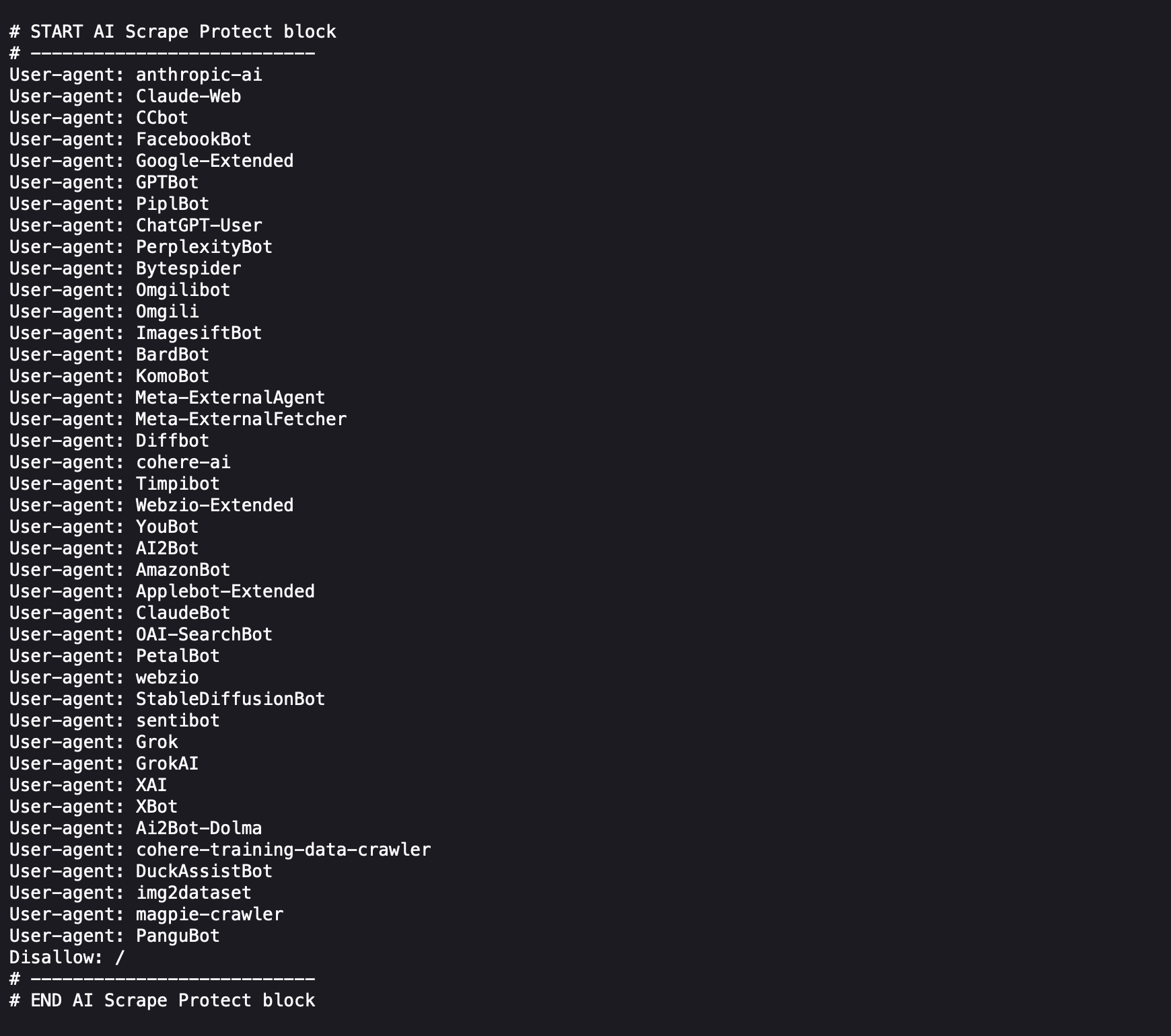
robots.txt File Example: Shows how the plugin updates the
robots.txtfile.
meta tags Example: Shows an example of the Meta Tags added to the head section.
Changelog
4.6
- Added six new AI scraping bots to the block list: 360Spider, ChatGLM-Spider, Sogou, Baiduspider, ErnieBot, DeepseekBot. // Added V 4.6
- Ensures existing entries remain intact and no duplication occurs.
- Maintains compatibility with major search engines (Googlebot, Bingbot, etc.).
- No functional changes to meta tags or admin bar.
4.5
- Removed DuckDuckBot from the blocklist.
- Specifically allowed Googlebot, Googlebot-Image, Googlebot-News, Google-PageSpeed, Google-Site-Verification and Lighthouse to improve functionality.
4.4
- Improved compatibility with other plugins modifying robots.txt by no longer injecting a redundant “User-agent: *” directive.
4.3
Increased priority for the robots.txt modification by improving the order of the User-agent rules.
The modify_robots_txt function was updated to add all User-agent rules in a single loop.
4.2
- Added four new AI training bots to the block list: Claude-User, DataForSeoBot, GoogleOther, and TurnitinBot.
- Improved accuracy of the block list to better focus on bots used for AI model training (not for SEO or search engine indexing).
- Maintains compatibility with major search engines for proper indexing.
4.1
- Added two new AI bots to the block list: Amazon-AI and AnthropicBot.
- Ensured existing entries were not duplicated.
- Maintains compatibility with major search engines for proper indexing.
4.0
- Project URL and documentation moved from
uisce.euto https://codesurf.eu to reflect the new home of the plugin and its development. - All internal plugin references and support links updated accordingly.
- No functional changes to code — purely branding and maintenance update.
3.1
- Added new AI bots to the block list: DuckDuckBot, OpenAIContentCrawler, YandexBot, NeevaBot, AIMatrixCrawler.
- Improved admin bar icon clarity with higher resolution and visual indicators (green dot for active state).
3.0
- Added admin bar icon functionality to indicate plugin activity.
- Updated meta tags for compliance with official documentation and improved AI scraping protection:
- Adjusted Bingbot tag to use
nocachefor better compatibility with Bing AI Chat. - Removed “noindex” from the
ai-botmeta tag to allow search engine indexing. - Added
DisallowAITrainingandnoimageaito therobotsmeta tag. - Introduced dedicated meta tags for CCBot.
- Adjusted Bingbot tag to use
- Removed OpenAI SearchBot from the
robots.txtblocklist based on OpenAI’s recommendations.
2.4
- Updated meta tags for improved AI scraping protection.
- Prevent Bingbot and general AI bots from using the content for AI purposes.
- Added clear comments in the code to describe the functionality of each meta tag.