

AI Thumbnails Maker – auto featured image & force regenerate thumbnails
Revolutionary auto featured image generator with AI. Effortlessly create thumbnails, force regenerate thumbnails, and automate image workflows.
Plugin info
Maintenance & Compatibility
Maintenance score
Actively maintained • Last updated 74 days ago
Is AI Thumbnails Maker – auto featured image & force regenerate thumbnails abandoned?
Likely maintained (last update 74 days ago).
Compatibility
Languages
Similar & Alternatives
Explore plugins with similar tags, and compare key metrics like downloads, ratings, updates, support, and WP/PHP compatibility.
Description
Transform Your WordPress Image Workflow Forever
AI Thumbnails Maker is a powerful all-in-one solution for auto featured image generation and intelligent thumbnail management. Whether you’re managing a blog, running an e-commerce store, or operating a news website, this plugin streamlines your entire image workflow with cutting-edge automation and the ability to force regenerate thumbnails whenever needed.
Say goodbye to manually setting featured images for every post. Our intelligent auto featured image generator automatically creates stunning visuals using 5 advanced methods including AI-powered generation, making your content more engaging and professional—effortlessly.
🚀 Real-World Use Cases
Bloggers & Content Creators
Use auto featured image generation to create eye-catching thumbnails from content or titles. Every post looks professional and drives more clicks instantly.
E-Commerce Stores
Perfect for WooCommerce stores. Use auto featured image to generate product thumbnails during bulk imports. Force regenerate thumbnails when changing product image sizes. Save hours of manual work.
News & Magazine Sites
Publish breaking news faster. Our post thumbnail automation finds images instantly or creates custom title cards on the fly.
Content Migration
Imported thousands of posts? Process your entire library in minutes with bulk generation. Every post gets a professional thumbnail automatically.
Social Media Optimization
Create share-optimized featured images for Facebook, Twitter, and LinkedIn. Consistent branding across all platforms.
Developers & Agencies
Manage multiple client sites efficiently. Force regenerate thumbnails after theme changes. Maintain consistency across all projects.
Multilingual Sites
AI-powered generation supports multiple languages, creating culturally relevant images for global audiences.
💎 Powerful Features
- 5 Auto Featured Image Methods – Content images, AI creation, title graphics, smart fallback, default image
- AI Integration – OpenAI DALL-E 3 for unique, contextual auto featured image generation
- Title Image Creator – Custom graphics with live preview and full customization
- Smart Dashboard – Real-time statistics with Chart.js and bulk operations
- Force Regenerate Thumbnails – Rebuild all thumbnail sizes after theme or settings changes
- Auto-Generation – Automatically set featured images when publishing posts
- Bulk Processing – Generate or delete thousands of thumbnails with progress tracking
- Quality Control – Set minimum image dimensions and validation rules
- Post Type Support – Works with posts, pages, WooCommerce products, custom types
- Admin Preview – See featured images directly in posts list
- Activity Logging – Detailed logs with image dimensions and file sizes
- Overwrite Protection – Choose to preserve or update existing featured images
- WordPress Standards – Clean code following official guidelines
🎨 Generation Methods Explained
1. First Content Image (Free)
Automatically scans your post content and selects the first suitable image that meets your quality requirements. Perfect for blogs and news sites where articles already contain relevant images. Smart detection ensures only high-quality images become featured thumbnails. No API keys or external services required.
2. AI Generation with OpenAI DALL-E (Optional)
Create completely unique, contextual images using cutting-edge AI technology. The plugin analyzes your post content (title, paragraphs, or full text) and generates a detailed prompt using GPT models (GPT-4, GPT-4o, or GPT-4o-mini). DALL-E then creates a custom image matching your content perfectly. Choose from natural or vivid styles, resolutions up to 1024×1792, and multiple language options. Requires OpenAI API key (costs ~$0.04-$0.08 per image).
3. Generate from Title (Free)
Transform post titles into professional custom graphics with text overlays. Fully customize width, height, background color, text color, and font size. The real-time live preview shows exactly how your thumbnail will look before generating. Perfect for social media sharing and maintaining consistent branding. Uses local GD Library—no external services needed.
4. Search or Generate (Free)
Smart fallback strategy that combines the best of both worlds. First attempts to find a suitable image in your post content. If none found, automatically generates a custom title-based graphic. Ensures every post gets a featured image without manual intervention. Ideal for mixed content where some posts have images and others don’t.
5. Use Default Image (Free)
Professional fallback system using a preset image from your WordPress media library. When no suitable image is found in content, the plugin automatically uses your chosen default. Perfect for maintaining consistent branding across posts without images. Great for podcasts, text-heavy content, or specific categories.
🏆 Why Choose AI Thumbnails Maker?
Effortless Automation
Stop wasting time manually setting featured images. Our intelligent post thumbnail automation handles everything automatically, freeing you to focus on creating great content.
Professional Results
Whether using AI generation or traditional methods, every thumbnail looks polished and professional. Your site will have that premium, well-maintained appearance that builds trust with visitors.
Complete Flexibility
With 5 different generation methods, you’re never locked into one approach. Switch strategies anytime, combine methods, or use different approaches for different post types.
Cost-Effective Solution
4 out of 5 generation methods are completely free. Only AI generation requires an optional OpenAI API key—and even that creates unlimited unique images for pennies per image.
Built for Scale
Managing 10 posts or 10,000? Our bulk processing handles any size library efficiently. Force regenerate thumbnails across your entire site in minutes, not hours.
Developer Friendly
Clean, well-documented code following WordPress standards. Extensive hooks and filters for customization. Modern build process with Vite and SCSS.
🔌 Our Other Plugins
SmartyPress AI Engine – Powerful AI integration for WordPress with ChatGPT and Deepseek. Generate high-quality content directly in Gutenberg editor with Magic Wand inline editing and AI Content Generator panel. Create titles, articles, excerpts with 10+ pre-built actions or custom prompts.
AdsDestroyer – Transform your WordPress admin into a clean, distraction-free workspace. Remove unwanted notices, promotional banners, and clutter with visual selection. Perfect for maintaining focus and creating professional client experiences.
Unnotifier — disable admin notices individually – Take complete control over WordPress admin notifications. Hide, customize, or remove any admin notice with precision. Essential for agencies managing multiple client sites or power users who value a clean interface.
💡 Inspired By Industry Leaders
We studied the best WordPress thumbnail and featured image plugins to bring you the most comprehensive auto featured image solution:
- Auto Post Thumbnail – Pioneer in auto featured image generation from content
- Quick Featured Images – Excellent bulk management and filtering capabilities
- Easy Add Thumbnail – Intuitive user interface for thumbnail assignment
- Regenerate Thumbnails – Industry standard to force regenerate thumbnails and rebuild thumbnail sizes
- Default Featured Image – Smart fallback image functionality
We’ve combined the best features from these proven solutions and added powerful new capabilities like AI generation, title-based creation, and advanced automation that go far beyond what’s currently available.
🛠️ Requirements
- WordPress 6.2 or higher
- PHP 8.0 or higher
- GD Library (included with most hosting)
- OpenAI API key (optional, only for AI generation)
External Services
This plugin can optionally use OpenAI DALL-E 3 API for AI-powered image generation. This is completely optional – the plugin works perfectly without it using 4 free generation methods.
OpenAI DALL-E 3 API (Optional)
Service Provider: OpenAI, Inc. (https://openai.com)
When Used: Only when you:
* Select “AI Generation (OpenAI)” as your generation method
* Configure a valid OpenAI API key in settings
* Manually or automatically trigger thumbnail generation
Data Sent:
* Text prompts generated from post titles and/or content
* API authentication (your API key)
* Image parameters (size, style, resolution)
* NO personal data, visitor information, or sensitive content
Privacy & Terms:
* OpenAI Terms of Service
* OpenAI Privacy Policy
* API Documentation
* Pricing Information
Your Control:
* AI services disabled by default
* 4 completely free alternative methods available
* Switch methods anytime in settings
* No data sent if AI generation not configured
* All images stored locally in WordPress
GDPR Compliance:
* No visitor data processed
* Only admin users trigger API calls
* Complete transparency in data usage
* Delete all data by removing plugin
Privacy & Data Protection
Your Data Stays Private
AI Thumbnails Maker respects your privacy and follows WordPress best practices:
- No Tracking – We don’t collect any usage data or analytics
- No External Calls – Except optional OpenAI API when you explicitly enable AI generation
- Local Storage – All generated images and logs stored in your WordPress database
- Complete Control – You decide what data (if any) is sent to external services
- GDPR Compliant – No personal data processing of your visitors
- Transparent – Full disclosure of when and what data is transmitted
When using AI generation, only text prompts are sent to OpenAI. Review our External Services section for complete details.
Support & Documentation
Need Help?
- What’s New Page – Visit AI Thumb Maker What’s New for feature documentation
- Support Forum – Get help on WordPress.org
- Settings Help – Each setting includes detailed inline descriptions
- Video Guides – Check our website for tutorial videos (coming soon)
Report Bugs or Request Features
Found a bug? Have an idea for improvement? We’d love to hear from you! Visit our support forum or contact us through the plugin.
Credits & Acknowledgments
Built With Excellence
- WordPress REST API & Settings API
- Chart.js for beautiful data visualization
- OpenAI API integration for AI capabilities
- Modern JavaScript (ES6+) and SCSS
- Vite for lightning-fast asset compilation
- Follows WordPress coding standards
Special Thanks
To the WordPress community, OpenAI, and all the developers whose plugins inspired us to create the most comprehensive thumbnail solution available.
Developers
Contributing
Development happens on GitHub. Pull requests welcome!
Code Quality
* WordPress Coding Standards (WPCS) compliant
* Object-oriented PHP 8.0+ architecture
* Modern JavaScript with jQuery integration
* BEM methodology for CSS
* Comprehensive inline documentation
* Automated build process with quality checks
Hooks & Filters
Extensive customization options for developers:
* aitm_generation_methods – Add custom generation methods
* aitm_ai_models – Register additional AI services
* aitm_image_quality – Modify quality validation logic
* aitm_thumbnail_sizes – Customize registered sizes
* And many more documented in code
Roadmap
Coming Soon
- Additional AI services (Stable Diffusion, Midjourney)
- Advanced image style presets and templates
- Smart image analysis and content recognition
- Batch optimization tools for large sites
- Enhanced caching for better performance
- Custom prompt templates library
- A/B testing for thumbnail effectiveness
- Integration with popular page builders
- Advanced analytics and reporting
- Mobile app for management on-the-go
Your Feedback Matters
Help shape the future of AI Thumbnails Maker! Share your ideas and feature requests in our support forum.
Transform your WordPress image workflow today with AI Thumbnails Maker – the ultimate auto featured image and thumbnail generator solution.
Installation
Automatic Installation (Recommended)
- Log in to your WordPress admin panel
- Navigate to Plugins > Add New
- Search for “AI Thumbnails Maker”
- Click “Install Now” then “Activate”
- Go to AI Thumb Maker in your admin menu to start
Manual Installation
- Download the plugin ZIP file
- Go to Plugins > Add New > Upload Plugin
- Choose the ZIP file and click “Install Now”
- Click “Activate Plugin”
Quick Start Guide
-
Configure Settings – Visit AI Thumb Maker Settings
- Choose your preferred generation method
- Enable automatic generation
- Select which post types to process
-
Customize Options (Optional)
- Set minimum image quality requirements
- Configure AI settings if using AI generation
- Customize title image appearance with live preview
-
Generate Thumbnails
- Go to Auto Featured Image dashboard
- View statistics and select post type
- Click “Generate Thumbnails” for bulk processing
-
Regenerate Sizes (Optional)
- Visit Regenerate Thumbs for thumbnail size management
- Select options and click “Regenerate” to rebuild all sizesSee the Installation tab above for detailed setup instructions.
Frequently Asked Questions
No! AI generation is completely optional. The plugin offers 4 free methods that work without any API keys:
* First Content Image (finds images in your content)
* Generate from Title (creates custom title graphics)
* Search or Generate (smart combination)
* Use Default Image (fallback from media library)
Only choose AI generation if you want to create completely unique images using DALL-E.
OpenAI DALL-E 3 costs approximately $0.040-$0.080 per image depending on size and quality. Other methods are completely free. You only pay OpenAI directly through your own API account.
Yes! Enable “Auto Generation” in settings, select your post types, and choose a generation method. Every new post will automatically get a featured image when published.
Absolutely! The plugin supports all post types including WooCommerce products. Perfect for automatically generating product thumbnails during bulk imports.
It depends on your chosen method:
* First Content Image – Post remains without featured image
* Search or Generate – Automatically creates title-based image
* Use Default Image – Uses your preset fallback image
* AI Generation – Creates unique image from content
By default, no. The plugin only generates featured images for posts without them. Enable “Overwrite Existing Featured Images” in settings if you want to replace existing thumbnails.
Go to AI Thumb Maker Regenerate Thumbs, select your options (regenerate all, skip existing, delete old), and click “Start Regeneration”. The tool rebuilds all registered thumbnail sizes automatically.
Yes! The plugin intelligently parses both classic editor content and Gutenberg blocks to find images. Works seamlessly with all WordPress editors.
Definitely! When using “Generate from Title” method, customize:
* Image dimensions (width × height)
* Background color
* Text color
* Font size
* Real-time live preview shows exactly how it will look
Yes. Only text prompts (derived from your post titles/content) are sent to OpenAI. No personal data, user information, or sensitive content is ever transmitted. Generated images are stored in your WordPress media library.
No! The plugin only processes images in the WordPress admin area using background AJAX. Your website frontend performance is completely unaffected.
Yes! The plugin adds a thumbnail preview column to your posts list, giving you instant visual overview of your featured image coverage.
- Go to AI Thumb Maker Auto Featured Image
- Select post type from the filter
- View statistics showing posts with/without featured images
- Click “Generate Thumbnails” to process all posts automatically
- Monitor real-time progress and view detailed logs
All standard WordPress formats: JPEG, PNG, GIF, WebP, and more. AI-generated images are returned as PNG for maximum quality.
Review feed
Screenshots
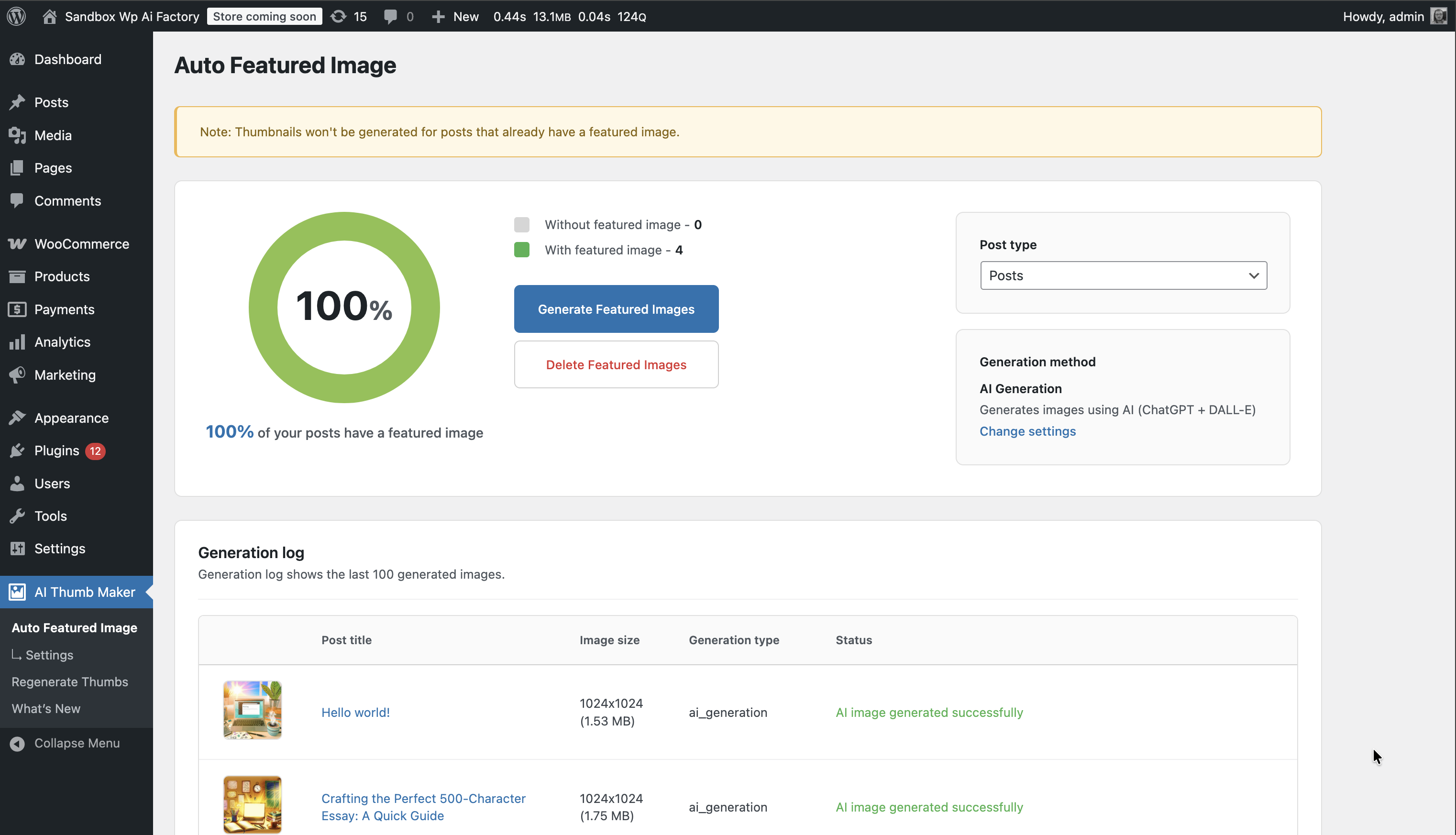
Auto Featured Image Dashboard - Real-time statistics with Chart.js visualization, filters, and bulk generation controls
Changelog
1.2.5 – 2025-12-06
- Fixed: WordPress Coding Standards compliance – all errors and warnings resolved
- Fixed: Added missing translators comments for i18n strings with placeholders
- Fixed: Replaced direct file operations (fopen, fclose, readfile, unlink, rmdir) with WP_Filesystem methods
- Fixed: Replaced date() with gmdate() for timezone-safe date operations
- Fixed: Added prefixes to global variables in uninstall.php
- Updated: Tested up to WordPress 6.9
- Improved: Code quality and WordPress.org repository compliance
1.2.4 – 2025-11-06
- Enhanced: AI rate limiting – reduced to 2 parallel requests and 3 images per minute for better API compliance
- Improved: Queue management – proactive batch loading eliminates delays between batches
- Added: Backend persistence for post type selection – selection saved to user meta
- Added: GLightbox integration – click thumbnails in Generation log to view full-size images
- Improved: Generation log UI – removed redundant “Generation type” column
- Enhanced: Generation method display – human-readable descriptions under post titles
- Added: “Waiting for queue slot” status with animated indicator for queued posts
- Improved: Stop/Continue button – toggle between states for better control
- Enhanced: AI limit notice – changed to orange color with improved text wrapping
- Fixed: Concurrent request limit enforcement – strict 2-request maximum for AI generation
- Improved: Visual feedback – clear distinction between generating, queued, and waiting states
1.2.3 – 2025-11-04
- Fixed: AI Generation throttling logic – proper cooldown implementation for DALL-E API limits
- Added: localStorage support – selected post type now persists across page reloads
- Improved: User experience – dashboard remembers your last selected post type
- Optimized: AI request queue management for better performance
1.2.2 – 2025-10-29
- Fixed: WordPress compatibility – updated “Tested up to” version to 6.8
- Fixed: Version consistency between main plugin file and readme.txt
1.2.1 – 2025-10-29
- Added: Plugin icons (128×128, 256×256) for WordPress.org directory
- Improved: SVN repository structure and deployment process
- Updated: Build and deployment documentation
1.2.0 – 2025-10-29
- Enhanced: SEO-optimized readme.txt with compelling use cases and feature descriptions
- Added: “What’s New” landing page in WordPress About style showcasing all capabilities
- Added: Object caching (wp_cache) for database queries improving performance
- Added: Build compilation script for creating distribution packages
- Fixed: All WordPress Coding Standards compliance issues – 0 errors, 0 warnings
- Fixed: HTML links now display correctly with wp_kses() sanitization
- Fixed: Missing translators comments for i18n compliance
- Fixed: Deprecated functions replaced (strip_tags, parse_url, add_option)
- Improved: Compact, scannable use cases for better readability
- Improved: Structured feature list with detailed generation methods
- Improved: Menu organization – Settings as second item
- Updated: Author information to WP AI Factory
- Updated: Links to other plugins (AdsDestroyer, Unnotifier)
1.1.1 – 2025-10-29
- Major Update – Revolutionary new features and capabilities
- Added: AI-powered thumbnail generator with OpenAI DALL-E 3 integration
- Added: Professional title image generator with real-time live preview
- Added: Smart “Search or Generate” fallback method combining best approaches
- Added: Default image fallback system for consistent branding
- Added: Advanced thumbnail regeneration tool for all registered sizes
- Added: Thumbnail preview column in posts list for quick visual overview
- Added: Beautiful “What’s New” page showcasing all features
- Improved: Modern flat design with enhanced user experience
- Improved: Real-time statistics dashboard with Chart.js visualization
- Improved: Enhanced logging with detailed image dimensions and file sizes
- Improved: Advanced progress tracking with stop/resume functionality
- Fixed: Intelligent image detection preventing cURL errors
- Fixed: Visual grouping on settings page for better usability
- Fixed: Professional build process with Vite and SCSS compilation
- Enhanced: Multiple content selection strategies for AI prompts
- Enhanced: Image quality validation with minimum size requirements
- Enhanced: Comprehensive error handling and user feedback
1.0.0 – 2025-09-15
- Initial Release – Foundation features
- Automatic featured image generation from content
- First content image detection strategy
- Bulk generation for existing posts
- Statistics dashboard with visual overview
- Activity logging and monitoring
- Post type selection and configuration
- WordPress coding standards compliance