
AJ FAQ Block
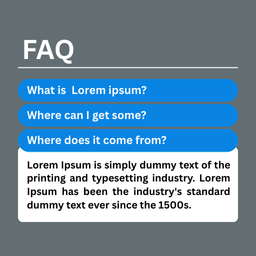
A simple and powerful FAQ Block plugin to showcase your visitor Frequently Asked Questions in an engaging way.
Plugin info
Maintenance & Compatibility
Maintenance score
Stale • Last updated 318 days ago • 1 reviews
Is AJ FAQ Block abandoned?
Likely maintained (last update 318 days ago).
Compatibility
Similar & Alternatives
Explore plugins with similar tags, and compare key metrics like downloads, ratings, updates, support, and WP/PHP compatibility.
Description
This plugin allows you to create an FAQ Block to professionally display your visitors’ Frequently Asked Questions. You can easily manage FAQ content, customize colors, and display it using shortcodes. The plugin is lightweight, supports Elementor, and is optimized for performance.
Key Features:
- Create unlimited FAQ Blocks
- Display FAQ in a Block format
- Add specific FAQ to a custom Block
- Able to Create FAQ Group, Every group contain several number of questions with unique shortcode
- Fully responsive and mobile-friendly
- Shortcodes and widget support
- Easy to install and configure
- Unlimited color customization
Customization Options:
- Change FAQ Block Background color from WordPress Dashboard.
- Change Text Background color.
- Change Text Color and typography.
- Change FAQ Hover Color.
Support & Contact
For any issues, please open a support ticket in the WordPress plugin repository or visit our support page.
Installation
Minimum Requirements
- WordPress 4.5 or greater
- PHP version 7.4 or greater
- MySQL version 5.0 or greater
Installation Process
-
Automatic Installation (Recommended):
- Log in to your WordPress dashboard.
- Navigate to “Plugins > Add New”.
- Search for “AJ FAQ Block”.
- Click “Install Now” and then activate the plugin.
-
Manual Installation:
- Download the plugin ZIP file from the WordPress plugin repository.
- Upload the
aj-faq-blockfolder to the/wp-content/plugins/directory using an FTP client or your web hosting file manager. - Activate the plugin through the ‘Plugins’ menu in WordPress.
Usage
- After installation, navigate to AJFAQ Block > FAQ Groups in the WordPress Admin Dashboard.
- Create new FAQ groups and questions under each group.
- Each FAQ group generates a unique shortcode (e.g.,
[aj-faq id="123"]). - Copy and paste the shortcode into any post, page, or widget area to display the FAQ Block.
- Optionally, use the Elementor widget to add the FAQ Block visually.
Frequently Asked Questions
In the WordPress Admin Dashboard, under the AJFAQ Block > FAQ Groups section, each FAQ group (like Site FAQ and General FAQ) has a corresponding shortcode that can used to embed the FAQ block on anywhere of your website page or post. The shortcodes are listed in the “Shortcode” column.
Yes, you can customize the FAQ Block Background, Text color, Text Background Color, and FAQ Hover from the WordPress dashboard.
Yes, the FAQ Block is fully responsive and works well on all devices.
Review feed
Screenshots

Front End

Customize Settings

Back End


Changelog
1.0.0
- Initial release.