

Alpha Google Map For Elementor
Alpha Google Map For Elementor offers premium Google Map features for WordPress, enhancing your site with advanced map functionalities.
Plugin info
Maintenance & Compatibility
Maintenance score
Stale • Last updated 348 days ago • 1 reviews
Is Alpha Google Map For Elementor abandoned?
Likely maintained (last update 348 days ago).
Compatibility
Similar & Alternatives
Explore plugins with similar tags, and compare key metrics like downloads, ratings, updates, support, and WP/PHP compatibility.
Description
This plugin provides essential Google Maps functionalities with additional premium features tailored for Elementor.
Plugin Features:
- Custom map pins with hover and active states
- Customizable info-box with image gallery support
- Extensive map controls
- Responsive live editing within Elementor
- Compatibility with the latest Google Maps API standards
Demo:
Check out the plugin demo here.
Contributing and Reporting Bugs:
Contribute on GitHub: Alpha-Google-Map-For-Elementor
Support:
For community support, use the WordPress.org forums. Report bugs on GitHub Issues.
Installation
Minimum Requirements:
- WordPress 6.0 or greater
- PHP version 7.4 or greater
- MySQL version 5.0 or greater
Recommended:
- PHP version 8.1 or greater
- MySQL version 5.6 or greater
- WordPress Memory limit of 128 MB or higher
Installation Steps:
- Ensure Elementor Website Builder is installed and activated.
- Navigate to Plugins > Add New in your WordPress dashboard.
- Search for ‘Alpha Google Map For Elementor’.
- Install and activate the plugin.
Manual Installation:
- Upload the ‘alpha-google-map-for-elementor’ folder to
/wp-content/plugins/. - Activate the plugin via the ‘Plugins’ screen in WordPress.
Frequently Asked Questions
No. Elementor Website Builder must be installed and activated.
Review feed
Screenshots
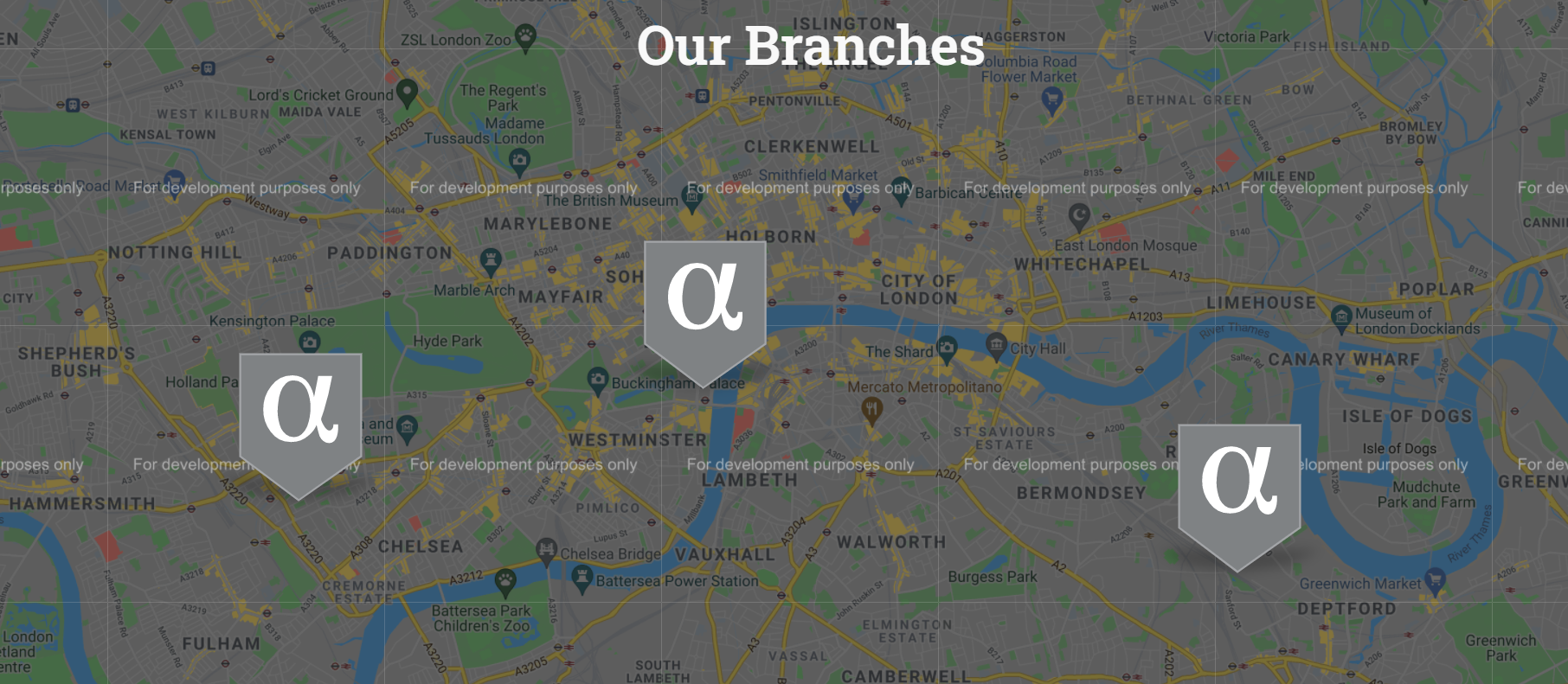
Multiple Pins. Map with multiple pins.

Pins Change On Active. Catch customers eyes with this nice feature, and add whatever you want inside the info-box, including timetable or gallery.

Gallery Inside The Info Box. Gallery in the info-box with the ability to slide show the gallery with Elementor Lightbox.

Map Controls. Easily configure Google Maps controls.

Live Preview. See the changes in realtime.

Pins Controls. Choose your pins icons, and easily set your pins coordinates.

Pin Gallery. Choose and add images to each pin gallery.
Changelog
1.3 – 2025-04-19
- Compatibility for WP 6.8 and
- Feature: One finger scroll on mobile (GestureHandling)
1.2.2 – 2024-12-18
- Compatibility for the updated Elementor colors and typography schema.
1.2.1 – 2024-11-16
- Enhanced compatibility with the latest WordPress and Elementor versions.
- Adhered to WordPress coding standards throughout the codebase.
- Refactored JavaScript code to use modern standards and practices.
- Fixed bugs and optimized performance.
1.2.0 – 2024-07-20
- Compatibility for WP 6.6 and refactor the integration with Elementor.
1.1.0 – 2024-04-04
- Compatibility for WP 6.5 and optimize the plugin assets loading method.
1.0.9 – 2023-11-11
- Compatibility for WP 6.4 and bug fix for clicked pins.
1.0.8 – 2023-08-17
- Compatibility for WP 6.3.
1.0.7 – 2023-06-23
- Minor improvements and adding a demo.
1.0.6 – 2023-06-10
- Update deprecated functions.
1.0.5 – 2023-01-11
- Update deprecated functions.
1.0.4 – 2022-07-13
- Applying PHPCS standards and fixing bugs.
- Fixing incorrect hook usage and replacing deprecated functions.
1.0.3 – 2022-06-19
- Adding README.md
1.0.2 – 2022-05-08
- Testing for WordPress 6.0
1.0.1 – 2021-06-03
- Tweak: Improving the readme.txt file (Tags and more information)
- Tweak: Regenerating the .pot file (fixing one text)
1.0.0 – 2021-06-02
- Initial Public Release