
Alt Text Pro – AI Alt Text Generator for Image SEO & Accessibility
AI-powered alt text generator that automatically creates image alt tags for better SEO and accessibility. Generate alt text for all your images with o …
Plugin info
Maintenance & Compatibility
Maintenance score
Maintained • Last updated 117 days ago
Is Alt Text Pro – AI Alt Text Generator for Image SEO & Accessibility abandoned?
Likely maintained (last update 117 days ago).
Compatibility
Similar & Alternatives
Explore plugins with similar tags, and compare key metrics like downloads, ratings, updates, support, and WP/PHP compatibility.
Description
Alt Text Pro is the ultimate AI-powered alt text generator for WordPress. Automatically generate professional image alt text and alt tags to boost your image SEO and meet accessibility standards. Our advanced AI creates accurate, descriptive alt text that improves your site’s search rankings and makes your content accessible to everyone.
Stop wasting hours writing alt text manually. Let our automatic alt text generator create optimized alt attributes for hundreds of images in minutes. Whether you’re a blogger, e-commerce store owner, or agency, Alt Text Pro makes image optimization effortless.
🚀 Automatic Alt-Text Generation Features
- AI Alt Text Generator: Uses Google Gemini AI to create accurate, descriptive alt text automatically
- Automatic Alt Tag Creation: Generate alt tags automatically when uploading images
- Bulk Alt Text Processing: Process hundreds of existing images at once with our bulk alt text generator
- Context-Aware Descriptions: AI understands your content to provide better image alt text
- Beautiful Dashboard: Modern, intuitive admin interface for managing alt text generation
- Usage Tracking: Monitor your API usage and credit consumption
- Image SEO Optimization: Improve search engine rankings with better image alt text descriptions
- Accessibility Compliance: Meet WCAG guidelines for screen reader compatibility with proper alt attributes
💡 How Our AI Alt Text Generator Works
- Connect Your Account: Get your API key from Alt Text Pro dashboard
- Configure Settings: Set up automatic alt text generation preferences
- Generate Alt Text: Process images individually or use bulk alt text generation
- Review & Edit: Fine-tune generated alt tags and alt attributes as needed
🎯 Perfect For Image SEO & Accessibility
- Content Creators: Bloggers, journalists, and content marketers who need alt text fast
- E-commerce Sites: Product catalogs needing automatic alt text for image SEO
- Agencies: Web developers using bulk alt text generation for client sites
- Accessibility Advocates: Organizations focused on inclusive design and alt tag compliance
- SEO Professionals: Improving image SEO optimization with quality alt text
📊 Pricing Plans
- Free Trial: 30 credits to try our alt text generator
- Starter Plan: 500 credits/month for small sites
- Pro Plan: 2000 credits/month for busy sites
- Pay-as-you-go: $3 for 50 credits when you need more
Each alt text generation uses 1 credit.
🔧 Technical Requirements
- WordPress 5.0 or higher
- PHP 7.4 or higher
- Active internet connection for API calls
- Alt Text Pro account (free signup available)
🌟 Why Choose Alt Text Pro for Image SEO?
- Accuracy: Advanced AI trained specifically for alt text and alt tag generation
- Speed: Process hundreds of images in minutes with bulk alt text processing
- Quality: Human-like image alt text descriptions that make sense
- Image Optimization: Boost your image SEO with proper alt attributes
- Integration: Seamless WordPress integration for automatic alt text
- Support: Dedicated customer support team
- Privacy: Your images are processed securely and not stored
Support
Need help with alt text generation? We’re here for you!
- Documentation: Visit our knowledge base
- Support: Contact us at support
- Feature Requests: We love hearing your ideas!
Privacy Policy
Alt Text Pro is committed to protecting your privacy:
- Images are processed securely via encrypted HTTPS connections
- Images are not stored on our servers after alt text generation
- Only necessary metadata is logged for service improvement
- We comply with GDPR and other privacy regulations
- You can delete your account and data at any time
For full details, see our Privacy Policy.
About Alt Text Pro
Alt Text Pro is the leading AI alt text generator dedicated to making the web more accessible for everyone. Our mission is to provide powerful, easy-to-use tools that help website owners create better alt text descriptions for their images, improving both accessibility and image SEO.
Founded by accessibility advocates and AI experts, we understand the importance of inclusive design and the challenges of creating quality alt text at scale. Our automatic alt text generator combines cutting-edge AI technology with human insight to deliver the best possible image optimization results.
Join thousands of websites already using Alt Text Pro – the #1 AI alt text generator – to improve their accessibility and image SEO!
Get started today: Sign up for free and get credits to try our alt text generator risk-free.
Installation
Automatic Installation
- Go to your WordPress admin dashboard
- Navigate to Plugins Add New
- Search for “Alt Text Pro”
- Click “Install Now” and then “Activate”
Manual Installation
- Download the plugin zip file
- Go to Plugins Add New Upload Plugin
- Choose the zip file and click “Install Now”
- Activate the plugin
Setup
- Go to Alt Text Pro Settings in your WordPress admin
- Sign up for a free account at Alt Text Pro
- Copy your API key from the dashboard
- Paste it into the plugin settings and save
- Test the connection to ensure everything works
- Start generating alt text for your images!
Frequently Asked Questions
Alt text (also called alt tags or alt attributes) is descriptive text added to images that helps search engines understand your images and makes your site accessible to visually impaired users using screen readers. Proper alt text is essential for image SEO and accessibility compliance.
Alt Text Pro automatically generates descriptive, keyword-relevant alt text for your images. Search engines like Google use alt text to understand and index your images, which can improve your rankings in image search results and boost overall image SEO performance.
Yes! Our bulk alt text generator can process hundreds of existing images that are missing alt tags. Simply go to the Bulk Processing page, select your images, and let the AI generate alt text automatically for all of them.
Yes, these terms refer to the same thing. “Alt text” is the content, while “alt tag” and “alt attribute” refer to the HTML attribute that contains this text. Alt Text Pro generates quality alt text that gets added to your images’ alt attributes.
Our AI alt text generator uses Google Gemini AI, specifically trained for image description and alt text generation. It analyzes image content, context, and metadata to create accurate, descriptive alt text that sounds natural and helps with image SEO.
Yes, you need a free Alt Text Pro account to use this plugin. You can sign up at https://www.alt-text.pro and get free credits to start generating alt text immediately.
Our AI is trained specifically for alt text generation and provides highly accurate descriptions. However, we always recommend reviewing and editing the generated alt text to ensure it fits your specific context perfectly.
Absolutely! The plugin generates alt text as a starting point. You can always edit, refine, or completely rewrite the alt tags to match your needs.
If you run out of credits, the alt text generator will stop processing new images. You can purchase more credits or upgrade your plan from your Alt Text Pro dashboard.
Yes! The bulk processing feature can generate alt text for all your existing images that don’t have alt attributes yet, making image optimization fast and easy.
Yes, we take security seriously. Images are processed securely via encrypted connections and are not stored on our servers after processing.
Definitely! The plugin works great for product images and image SEO for online stores. You can even provide context like “product photo” to get more relevant alt text descriptions.
Absolutely! Proper alt text is a key factor in image SEO. It helps search engines understand your images, improves image search rankings, and can drive significant traffic through Google Images. Our alt text generator creates SEO-optimized descriptions.
The alt text generator supports all standard web image formats including JPEG, PNG, GIF, and WebP.
Yes, you can cancel your subscription at any time from your Alt Text Pro dashboard. You’ll continue to have access until the end of your billing period.
Review feed
Screenshots
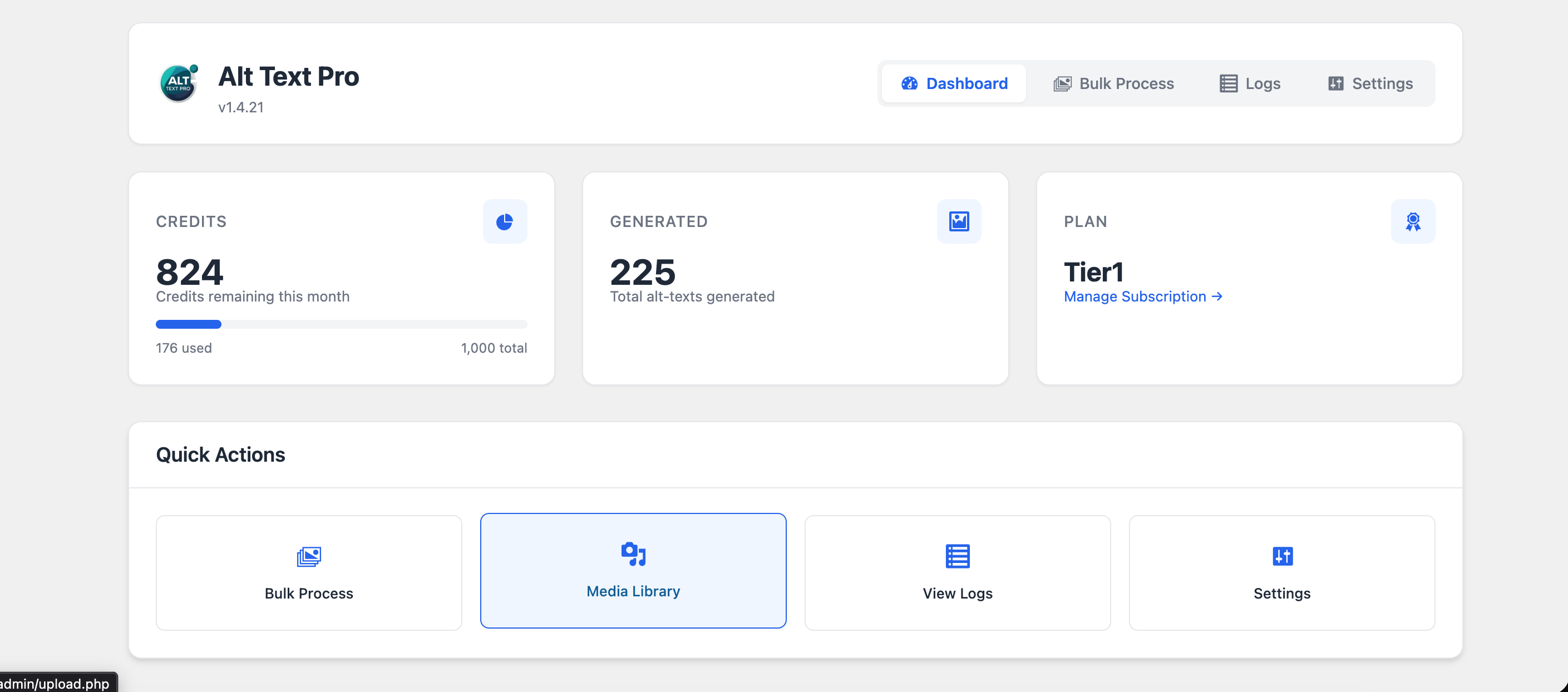
Alt Text Generator Dashboard - AI-powered alt text generator dashboard showing usage stats and one-click generation
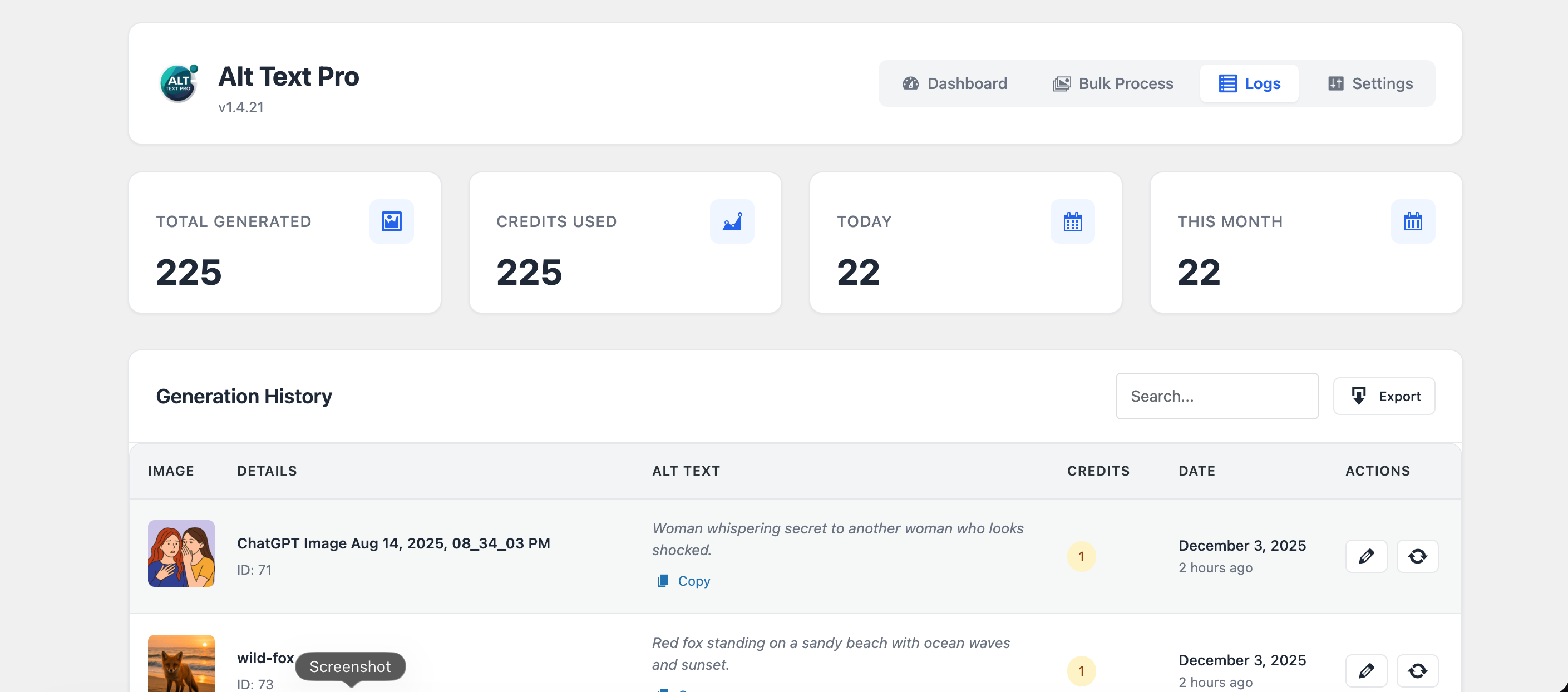
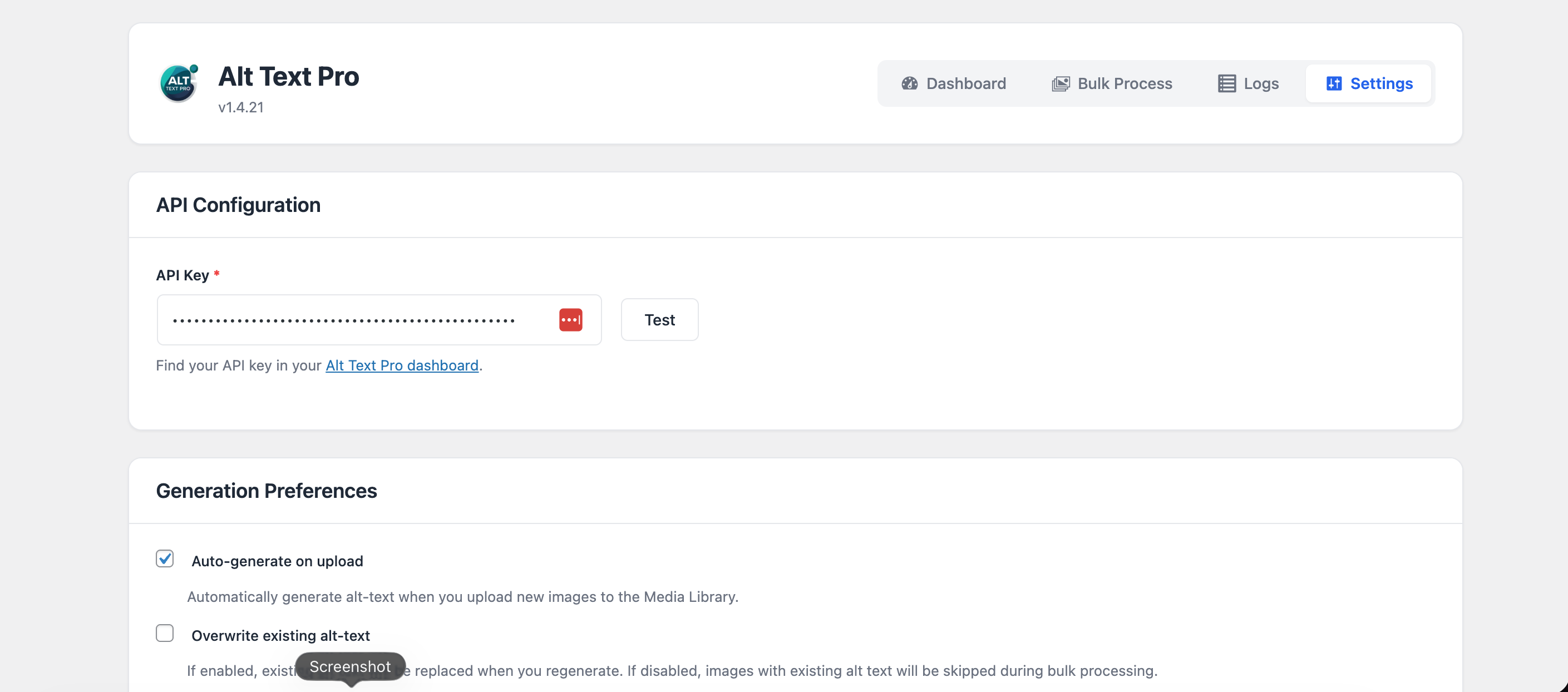
Alt Text Settings - Configure automatic alt text generation, API settings, and image SEO preferences
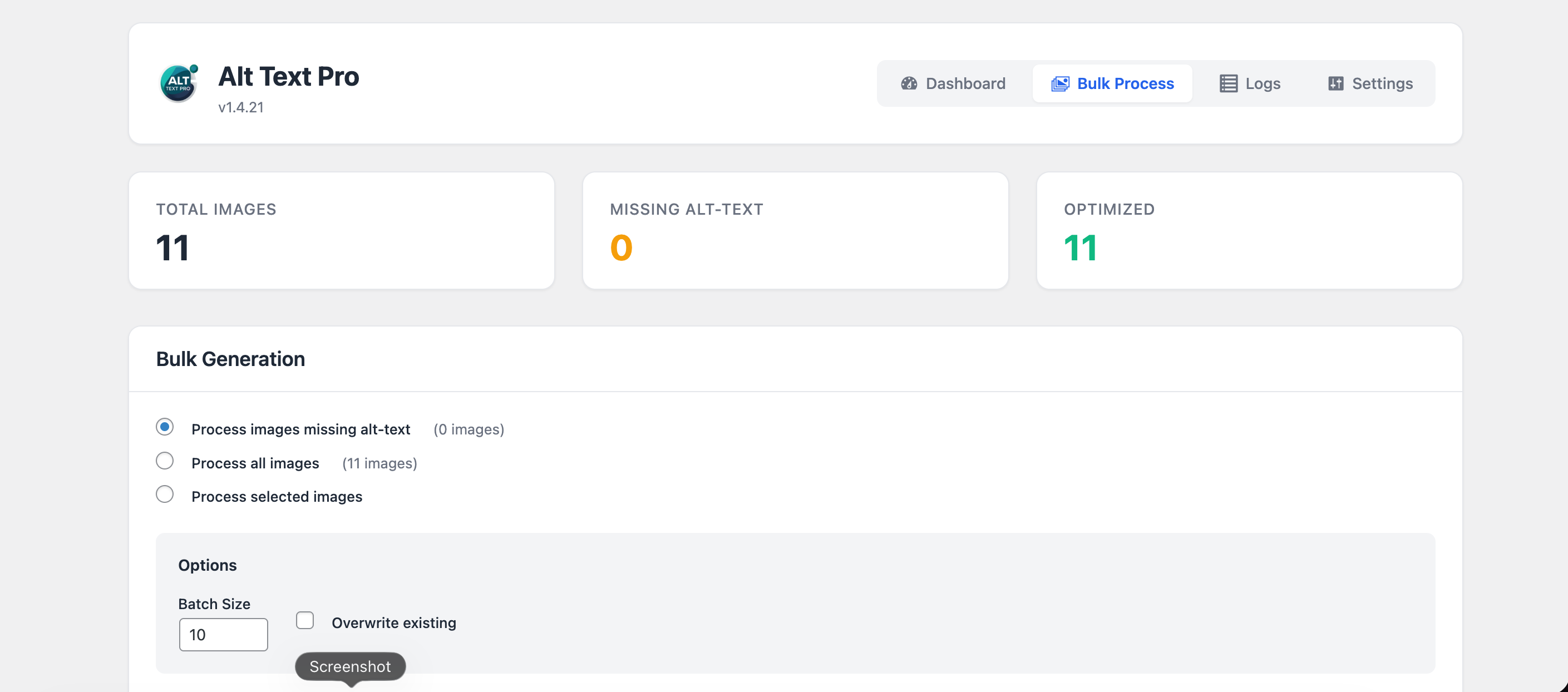
Bulk Alt Text Generator - Process hundreds of images with our bulk alt text processor and progress tracking
Media Library Alt Text Integration - Generate alt text and alt tags directly from the WordPress media library
Changelog
1.4.27
- Updated plugin title and description for better SEO and discoverability
- Enhanced tags for improved search visibility
- Tested compatibility with WordPress 6.9
1.4.25
- Improved plugin title and description for better discoverability
- Optimized tags for image SEO and alt text searches
- Enhanced FAQ section with additional helpful questions
- Updated screenshot captions for clarity
- Tested compatibility with WordPress 6.9
1.4.24
- Added onboarding modal for API key setup
- Improved user experience with guided API key entry
- Enhanced modal UI with better accessibility
- Automatic modal display when API key is missing
1.4.21
- Fixed code analysis warnings for discouraged functions and syntax
1.4.20
- Temporarily hid context input field from media sidebar
1.4.19
- Fixed issue where context was not being sent to the API during generation
- Improved JavaScript selectors for better compatibility with different admin views
1.4.18
- Fixed missing context input field in media edit sidebar
1.4.17
- Fixed bulk process progress counters showing incorrect numbers after completion
- Ensured processed count and successful count match final results
1.4.16
- Fixed bulk process completion status bug where status was overwritten with “running”
- Ensured success notification appears correctly after bulk processing completes
1.4.15
- Fixed status badge stuck on “Processing…” after completion
- Fixed completion detection – now properly stops polling and shows completion
- Added comprehensive console logging for debugging completion flow
- Improved status update logic to prevent overriding completed status
- Enhanced notification display to ensure it’s visible
1.4.14
- Fixed success notification not appearing after bulk process completion
- Fixed cancel button visibility – now properly hidden when process hasn’t started
- Improved notification display with better selector and visibility handling
- Enhanced cancel button show/hide logic with proper !important styles
1.4.13
- Fixed JavaScript syntax error that was preventing script from loading
- Removed problematic button cloning that caused DOM issues
- Simplified event handler attachment for better reliability
- Fixed typeof checks in event handlers
1.4.12
- Fixed “Start Processing” button – removed button cloning that was breaking event handlers
- Added dual event handlers (jQuery + native DOM) for maximum compatibility
- Enhanced form submission prevention with capture phase listeners
- Improved event handler binding to ensure button works reliably
1.4.11
- Fixed “Start Processing” button click handler – improved event binding and prevention
- Added immediate DOM event handlers to prevent form submission before jQuery loads
- Enhanced event handler cleanup to prevent duplicate bindings
- Added comprehensive console logging for debugging
1.4.10
- Fixed “Start Processing” button not working – added form submission prevention
- Fixed Cancel button showing when process hasn’t started – now properly hidden
- Added validation to prevent double-clicking start button
- Added console logging for debugging bulk process issues
1.4.9
- Fixed bulk process status badge not updating to “Completed” when process finishes
- Added completion notification popup showing process results and error details
- Improved status polling to stop immediately when process completes
- Enhanced error reporting in completion notification
1.4.8
- Updated “Generate Alt-Text” button icon to show “SEO+” text instead of image icon
- Improved button visual design for better relevance
1.4.7
- Fixed automatic alt-text generation appearing on image edit page
- Loading state now only appears when user clicks “Generate Alt-Text” button
- Automatic generation only occurs per plugin settings (on upload) or bulk process
1.4.6
- Fixed escaping of all variables when echoed
- Added wp_kses_post() for HTML output from get_media_field_html()
- Ensured all output follows WordPress escaping best practices
1.4.5
- Fixed text domain to match plugin slug (alt-text-pro)
- Added load_plugin_textdomain() for proper translation loading
- Ensured all 250+ translation functions use correct text domain
1.4.4
- Fixed JavaScript and CSS enqueuing to use WordPress built-in functions
- Moved all inline scripts to wp_add_inline_script() for proper WordPress compliance
- Removed inline script tags from template files
1.4.3
- Fixed Contributors field to include correct WordPress.org username
1.4.2
- Version update
1.4.1
- Renamed plugin slug and folder to match Text Domain
- UI overhaul with modern design
- Improved navigation and dashboard layout
- Enhanced user experience for settings and logs
- Added real-time completion notifications for bulk processing
- Added immediate credit exhaustion alerts during processing
- Improved error notifications with visual feedback
- Enhanced status updates during bulk processing
- Fixed notification display for all completion statuses
- Fixed critical bug: Processing now stops immediately when credits are exhausted
- Fixed dashboard credit calculation – now correctly displays credits used vs total
- Improved error messages when credits run out during bulk processing
- Added proper handling for credit exhaustion across all subscription plans
- Fixed edge cases in credit display (negative values, exceeding totals)
- Fixed processing options – “Process images missing alt-text”, “Process all images”, and “Process selected images” now work correctly
- Fixed overwrite existing alt-text checkbox logic
- Improved batch size handling
- Better separation of process type and overwrite settings
- Fixed successful count tracking in bulk processing
- Improved progress tracking accuracy across batches
- Enhanced data persistence for bulk process status
- Added automatic verification of successful count vs actual processed images
- Better error handling and debug logging for bulk operations
- Fixed API endpoint from auth/validate to auth-validate
- Enhanced debug logging to show exact URLs
- Better error handling for 404 responses
- AI-powered alt-text generation using Google Gemini
- Automatic processing on image upload
- Bulk processing for existing images
- Beautiful admin dashboard
- Usage tracking and logs
- Context-aware generation
- Media library integration
- Mobile-responsive design
- Comprehensive settings panel