

WP Logo Changer
WP Logo Changer - Admin Panel provides multiple features to Customize Admin Panel that you don't have in wordpress by default.
Maintenance 22/1003355d since update
Active installs
100
Downloads
9,309
Reviews
5
Age
9.3y
Plugin info
Total downloads: 9,309
Active installs: 100
Total reviews: 5
Average rating: 4.2
Support threads opened: 0
Support threads resolved: 0 (0%)
Available in: 1 language(s)
Contributors: 3
Last updated: 1/26/2017 (3355 days ago)
Added to WordPress: 12/24/2016 (9 years old)
Minimum WordPress version: 4.6
Tested up to WordPress version: 4.7.31
Minimum PHP version: f
Maintenance & Compatibility
Maintenance score
Possibly abandoned • Last updated 3355 days ago • 5 reviews
22/100
Is WP Logo Changer abandoned?
Possibly abandoned (last update 3355 days ago).
Compatibility
Requires WordPress: 4.6
Tested up to: 4.7.31
Requires PHP: f
Languages
Similar & Alternatives
Explore plugins with similar tags, and compare key metrics like downloads, ratings, updates, support, and WP/PHP compatibility.
Companion Auto Update
Rating 4.8/5 (105 reviews) • Active installs 50,000
Advanced WordPress Backgrounds
Rating 4.8/5 (44 reviews) • Active installs 30,000
Simple Full Screen Background Image
Rating 4.4/5 (45 reviews) • Active installs 10,000
Particle Background WP
Rating 3.1/5 (8 reviews) • Active installs 3,000
XO Post Background
Rating 0.0/5 (0 reviews) • Active installs 2,000
WP Supersized
Rating 4.1/5 (25 reviews) • Active installs 1,000
Description
WP Logo Changer – provides multiple features to Customize Admin Panel that you don’t have in wordpress by default. General Tab is for customizing Login Page mostly and Advanced tab is for customizing Admin Panel colors.
- Change Login page logo
- Set Login Page Background Color
- Set Login Page Background Image
- Change Login Page Form Background Color
- Change Login Page Form Field Background Color
- Change Login Page Form Text Color
- Change Welcome Message
- Change Footer Text
- Hide WordPress Logo on Dashboard
- Hide Admin Bar on Front End
- Change Navigation Background Color
- Change Navigation Font Color
- Change Navigation Font Hover Color
- Change Navigation Hover Background Color
- Change Sub Navigation Background Color
- Change Sub Navigation Font Color
- Change Icons Color
Installation
- Upload the directory
/am-login-logo/to the/wp-content/plugins/directory - Activate the plugin through the ‘Plugins’ menu in WordPress
- Click on the Settings link below the plugin name on the plugins page to add your Own logo for the login screen.
Frequently Asked Questions
No FAQ available
Review feed
Bhavesh Khadodara
Awesome work guys..!!!!
Great work guys.
Vala bhavesh v
Fabulas work guys best of luck :)
THNAK YOU GUYS NICE WORK #Superb
Screenshots
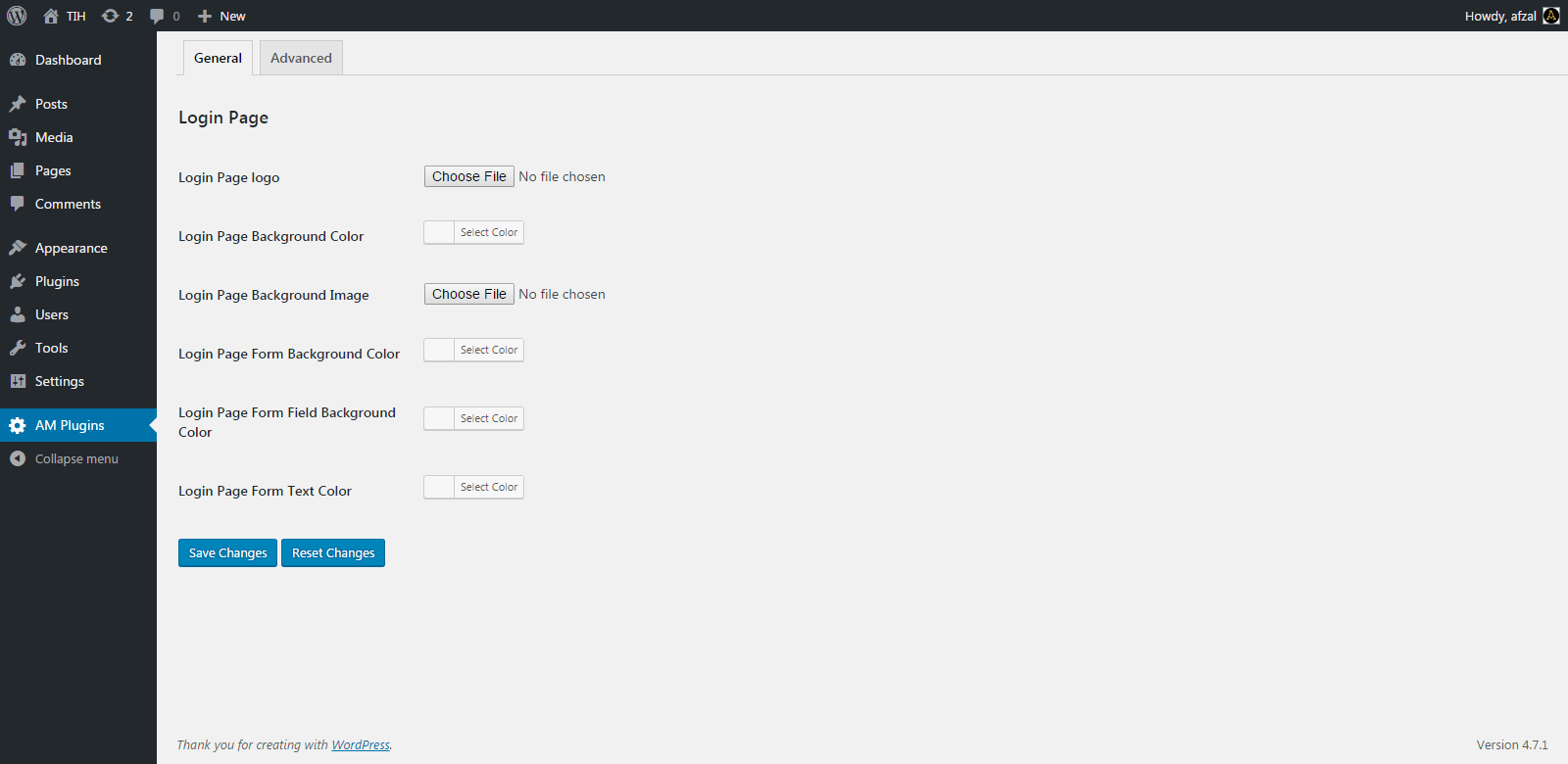
Genral settings tab.
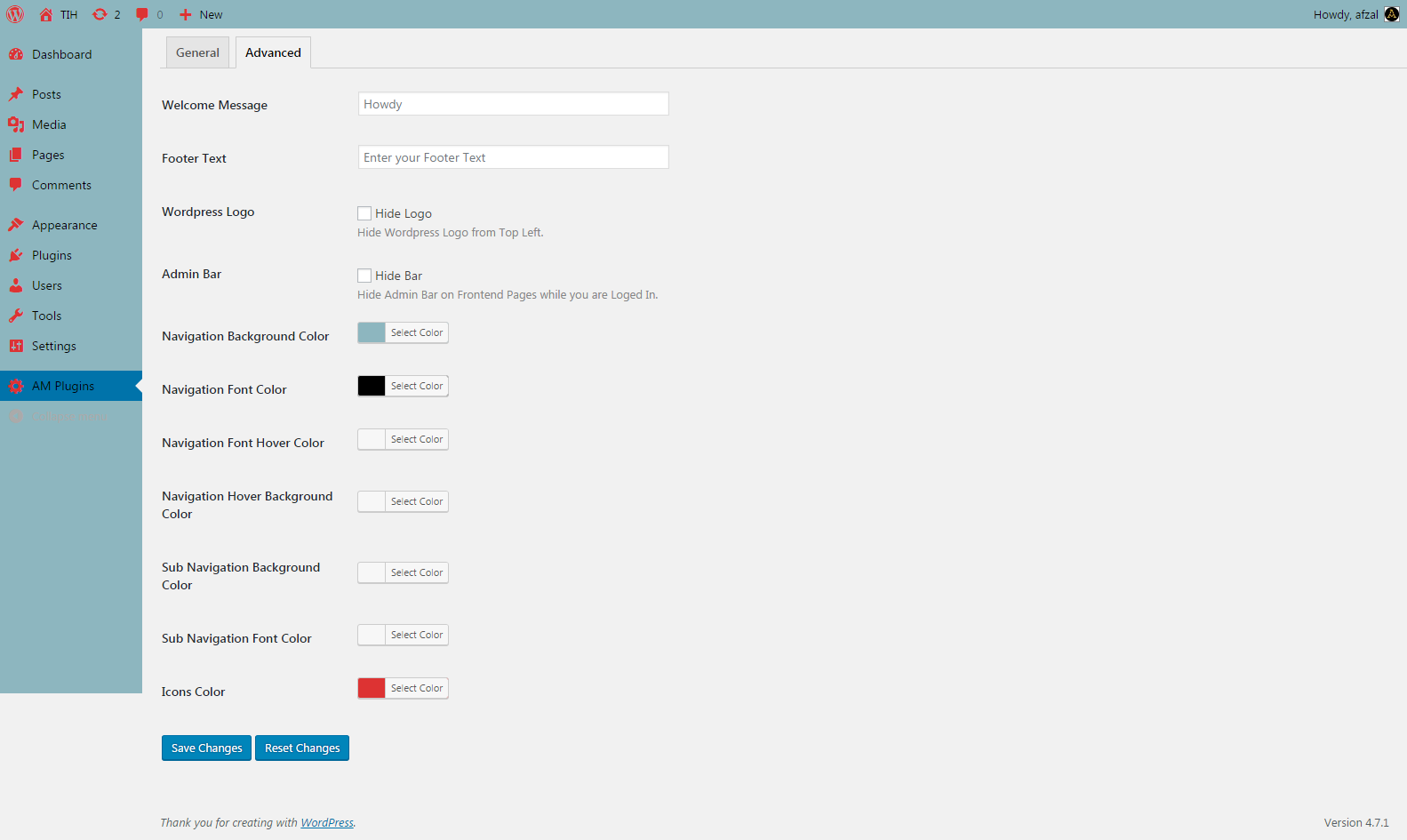
Advanced settings tab.

Login page Background Image
Changelog
= 1.0.0
* This is the first version
= 1.0.1
* enhanced features