

AmbiProducts
Add products with categories and geotags and display in a map or embed to section pages using shortcodes
Plugin info
Maintenance & Compatibility
Maintenance score
Possibly abandoned • Last updated 2433 days ago
Is AmbiProducts abandoned?
Possibly abandoned (last update 2433 days ago).
Compatibility
Similar & Alternatives
Explore plugins with similar tags, and compare key metrics like downloads, ratings, updates, support, and WP/PHP compatibility.
Description
This plugin enables you to add products with categories using geotags then use shortcodes to print a table according to category and display in a map
If you have products listed in different geographical locations this plugin helps you to maintain all in a single table and display in category pages using a map.
Simple case would be a real estate agent with a list of houses distributed across different locations, could insert all listings in a single table then shortcodes can be used in different pages to pull listings according to each category such as apartments, bungalow, condominium and etc.
Map shortcode is used to mark houses in a map and upon click information is shown in a balloon in which user may redirected to a page to inquire about the particular house.
Plugin is checked on wordpress 5.2.2 and fully functional.
Shortcodes
Category
-
Use ambi-products to list products of each category in a table. e.g
[ambi-products cat=”category name” url=”link to redirect”][/ambi-products] -
Then use ambi-product-inquiry shortcode in contact page to capture inquiry for your form (you can use plugins like contact form 7 to add forms)
[ambi-product-inquiry form-id=”my-form-id” field-name=”mail-subject“][/ambi-product-inquiry]
Above shortcode is used for a form generated using contact-form-7
[contact-form-7 html_id=”my-form-id” title=”Contact form 1″]
[text mail-subject]
- If your table consists large number of records use datatable=”true” attribute to organize it neatly with pagination and search function
[ambi-products cat=”CATEGORY NAME” datatable=”true” ][/ambi-products]
Plot in Google Map
- Use ambi-products-map to list products of each category in a map. e.g
[ambi-products-map cat=”category name” url=”link to redirect”][/ambi-products-map]
Installation
This section describes how to install the plugin and get it working.
- Upload the plugin files to the
/wp-content/plugins/ambi_productsdirectory, or install the plugin through the WordPress plugins screen directly. - Activate the plugin through the ‘Plugins’ screen in WordPress
- Use the Settings->Ambi Products Settings screen to configure the plugin
- Use Google Maps Javascript API to generate a key and paste it
- List each category seperated by comma e.g. apartments, bungalow, condominium
- Now you can navigate to Plugins->Ambi Products to add / update products
Frequently Asked Questions
TBU
Review feed
Screenshots

Homepage with plugin
/assets/screenshot-7.png
Activate plugin
/assets/screenshot-1.png
Navigate to Settings page
/assets/screenshot-2.png
Add Google Maps Javascript API Key
/assets/screenshot-3.png
Add Categories and API Key
/assets/screenshot-4.png
Add Products
/assets/screenshot-5.png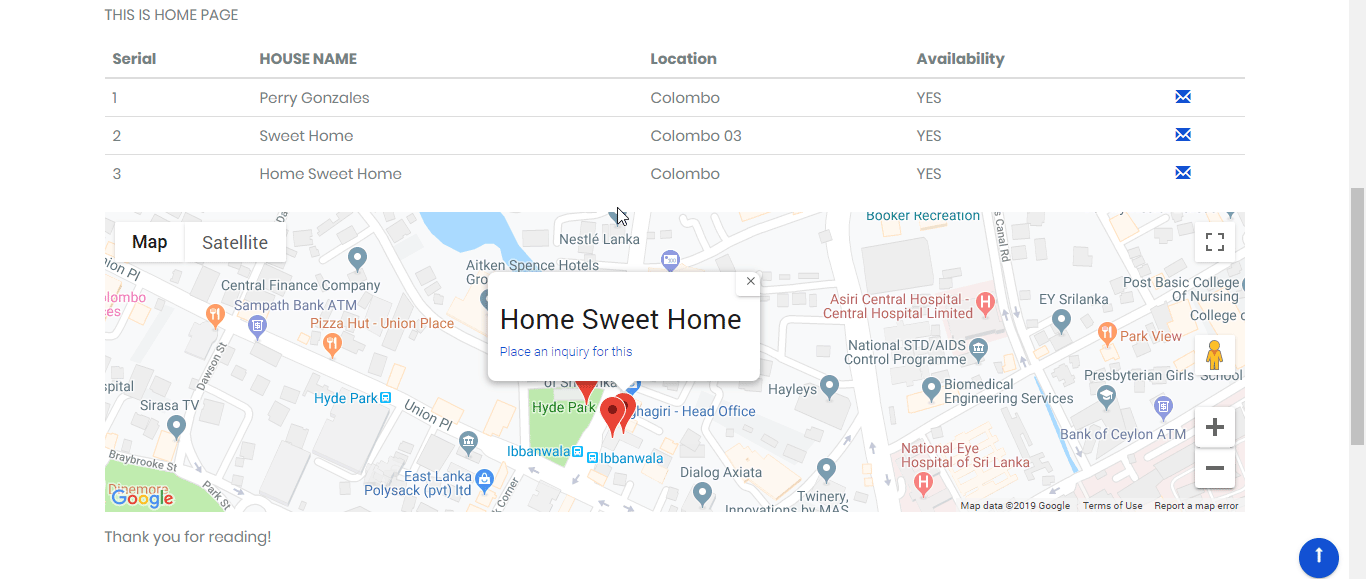
Shortcodes
/assets/screenshot-6.png
Changelog
1.5
- Integration of DataTables for large number of records
- Automatic capture of product info for the inquiry
- Use images in Map Marker popup window
1.0
- Plugin with Table and Map