

amCharts Embed
Embed interactive charts and maps from amCharts.com into your WordPress site.
Plugin info
Maintenance & Compatibility
Maintenance score
Possibly abandoned • Last updated 2988 days ago • 1 reviews
Is amCharts Embed abandoned?
Possibly abandoned (last update 2988 days ago).
Compatibility
Developers
Similar & Alternatives
Explore plugins with similar tags, and compare key metrics like downloads, ratings, updates, support, and WP/PHP compatibility.
Description
Visualize your data with interactive charts and maps with amCharts Live Editor, and embed them into your WordPress site.
About amCharts
AmCharts is a set of stunningly charts for websites and web-based products. It’s an advanced charting library that will suit any data visualization need. You can download the complete library or use the Live Editor to make your charts online.
Using the Live Editor you can create beautiful interactive charts with a click of a few buttons. No development knowledge required. Just use the predefined chart templates, add your data and customize the appearance of the chart page, save the chart and share the result with the world.
Usage
Using this WordPress plugin you can embed charts and maps, created by “amCharts Live Editor”, into your WordPress site using the chart URL or using a simple shortcode.
Embed using a shortcode:
You can embed charts using the [amcharts] shortcode, with the following attributes:
- id (required) – chart id.
- width – chart width.
- height – chart height.
Example:
[amcharts id="NjEwN" width="300" height="200"]
Embed using chart URL:
Choose any chart from amCharts live, or create your own! Copy the chart URL and paste it to the post text editor. Then simply click over to the visual editor to confirm that it loads properly.
Installation
Frequently Asked Questions
What are the plugin requirements?
Minimum Requirements
- WordPress version 3.5 or greater.
- PHP version 5.2.4 or greater.
- MySQL version 5.0 or greater.
Recommended Requirements
- The latest WordPress version.
- The latest PHP version.
- MySQL version 5.7 or greater.
How do I embed charts from live.amcharts.com ?
With this plugin you can use the URL to embed your charts, just paste the chart URL into your post editor:
https://live.amcharts.com/NjEwN/
How do I set custom dimensions to my chart?
Since WordPress 4.2, you can double click the embedded item to set max width and max height. It will add the WordPress [embed] shortcode:
[embed width="600" height="400"]https://live.amcharts.com/NjEwN/[/embed]
Note: Doing it the WordPress way, using the [embed] shortcode, is backwards and forward compatible, and it works with all the themes.
How do I embed charts using a shortcode?
You can embed charts using the [amcharts] shortcode, with the following attributes:
- id (required) – chart id.
- width – chart width.
- height – chart height.
Example:
[amcharts id="NjEwN" width="300" height="200"]
Review feed
Screenshots
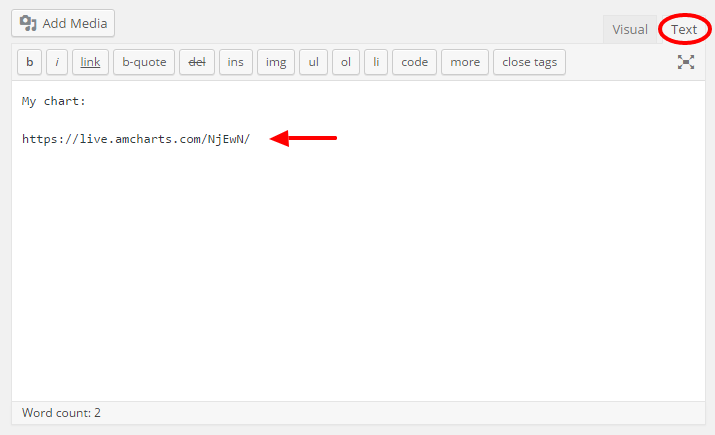
Pasting the URL to the text-editor.

Pasting the URL to the visual-editor.
Changelog
1.3 (2017-01-26)
- Escape URL.
1.2 (2016-04-04)
- Add shortcode.
- Move plugin files to ‘includes’ directory.
1.1 (2015-12-02)
- Add two screenshots.
- Remove po/mo files from the plugin.
- Use translate.wordpress.org to translate the plugin.
1.0 (2015-04-10)
- Initial release.
- Register oEmbed provider.