

Annotatr – Bug Reporting, Bug Tracking, Kanban Board and Project Management
Visual feedback and bug tracking for WordPress. Capture, assign, and fix issues without leaving your site — no more chasing reports.
Plugin info
Maintenance & Compatibility
Maintenance score
Maintained • Last updated 128 days ago
Is Annotatr – Bug Reporting, Bug Tracking, Kanban Board and Project Management abandoned?
Likely maintained (last update 128 days ago).
Compatibility
Similar & Alternatives
Explore plugins with similar tags, and compare key metrics like downloads, ratings, updates, support, and WP/PHP compatibility.
Description
Tired of playing bug report detective?
If you’ve ever launched a client project, you know the chaos:
- Clients email screenshots that don’t make sense
- Testers dump bugs into messy spreadsheets
- Developers lose track of what’s “in progress” vs. “done”
- Conversations scatter across email, Trello, Slack, and DMs — with no single source of truth
- Critical bugs slip through the cracks because no one knows who’s responsible
- You spend more time managing feedback than actually fixing it
The result? Missed deadlines, frustrated clients, and projects that drag on longer (and cost more) than they should.
Enter Annotatr: A bug tracking plugin built for WordPress teams.
Capture issues, assign them, and track progress — without ever leaving the site you’re building. Everything stays in one place, inside your WordPress dashboard, so you can focus on delivering projects — not chasing down bug reports.
Stop juggling multiple apps. No more creating endless accounts for developers and clients. Keep your entire bug-fixing workflow simple, streamlined, and fully inside WordPress.
Key Benefits
- Single source of truth — All feedback lives in WordPress, not scattered across tools
- Context captured automatically — Device type, browser, screen resolution, and more
- Client-friendly — Let clients report bugs directly with a professional interface
- Built for WordPress — No third-party apps, external platforms, or confusing integrations
- Visual workflow — See progress at a glance with an intuitive Kanban board
Core Features (Free)
- Point & Capture — Highlight any part of your site, screenshot it, and raise a bug instantly
- Automatic screenshots — No manual uploads or external tools needed
- Team assignment — Add developers and testers so every bug has a clear owner
- Visual Kanban board — Track bugs from Open In Progress In Review Done
- Real-time notifications — Keep your team updated when tasks are created, assigned, or resolved
- Comments & collaboration — Discuss issues right where they happen
- Debug context — Automatically logs device, browser, resolution, and page details
- Page-specific tracking — All bugs tied to specific pages and elements for easy context
- Modern UI — Fast, responsive interface built on the WordPress REST API
🎁 Special Offer: Use code earlybird25 for 25% off Premium — limited time!
Why Choose Annotatr?
Built specifically for WordPress teams
Unlike generic project management tools, Annotatr is designed from the ground up for WordPress development workflows. It understands your site structure and captures the context you need to fix bugs fast.
No third-party apps needed
Everything happens inside WordPress. No browser extensions, no separate platforms, no additional accounts to manage. Your team can start collaborating immediately.
Single source of truth
Stop hunting through email threads, Slack messages, and spreadsheets. Every bug, every comment, every status update lives in one organised dashboard.
Context captured automatically
Forget asking “What browser were you using?” or “What page was this on?” Annotatr automatically logs device type, browser version, screen resolution and page URL — giving developers everything they need to reproduce and fix issues.
Focus on delivery, not detective work
Spend less time managing feedback and more time building great websites. Annotatr eliminates the friction between finding bugs and fixing them.
Premium Features
Upgrade to unlock professional-grade bug tracking for agencies and teams:
- Unlimited team members — No limits on developers, testers, or clients
- Due dates & reminders — Set deadlines and get automatic overdue notifications
- Multiple board views — Switch between Kanban, List, or Timeline layouts
- Bulk actions & filters — Quickly update priorities and manage large projects
- Whitelabel branding — Remove Annotatr branding from client-facing emails
- Statistics dashboard — Visual reports on open vs. closed bugs, team workload, and project health
- Priority support — Faster response times and direct access to plugin experts
- 7-day money-back guarantee — Try risk-free
Privacy
This plugin optionally integrates with a licensing/telemetry framework (Freemius). On admin opt-in, basic usage data may be collected by that service per its policy. No personal data is collected from site visitors. You can opt out at any time from the Freemius settings dialog.
Data Removal on Uninstall
On uninstall, the plugin removes its custom database tables and options, and deletes any plugin-generated uploads in its folders. Backups created by the plugin in the uploads directory may also be removed. If you wish to preserve data, please create external backups before uninstalling.
For Developers
This plugin uses modern JavaScript tooling for optimal performance.
🐛 Bug Fixes
Screenshot Management
- Fixed deleted screenshots still visible in notes – Resolved issue where screenshots that were deleted would continue to display in the note view
Notification System
- Fixed notification baseline persistence – Notifications now correctly track which changes have been seen by updating the IndexedDB baseline after each sync
- Fixed missing actor names in notifications – Notifications now properly display the user’s name/initials instead of showing “User”
- Fixed HTML tags in comment notifications – Comment content in notifications now strips HTML tags for clean text display
- Fixed comment notifications not opening comments tab – Clicking a comment notification now correctly opens the note with the comments tab active
UI/UX
- Fixed accessibility warning – Added proper
SheetDescriptionto notification sheet for screen reader support - Fixed broken icon overlays – Action icons overlaying user avatars now have solid backgrounds instead of transparent ones
✨ New Features
Subtasks
- Subtask management – Added ability to create, complete, and delete subtasks within notes
Context Menu
- Context menu – Added context menu to notes for easy access to common actions
Watch Functionality
- Note watching – Users can now watch/unwatch notes to receive notifications about changes
Activity Logging
- Note activity log – Comprehensive activity tracking showing all changes made to a note
Notification System
- Notification sheet – New slide-out notification panel replacing the dropdown
- Rich notifications – Notifications now show user avatars with action icon badges
- Unread indicators – Visual indicators for unread notifications with counts
- Mark as read – Individual and bulk “mark as read” functionality
Comment System
- Comment attachments – Support for adding multiple file attachments to comments
- Comment deletion – Users can now delete their own comments
- Rich text editor – Enhanced comment textarea with better wysiwyg formatting support
Installation
- Upload the plugin files to the
/wp-content/plugins/annotatrdirectory, or install the plugin through the WordPress plugins screen directly. - Activate the plugin through the ‘Plugins’ screen in WordPress.
- Navigate to Annotatr in your WordPress admin menu to get started.
- Configure team members and notification settings in Annotatr Settings.
Getting Started
After activation:
- Add team members — Go to Settings and assign developers and test users
- Create your first note — Visit any page on your site and click the Annotatr icon
- Point and capture — Select an element, add your feedback, and take a screenshot
- Manage in dashboard — Track all notes in the visual Kanban board
- Collaborate — Assign notes, add comments, and move cards across the board
Frequently Asked Questions
Yes! The free version is yours to use without time limits. It includes all core bug tracking features like point-and-capture feedback, automatic screenshots, team assignment, the Kanban board, and collaboration tools. Premium just unlocks more power for agencies and larger teams.
Absolutely. Annotatr works seamlessly with virtually all WordPress themes and page builders — if it runs WordPress, it runs Annotatr. The plugin is built on WordPress standards and the REST API for maximum compatibility.
Unlike external tools like Trello, Asana, or Jira, Annotatr lives inside WordPress — capturing on-page feedback with screenshots, metadata, and context automatically. Your team can identify bugs, discuss solutions, and track progress without ever leaving the site you’re building. No context switching, no external accounts, no disconnected workflows.
Yes! Anyone with WordPress access can leave visual feedback directly on the page. The interface is intuitive and professional — no training required. Clients can point, click, and describe issues in plain language while Annotatr captures all the technical details automatically.
Definitely. You can assign bugs to specific team members, track them on the built-in Kanban board, update statuses with drag-and-drop, add comments and @mentions, set priorities, and keep all communication organised in one place.
Yes. Annotatr adapts to your process — organise tasks by status, filter by priority or assignee, and (with Premium) switch between Kanban, List, and Timeline views. The workflow is flexible enough to fit how your team already works.
Yes. All notes, screenshots, and feedback are stored in your WordPress database on your server. Nothing is sent to external services (except optional Freemius licensing, which you can opt out of). You have complete control over your data.
On uninstall, the plugin removes its custom database tables, options, and any plugin-generated uploads. If you want to preserve data, create external backups before uninstalling.
No. The frontend interface only loads when logged-in users with appropriate permissions are viewing your site. Regular visitors never see or download any Annotatr code, so there’s zero impact on public-facing performance.
Review feed
Screenshots
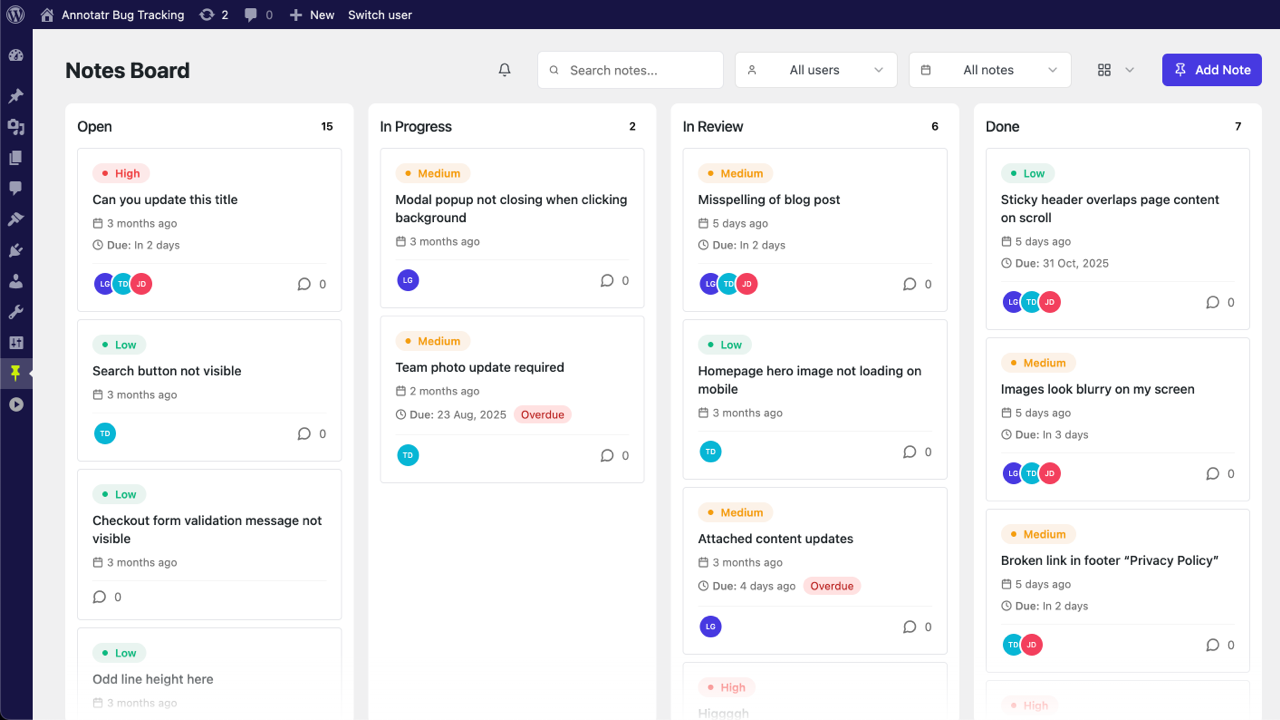
Visual Kanban board showing bugs organised by status (Open, In Progress, In Review, Done) with drag-and-drop functionality
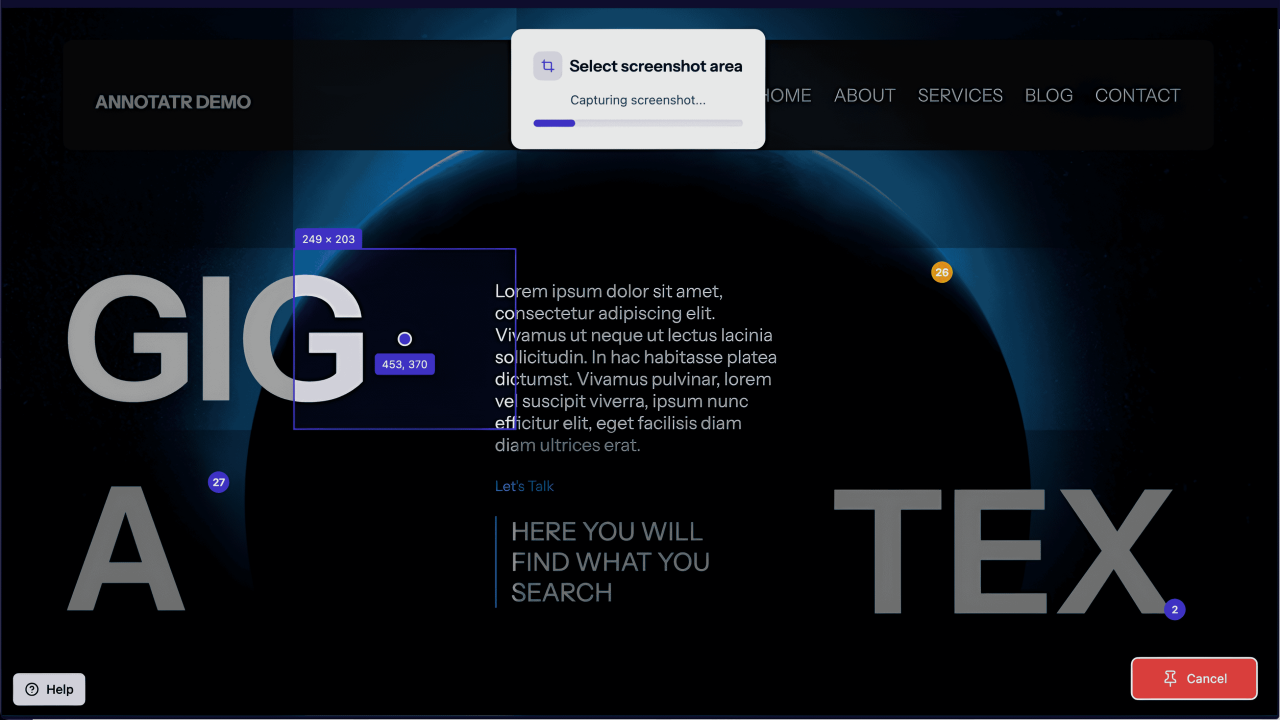
Frontend note creation interface — point, click, and capture feedback on any page element with automatic screenshots
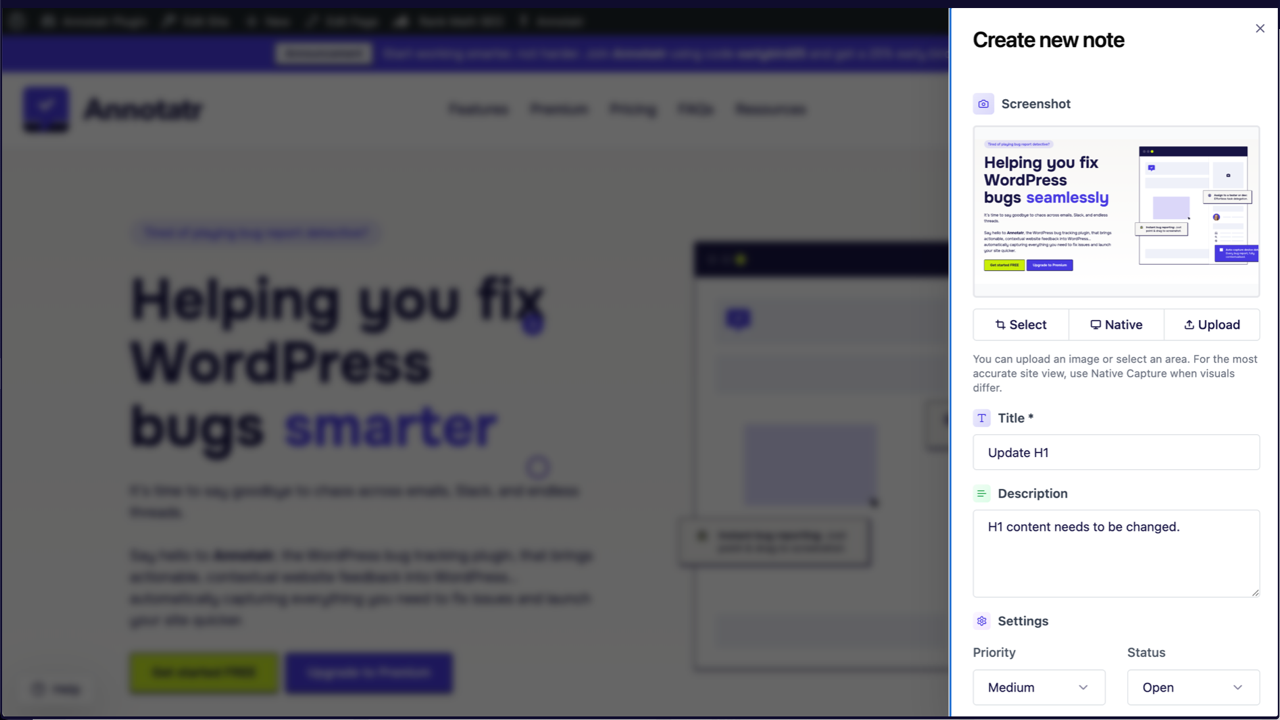
Note detail view with team comments, @mentions, file attachments, reactions, and assignment options
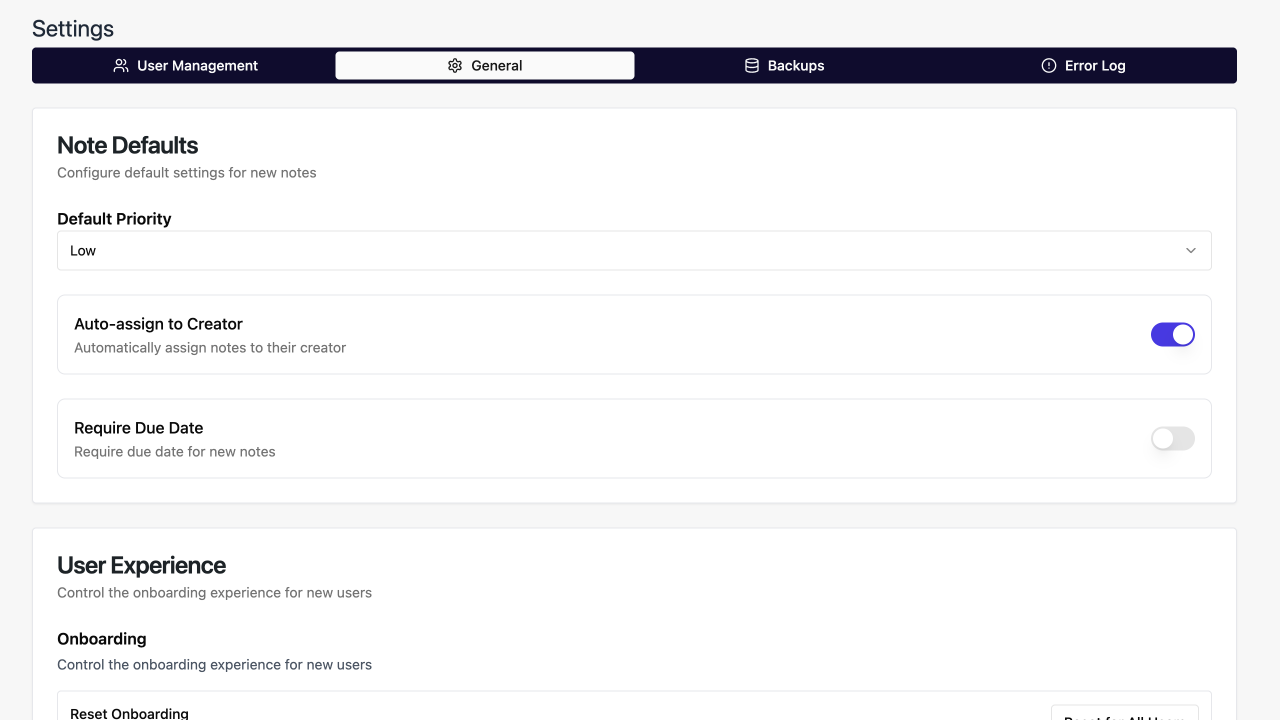
Settings page for managing team members, developers, test users, and notification preferences
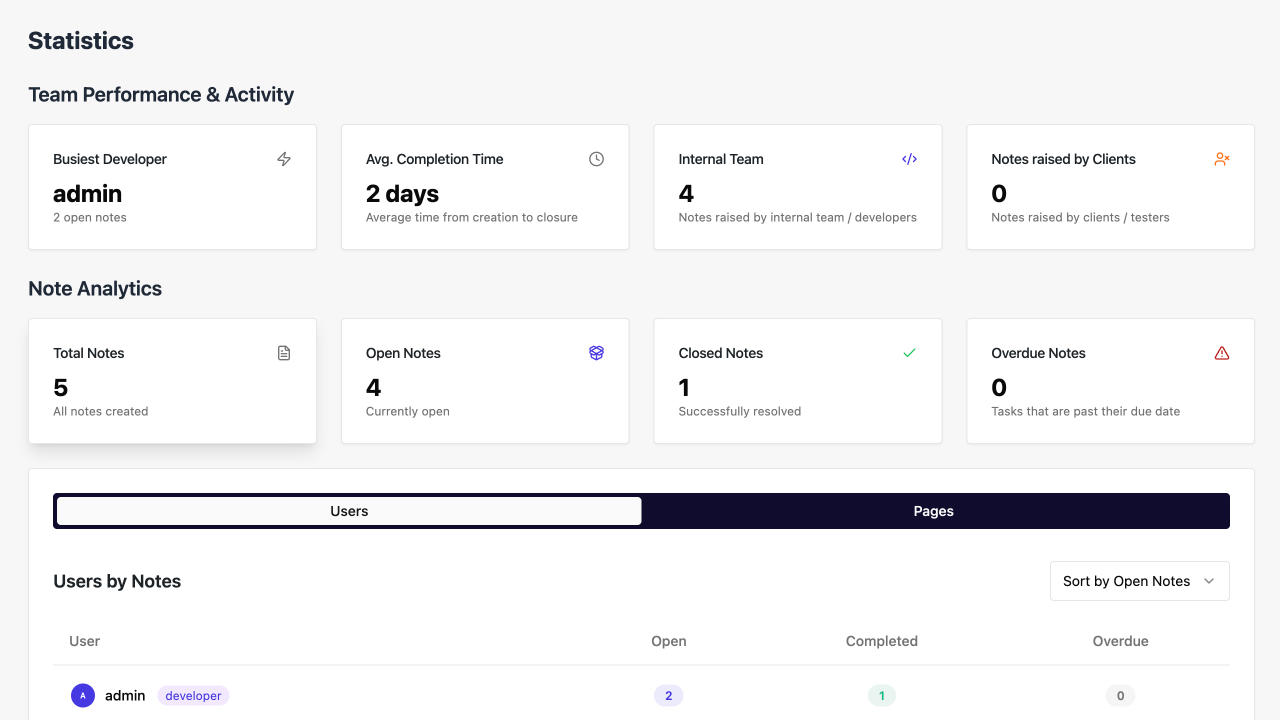
Statistics dashboard (Premium) — visual reports showing bug counts, team workload, and project health

Timeline view (Premium) — see all bugs organised chronologically with due dates and milestones