

Any Mobile Theme Switcher
This Plugin detects mobile browser and display the theme as the setting done from admin. Usefull for switch to Mobile Theme.
Plugin info
Maintenance & Compatibility
Maintenance score
Possibly abandoned • Last updated 576 days ago • 244 reviews
Is Any Mobile Theme Switcher abandoned?
Possibly abandoned (last update 576 days ago).
Compatibility
Similar & Alternatives
Explore plugins with similar tags, and compare key metrics like downloads, ratings, updates, support, and WP/PHP compatibility.
Description
Detects all the Mobile Browsers and loads the mobile theme as per your settings done in admin.
- Iphone / Ipod
- Ipad
- Palm Os
- Android
- Android Tab
- Windows Mobile
- Blackberry
- Opera Mini
- Others Mobile Browsers
You can select a different mobile theme for each mobile browser. You can select different mobile themes for each of the options above.
Any Mobile Theme Switcher Pro Features
- Works With W3 Total Cache
- Serve seprate home page for mobile devices.
- QR code for mobile bookmarking.
- Better Mobile Detection.
- Click To Call to phone numbers.
Click here for details about Any Mobile Theme Swticher Pro
Please visit our own support forum for any issues. We don’t respond support ticket created here.
Installation Video (Thanks to Scott Wiseman)
Our Other Plugins
Installation
- Upload the plugin any-mobile-theme-switcher files to the
/wp-content/plugins/directory - Activate the any-mobile-theme-switcher plugin through the ‘Plugins’ menu in WordPress.
- Select Themes For Mobile Browsers under under Settings > Any Mobile Theme
Frequently Asked Questions
Yes it detects most of the mobile browsers and redirects it to its mobile theme set from admin settings.
Yes, you can place the Switch to Desktop/Mobile theme from Shortcode or can make a menu item with the link as well. Please follow the instructions available in plugin’s settings page.
No, this is just a theme switcher plugin and we don’t include any mobile theme like other plugin does.
Yes, the pro version works with W3 Total Cache. Click here for details.
Review feed
Screenshots
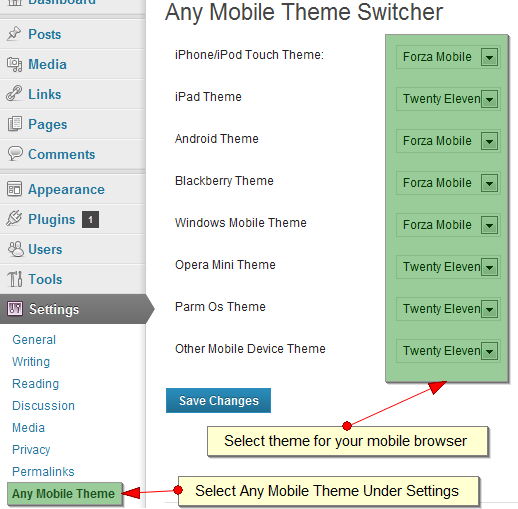
Admin Setting For Mobile Theme selection repective to their platform.
Changelog
3.2
- Mobile Theme Error fix for 6.4. Thanks Joe McGill ( https://gist.github.com/joemcgill )
3.1
- Tested with 5.8.2
3.0
- Tested with 5.4.1
2.1
- Tested with 4.7
2.0
- Tested with 4.5.3
1.9
- Tested with 4.3.1
1.8
- Tested with 4.2.2
1.7
- Tested with 4.1.1
1.6
- Added Remember forced layout till option.
1.5
- Removed depricated functions.
1.4
- Use of Force Layout GET Parameter from wp-config.php
1.3
- Use of Cookie inplace of session.
1.2
- Session Issue Fixed
1.1
- User Agents Update
- Tested With 3.5.1
1.0
- Added option for Andriod Tab
- User Agents Update
- Tested With 3.5
0.7
- New Interface
- User Agents Update
- Added Support Link
0.6
- Added More Mobile User Agents
0.4
- Added Child Theme Support
- Error Fixes
0.3
- Added Support to get mobile theme / desktop theme switch link from shortcode.
0.2
- Fixed Links
0.1
- First Release