

Object Cache for APCu – ZapCu
Lightweight object caching plugin using PHP's APCu extension for fast in-memory caching and performance boost.
Plugin info
Maintenance & Compatibility
Maintenance score
Stale • Last updated 320 days ago • Support resolved 0%
Is Object Cache for APCu – ZapCu abandoned?
Likely maintained (last update 320 days ago).
Compatibility
Similar & Alternatives
Explore plugins with similar tags, and compare key metrics like downloads, ratings, updates, support, and WP/PHP compatibility.
Description
Object Cache for APCu enables persistent object caching in WordPress using the APCu extension. It helps reduce database queries by caching objects in memory, speeding up page loads and backend performance.
Requires: APCu extension
How to Enable APCu Caching (cPanel)
⚠️ Make sure APCu is enabled on your server before activating this plugin.
Features:
* Uses APCu for WordPress object caching.
* Dashboard with real-time APCu stats (hits, misses, memory, inserts, etc.).
* Clear/reset cache with one click (protected by nonce).
* Automatically installs object-cache.php in wp-content.
* Clean, professional admin interface.
Installation
- Make sure the APCu PHP extension is installed and enabled.
- Upload the plugin to the
/wp-content/plugins/directory. - Activate the plugin from the ‘Plugins’ menu in WordPress.
- Visit Settings > APCU Cache to view stats or clear the cache.
Frequently Asked Questions
You’ll see a warning asking to enable the APCu extension via terminal or cPanel. You can install it using PECL: pecl install apcu.
How to Enable APCu Caching (cPanel)
Only if your host supports APCu.
APCu is ideal for single-server setups like small VPS or staging/dev sites. It’s not recommended for multi-server/clustered environments.
Review feed
Screenshots
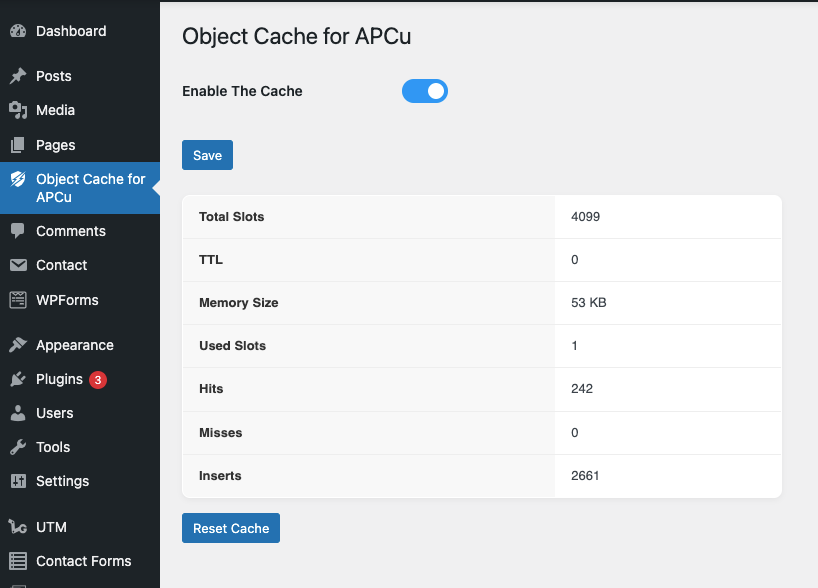
Cache statistics page with professional layout.
Changelog
1.0.0
- Initial release
- Object cache via APCu
- Admin dashboard with stats and reset