

Responsive Notification Bar Plugin for WordPress – Apex Notification Bar Lite
Product Page | Demo | Documentation | Premium Version
Plugin info
Maintenance & Compatibility
Maintenance score
Possibly abandoned • Last updated 1424 days ago • Support resolved 0% • 8 reviews
Is Responsive Notification Bar Plugin for WordPress – Apex Notification Bar Lite abandoned?
Possibly abandoned (last update 1424 days ago).
Compatibility
Similar & Alternatives
Explore plugins with similar tags, and compare key metrics like downloads, ratings, updates, support, and WP/PHP compatibility.
Description
Product Page | Demo | Documentation | Premium Version
Apex Notification Bar Lite
Add great looking Single Notification Bar in your WordPress site with – Apex Notification Bar Lite
- 5 Pre Available Templates or Custom Design Options
- 5 Pre Built Components Available
- InBuilt Pre Available Social Icons
Apex Notification Bar Lite is a FREE WordPress plugin to enable you display an attractive and effective notification bar in different position in your website. You can notify your website visitors about your new releases, offers, messages, news etc through notification in your website at the most effective way. The plugin is fully responsive and feature rich which is built up to simplify the user needs
This plugin allows you to create single notification bar with differents components in middle section with 5 pre available templates as well as custom design options which can be customized.Besides, it allows you to add various bar components such as social icons, email subscription form(opt in form), search form, static or multiple text with slider , ticker or scroller effects and many more.
You can choose the bar visibility type(Sticky, Show/Hide option, Hide after some time) with duration time
and even choose among 5 pre available template or custom designs for your notifications is your choice. Not only that, it has more appealing features stored in for you.
This plugin is highly compatible and works with any “well coded” WordPress themes (Free or Premium). It is responsive, Search Engine Optimized (SEO) and secure!
Free Features:
- Notification Bar Layout: 5 pre designed ready template.
- Single Notification Bar
- Notification Bar Position
- Top Absolute
- Top Fixed
- Bottom
- Notification bars With Different Components: Choose Any One
- Static Text or Multiple Text With Effect as Slider/Ticker/Scroller Type.
- Opt-in Custom Subscribe Form
- Recent Posts With Effect as Slider/Ticker/Scroller Type.
- Search Form
- Add Social Icons
- Notification Bar Effects : Slider/ Ticker /Scroller
- Unlimited Customization Bar Options
- Background color configurations
- Google Fonts integration
- Font size
- Font color
- Button Font Color
- Button Background Color
and many more.
- Preview of customized options on backend for notification bar and button preview
- Opt In Settings : Export as CSV and Delete Subscribers From List, Send Email to subscribers
- Custom Contact Form/ Contact Form 7 Shortcode Integration
- Inbuilt with Pre Available Social Icons
- Notification Bar Visibility Options
- Sticky (Always Show)
- Show After some time (Set with time duration)
- Hide after some time ( Set with time duration )
- Set Cookies
- Set Cookies with duration time to hide specific bar.
- Notification Bar Close Button Options
- Disable ( hide close button forever)
- Show/Hide option ( show toggle button)
- User can Close ( show close button)
- Multisite Compatible
- Language Translation Ready
- Responsive, Touch & Retina Ready
- Tested in all modern browsers
- Full Documentation
- Basic Support
Premium Features:
★ Notification Bar Layout: 15 pre designed ready template.
★ Multiple Notification bars
★ Add/Edit/Delete Notification Bars
★ Date Wise/Scheduled Notification Bars
★ Page based notification bars
★ Notification Bar Position
★ Top Absolute
★ Top Fixed
★ Bottom
★ Right
★ Left
★ Notification bars With Different Components
★ Left Components : Inbuilt with multiple Icons or Custom Icons
★ Right Components:
★ Static Text
★ Multiple Text
★ Opt-in Subscribe Form
★ Twitter Tweet Feeds
★ Posts Feeds
★ Countdown Timer With 6 Pre Designed Different Layouts
★ RSS Feeds
★ Video Popup With 4 Pre Designed Different
★ Custom HTML
★ Search Form With 5 Pre Designed Different
★ Notification Bar Effects : Slider/ Ticker /Scroller
★ Unlimited Customization Bar Options
★ Background color configurations
★ Google Fonts integration
★ Font size
★ Font color
★ Error message Font Color
★ Success Message Font Color
★ Button Text Color
★ Font Transform
★ Button Background Color
★ Countdown Timer customization options
★ Search Form customization options
★ Video Popup customization options
★ Preview of customized options on backend for notification bar and button preview
★ Backend Notification Bar Preview
★ Upload Background Image / Upload Custom Logo
★ Custom Contact Form/ Contact Form 7 Shortcode Integration
★ Opt In Form :Custom Form / Mailchimp / Constant Contact Subscribe Form Integration
★ Opt Subscribers Settings : Export as CSV and Delete Subscribers From List, Send Email to subscribers
★ Inbuilt with multiple Icons or Custom Icons
★ Notification Bar Visibility Options
★ Sticky (Always Show)
★ Show After some time (Set with time duration)
★ Hide after some time ( Set with time duration )
★ Set Cookies
★ Set Cookies with duration time to hide specific bar.
★ Notification Bar Close Button Options
★ Disable ( hide close button forever)
★ Show/Hide option ( show toggle button)
★ User can Close ( show close button)
★ Import/ Export Bar
★ Advanced Feature: Open Panel
★ Custom CSS/ Custom JS
★ Multisite Compatible
★ Language Translation Ready
★ Responsive, Touch & Retina Ready
★ Tested in all modern browsers
★ Full Documentation
★ Basic Support
Premium Upgrade
- For premium upgrade, please go here
Some Useful Links
- Support Forum Link: http://accesspressthemes.com/support/
- Youtube channel link: https://www.youtube.com/watch?v=TjZNcVG3fDE
- Facebook link: https://www.facebook.com/AccessPressThemes
For a easy installation guide checkout the Installation tab above.
For complete information and documentation regarding plugin,please visit below links.
Installation
- Unzip apex-notification-bar-lite.zip
- Upload all the files to the /wp-content/plugins/apex-notification-bar-lite
- Activate the plugin through the ‘Plugins’ menu in WordPress.
- To use the plugin, go to Appearance > Menus > Select Apex Notification Bar Lite and Check to enable notification bar on your site on General Settings Tab.
Frequently Asked Questions
This plugin allows you to enable and display an attractive and effective single notification bar in different position(top absolute, top fixed or bottom) in your website. You can notify your website visitors about your new releases, offers, messages, news etc through notification in your website at the most effective way.
No, It will not affect the loading of the site in anyways.
Review feed
Screenshots

Screenshot 1 - General Settings

Screenshot 2 - Components Settings

Screenshot 3 - 5 Pre Available Templates Settings

Screenshot 4 - Custom Design Settings
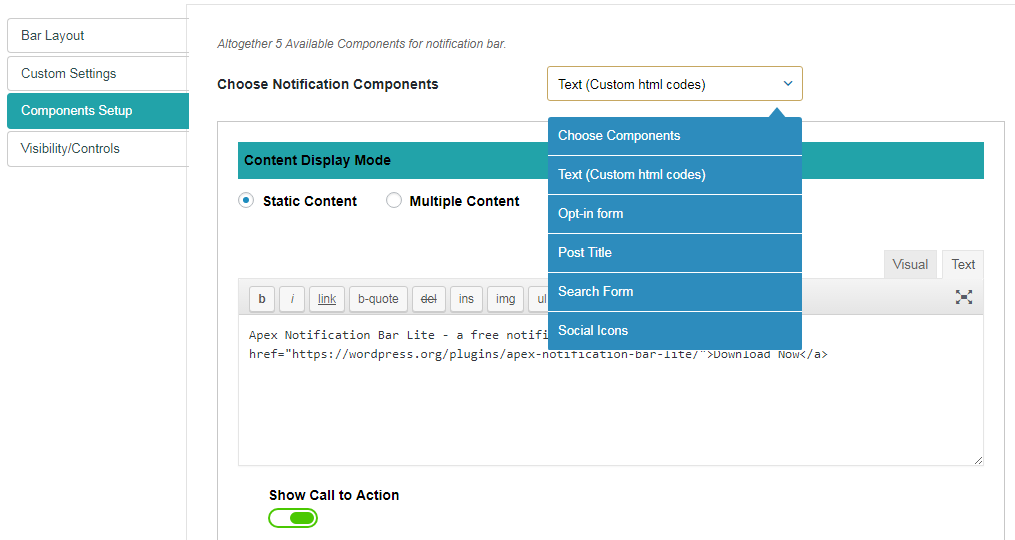
Screenshot 5 - Components Setup Settings

Screenshot 6 - Static Text With Call to action button Settings

Screenshot 7 - Multiple Text Content With Call to action button Settings

Screenshot 8 - Opt In Subscribe Form Settings

Screenshot 9 - Show Recent Posts Settings

Screenshot 10 - Search Form Settings
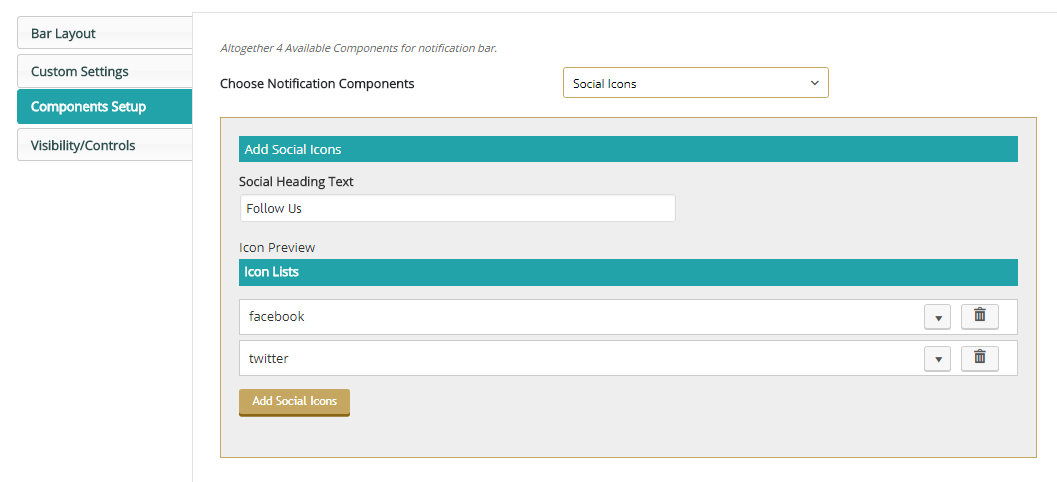
Screenshot 11 - Social Icons Settings

Screenshot 12 - Inbuilt Pre Available Social Icons Settings

Screenshot 13 - Add Social Icon Form Settings

Screenshot 14 - Notification Bar Effects : Slider Settings

Screenshot 15 - Notification Bar Effects : Ticker Settings

Screenshot 16 - Notification Bar Effects : Scroller Settings

Screenshot 17 - Call to action: Custom Contact Form Settings

Screenshot 18 - Call to action: Contact Form 7 Settings

Screenshot 19 - Call to action: Custom URL Settings

Screenshot 20 - Opt In Subscriber Lists Settings

Screenshot 21 - Visibility/Controls Settings

Screenshot 22 - Set Cookies : Show/Hide After Sometime

Screenshot 23 - Controls Settings : Disable, Show/Hide, Close button
Changelog
2.0.6
- Compatibility check with WordPress Version 5.9.3 .
2.0.5
- Compatibility check with latest WordPress Version.
- Removed CSS that reset styles of global elements.
2.0.4
- Fixed issue related to Notification Components.
- Fixed issue related to Header Information Error.
- Backend and Frontend Few CSS refinement work done.
2.0.3
- Compatibility check with latest Version of WordPress.
- Fixed header information issue.
2.0.2
- Fixed issue with show/hide option in the settings.
2.0.1
- Compatibility check with latest WordPress Version.
- Fixed the issue regarding Settings tab.
- Few Backend CSS refinement work done.
2.0.0
- Fixed the issue regarding mobile notification bar .
- Few Backend CSS refinement work done.
1.0.9
- Added Documentation and other informational links to the plugin.
- Few Backend CSS refinement work done.
1.0.8
- Compatibility check with latest New WordPress Version.
- Few Responsive CSS refinement work done.
1.0.7
- Backend and Frontend Few CSS refinement work done.
1.0.6
- Compatibility check with latest WordPress Version.
- Added Feature to set background color to transparent as custom design for notification bar.
- Added Custom Options Button Font Size, Button Font weight.
- Backend and Frontend CSS refinement work done.
1.0.5
- Added some promo content in the backend of the plugin.
1.0.4
- How to Use Page Translation Checked.
- Few Frontend CSS refinement done.
1.0.3
- Default value set for search button and description if left empty issue fixed.
- Few JS refinement done.
1.0.2
- Few CSS refinement.
- Latest WordPress Version compatible check.
1.0.1
- CSS conflict related with external plugin issue resolved.
- Few Plugin CSS and JS Refining
1.0.0
- Plugin submitted to http://wordpress.org for review and approval.