

APH Syntax Highlighter
Bringing SyntaxHighlighter 4 by Alex Gorbatchev into Wordpress easily. Easy to use with user-friendly GUI. Write-edit code in place
Plugin info
Maintenance & Compatibility
Maintenance score
Possibly abandoned • Last updated 3223 days ago
Is APH Syntax Highlighter abandoned?
Possibly abandoned (last update 3223 days ago).
Compatibility
Similar & Alternatives
Explore plugins with similar tags, and compare key metrics like downloads, ratings, updates, support, and WP/PHP compatibility.
Description
Syntax Highlighter developed by Alex Gorbatchev that has been developed 10+ years is a popular syntax highlighter. It is also widely used by a lot of blog and website.
Currently, it achieves version of 4, this version has significant change in the built method compared to the previous, this is, for some people, somewhat confused and hard to do.
This plugin helps you to bring this code highlighter to your WordPress easily, forget a headache builds. Provided with many features and user-friendly GUI, make it handy and easy to use
** Features. **
- Simple and easy to use
- Full GUI, don’t need to hardcode the parameters
- Custom container max-height. Useful when displaying long code.
- Easy to add custom CSS. Useful for responsive design.
- Easy to edit code that has been written in tinyMCE text editor (Screenshot 3)
- Write and edit code in place. The textarea code editor supports the tab and back tab, so you can directly edit or write your code, rather than switch back to your code editor.
- Load script on demand, load javascript and CSS files of syntax highlighter only when needed.
- Use Syntax Highlighter 4 by Alex Gorbatchev
- Ability to override global options and use individual options for each code block
- Custom Font Size
- Support TinyMCE Visual mode and Text Mode (Quick Tags), it also supports the Quick tags used in the admin comment page (screenshot 5)
- Use similar pattern with APH Prism Highlighter and Crayon Syntax Highlighter plugins, so your code will still work using those plugins
- Language added: dark plain (console style) and light plain
How To Use
After installing the plugin, go to the admin setting Settings > Syntax Highlighter to configure the global setting including the highlighter languages you want to load, theme, etc…
In the TinyMCE menu (add or edit post or page), there is a new button that can be used to pop up the code editor, simply copy-paste your code and fill in some options
This new button also can be found at the quick tags of comment editor in the Admin Edit Comments page. This quick tag appears when you edit or reply a comment.
Installation
Install & activate the plugin. Modify some options in the settings page to suits your need.
Frequently Asked Questions
Installation Instructions
Install & activate the plugin. Modify some options in the settings page to suits your need.
Review feed
Screenshots

Admin Settings

Code Editor

Edit code that has been written in the TinyMCE editor

Quick tags in the Text mode of TinyMCE editor
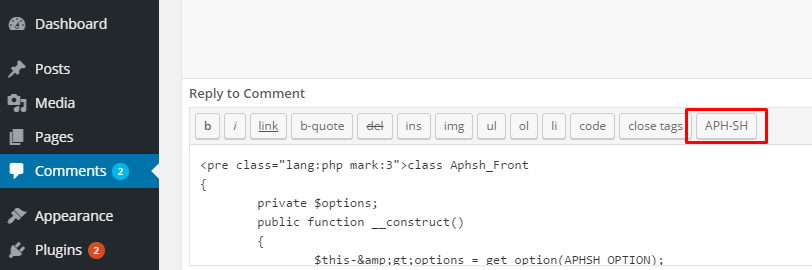
Quick tags in the admin edit comments page
Changelog
1.2.1 – April 22, 2017
- Bug fixed: lighplain and darkplain is not responsive
1.2.1 – March 19, 2017
- Bug fixed: starting line number not working
1.2 – March 18, 2017
- Language added: dark plain (console style) and light plain
- Bug fix
1.1 – September 25, 2016
- Ability to set max-height of container. Useful when displaying long code
- Ability to add custom CSS. Useful for responsive design
- Other improvements
1.0
Initial Public Release