

AppStore Lookup for WordPress
Adds shortcodes that display data from iOS and Mac AppStore applications.
Plugin info
Maintenance & Compatibility
Maintenance score
Possibly abandoned • Last updated 3340 days ago • 1 reviews
Is AppStore Lookup for WordPress abandoned?
Possibly abandoned (last update 3340 days ago).
Compatibility
Similar & Alternatives
Explore plugins with similar tags, and compare key metrics like downloads, ratings, updates, support, and WP/PHP compatibility.
Description
The AppStore Lookup is a simple WordPress plugin that provides shortcodes for querying Apple’s Lookup API to get app data from iTunes or the Mac AppStore. You can modify it as you wish, or use the built-in options to make it fit the needs of your site.
Features:
- Lookup and display data from Mac App Store and iPhone/iPad App Store
- Display App icons
- Display App screenshots
- Up-to-date app ratings information
- Add Smart App Banners for iOS mobile Safari
- Use your Linkshare ID for download links and Smart App Banners
Installation
This section describes how to install the plugin and get it working.
- Upload the plugin folder to the
/wp-content/plugins/directory - Activate the plugin through the ‘Plugins’ menu in WordPress
- Start using the shortcodes anywhere in a post or page. Detailed shortcode info can be found on the Plugin Settings page. For more information on how to use short codes in your posts or templates, check out the WordPress Codex.
Frequently Asked Questions
Where does the data come from?
The plugin uses the Apple Lookup API, information about which is found here: http://www.apple.com/itunes/affiliates/resources/documentation/itunes-store-web-service-search-api.html#lookup
I found a bug or I have an idea for a feature that would be great.
Get in touch via twitter @AdamDionne or my website and I can help. Probably.
Review feed
Screenshots
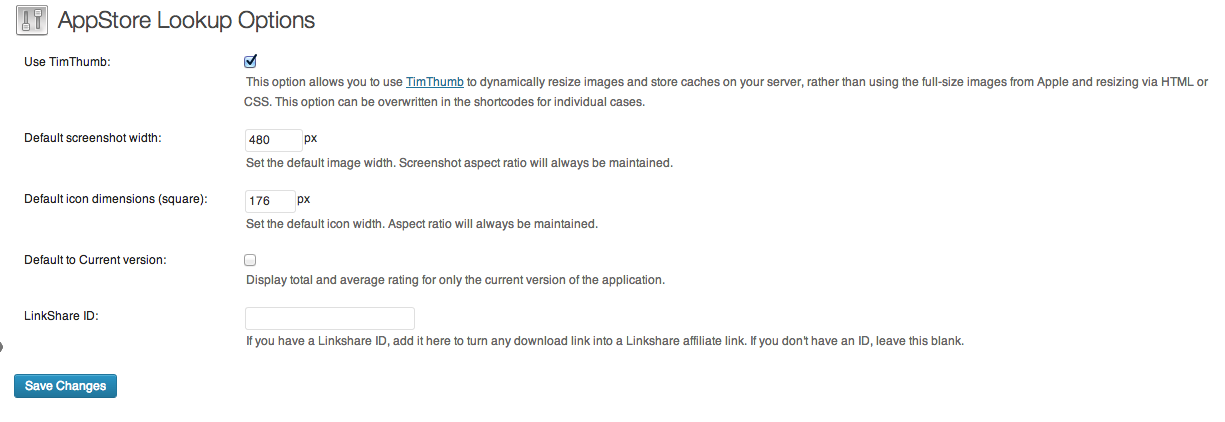
Options Screen

Shortcodes list from Settings Menu
Changelog
1.5.1
- Fixes to documentation. Updated plugin to reflect that this has been tested on latest WordPress.
1.5
- At long last, removed Timthumb. This should not be used by anyone anymore due to some dangerous exploits.
1.4.1
- Fixes a bug where the default icon size was being determined from the setting for screenshot width.
1.4
- There is now a default icon that will be shown when the app id is not found in the store (or when one is not passed by you to the plugin). Screenshots use placeholder kittens so that the package does not have a ton of included art, but I can update that later if that’s a thing people want.
- Beginning of localization/internationalization support, but since I’ve never done this, I’m not confident it’s ready quite yet.
1.3.2
- Now with silent error handling. When an appId is not found, it will continue loading the page without the appropriate content instead of using wp_die.
1.3.1
- Fixed bug with cache folder creation that would throw errors up all over the place
1.3
- Added local caching of JSON API data.
- Added feature to choose duration of JSON cache.
- Added ability to select default store for lookup data.
- Added optional link parameter to asl_seller to allow user to link to seller’s website.
- App Smart Banner support chooses not to show iPad apps to iPhone/iPod users, because that’s just mean.
- Fixed a bug where choosing not to link the SellerName displayed the URL and not the name. Which was in there because I’m stupid.
1.2
Now that we can establish if posts/pages are about a single app using custom field appId, we will automatically add a smart banner to that post for Safari mobile. If Linkshare is present in options, it adds that. No short code required.
1.1
For posts about a single app, the user can now set a post attribute called appId with the value of the AppStore ID. This will eliminate the need to place the id parameter in all short codes, which sure is easier than copy+pasting it every time.
1.0
- Initial version