

Aqua Page Builder
Stable Tag: 1.1.5 License: GNU Version 2 or Any Later Version Powerful Drag & Drop Page Builder with UI that feels like home with WordPress.
Plugin info
Maintenance & Compatibility
Maintenance score
Possibly abandoned • Last updated 3004 days ago • 25 reviews
Is Aqua Page Builder abandoned?
Possibly abandoned (last update 3004 days ago).
Compatibility
Similar & Alternatives
Explore plugins with similar tags, and compare key metrics like downloads, ratings, updates, support, and WP/PHP compatibility.
Description
Aqua Page Builder is a powerful WordPress plugin that allows you to create an unlimited number of template variations for use in your WordPress themes. It follows the same user interface used by the Menus & Widgets admin pages – making you feel right at home with the UI.
Similar to the Widgets & Menus, Aqua Page Builder features the drag and drop interaction to build its templates.
Features of the plugin include:
- Highly intuitive, drag-and-drop user interface
- Integrate seamlessly with WordPress admin interface
- Compatible with WordPress Import/Exporter
- Unlimited number of reusable templates
- Highly extensible
- Developer friendly with dozens of hooks and filters
More information at Aquagraphite.com.
Installation
- Activate the plugin
- Go to Appearance > Page Builder and create new templates
- For detailed instructions please refer to the complete Documentation page.
Frequently Asked Questions
Installation Instructions
- Activate the plugin
- Go to Appearance > Page Builder and create new templates
- For detailed instructions please refer to the complete Documentation page.
Why do I see only 6 blocks?
These are default blocks provided with this plugin. Please see the list of supported themes that includes more blocks, or learn how to create your own from our Wiki.
How do I Add My Own Custom Blocks?
Please see our Wiki section on how to develop your own custom blocks.
Review feed
Screenshots
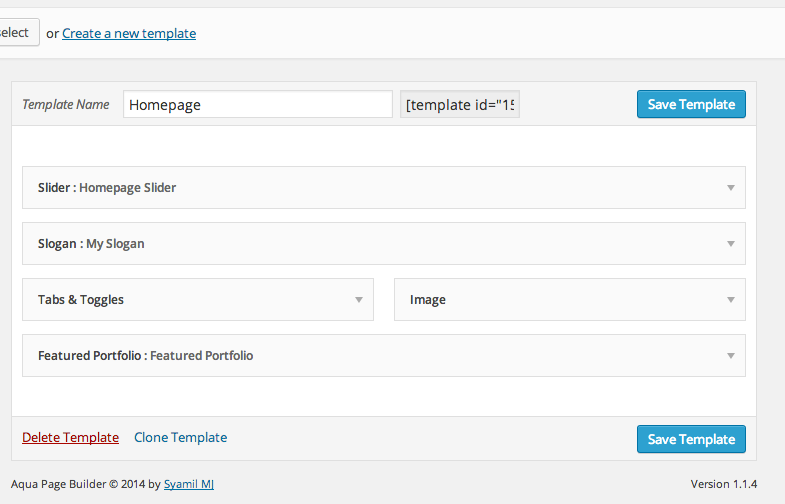
Main page builder panel

Available blocks. You can easily extend these to include your own

Simple button to insert page templates shortcode inside the post editor
Changelog
= 1.1.5: November 30, 2015
- FIX – Fix block height on dropping a block into the template area
- FIX – Renamed Visual Editor’s textarea block to avoid conflict with Text block
- IMP – Various cleanups
= 1.1.4: July 21, 2014
- NEW – Visual editor
- NEW – Template Manager
- NEW – Clone template
- IMP – UI/UX Minor revamps
- NEW – Localization
= 1.1.3: June 2014
- FIX – Various bug & CSS Fixes
- FIX – Compatibility with WP 3.8+
1.1.2: August 5, 2013
- DEL – Removed unused legacy files
- DEL – Removed PHP4 constructor in AQ_Block class
- FIX – Changed .cf in favor of .clearfix css class
- FIX – Bug fixes for WP 3.6 final
1.1.1: June 8, 2013
- FIX – Fixed issue with some blocks not exporting
- ADD – Navbar is sortable & will keep this order
1.1.0: April
- Public release