

Plugin info
Maintenance & Compatibility
Maintenance score
Possibly abandoned • Last updated 545 days ago • 5 reviews
Is Archive Title abandoned?
Possibly abandoned (last update 545 days ago).
Compatibility
Similar & Alternatives
Explore plugins with similar tags, and compare key metrics like downloads, ratings, updates, support, and WP/PHP compatibility.
Description
This plugin provides options to tweak an archive page title, such as removing annoying archive label (see FAQ). You can remove the label for any archive page completely, or just hide it accessibly.
Features
- Modifying category, tag, author, custom post type and custom taxonomy archive title (no need to modify the date archive title)
- Removing archive page title label completely
- Hiding archive page title label accessibly (using a CSS class of
screen-reader-text)
Additional Resources
Installation
- Unzip the plugin download file and upload
archive-titlefolder into the/wp-content/plugins/directory. - Activate the plugin through the “Plugins” menu in WordPress.
- Navigate to Settings → Reading to edit plugin options under “Archive Title Options” section.
Frequently Asked Questions
Archive page contains an archive – a list of posts or custom post types. WordPress recognizes 6 types of archives: category, tag, author, custom post type, custom taxonomy and date.
Title of every archive page contains an ‘archive label’ (please note this is a terminology used in this plugin). By default it is the first text in archive title followed with colon. For example, a category archive page with title of “Category: Uncategorized” has an archive label of “Category:”.
This plugin integrates its settings directly into Settings → Reading WordPress admin page. You can edit plugin options under “Archive Title Options” section on that page.
The plugin allows you to remove the archive title label completely or to hide it accessibly. Accessible hiding causes wrapping the archive title label in a <span class="screen-reader-text"> HTML element.
Every WordPress theme should provide styles for the screen-reader-text CSS class. And every text wrapped in such CSS class element will be hidden from visibility, but will be still accessible for assistive devices, such as screen reader.
We recommend using this option instead of removing the label completely.
Yes you can.
You can override the CSS class by defining the ARCHIVE_TITLE_CSS_CLASS_A11Y constant in your child theme’s functions.php like so:
define( 'ARCHIVE_TITLE_CSS_CLASS_A11Y', 'your-theme-accessibly-hidden-class' );
Well, the only 2 use cases I can think of for this option would be:
- To change the taxonomy name: For example, if you would like to keep the category archive title label such as “Category:” in “Category: Uncategorized”, but only want to change the “Category” text to “Topic”. For that case it’s much better to properly rename the taxonomy using a dedicated plugin. You can use this for any WordPress native taxonomy, such as Category, Tag, or any other custom taxonomy, such as Jetpack’s Project Types.
- To change the post type name: For example, if you would like to rename “Archives: Portfolio” to “Archives: Projects” (note that “Archives:” is actually a label here, and you can remove it with this plugin). For that case it’s much better to properly rename the post type using a dedicated plugin.
Review feed
Screenshots
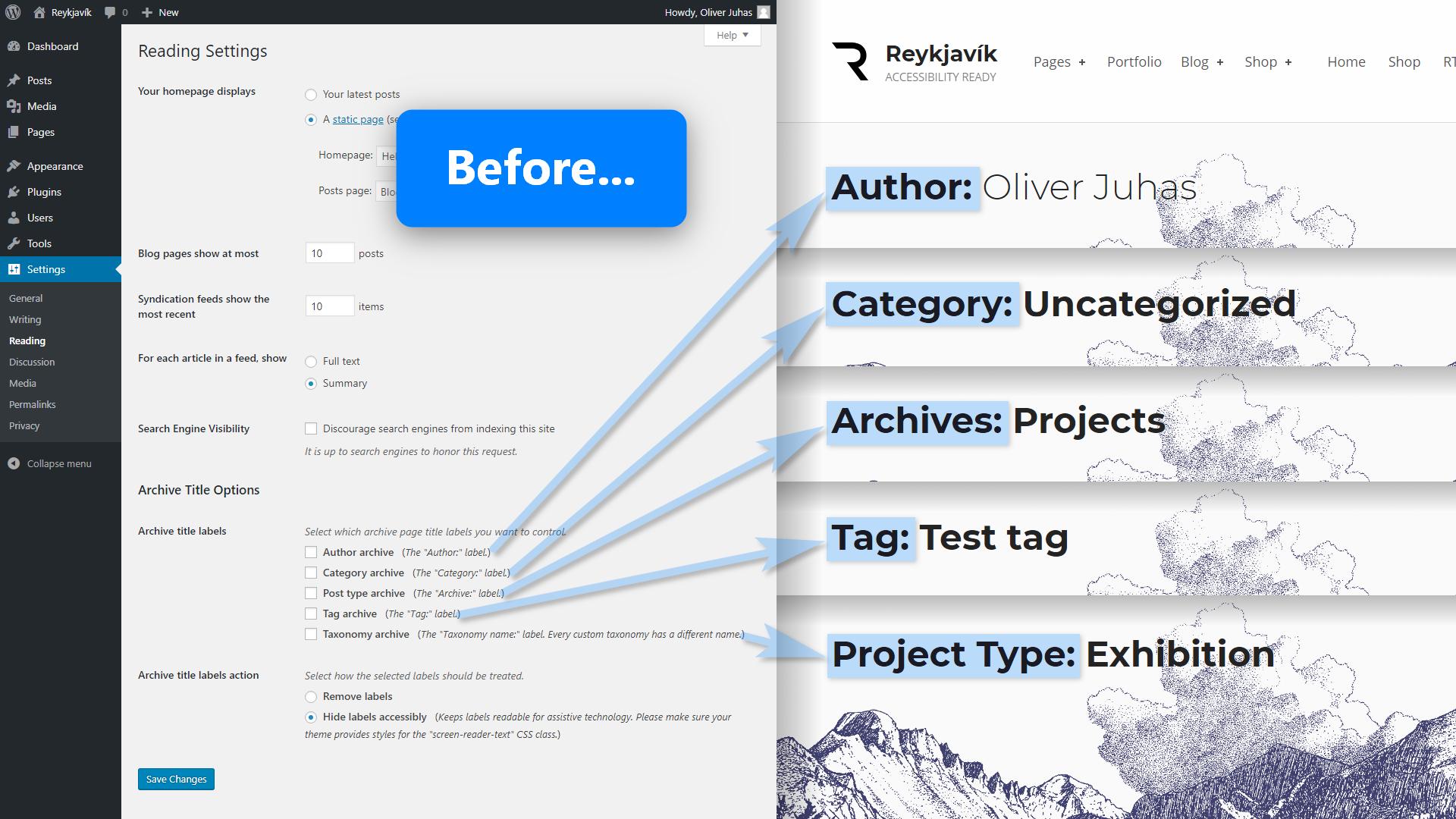
Default WordPress archive page titles, before plugin options are applied.

After we apply plugin options, the archive page title labels are gone.
Changelog
Please see the changelog.md file for details.