

Asset Queue Manager
A tool for experienced frontend performance engineers to take control over the scripts and styles enqueued on their site.
Plugin info
Maintenance & Compatibility
Maintenance score
Possibly abandoned • Last updated 3675 days ago • 14 reviews
Is Asset Queue Manager abandoned?
Possibly abandoned (last update 3675 days ago).
Compatibility
Similar & Alternatives
Explore plugins with similar tags, and compare key metrics like downloads, ratings, updates, support, and WP/PHP compatibility.
Description
This tool allows you to monitor, dequeue and requeue scripts and styles that are enqueued on your site. It is designed for frontend performance engineers who want to view and manage all assets enqueued on any page and control the minification and concatenation themselves.
For background, please read Chris Coyier’s initial request.
Warning: This plugin makes it easy to break your site. Don’t use this unless you know what you’re doing.
How to use
Once the plugin is activated, browse to any page on the front of your site. An Assets link will appear on the top right of the admin bar. Click that to view and manage all assets.
Developers
Development takes place on GitHub. Patches welcome.
Installation
- Unzip
asset-queue-manager.zip - Upload the contents of
asset-queue-manager.zipto the/wp-content/plugins/directory - Activate the plugin through the ‘Plugins’ menu in WordPress
Frequently Asked Questions
I dequeued jQuery (or something I shouldn’t have) and now my site is broken
Go to the list of plugins in your admin panel. Find the Asset Queue Manager and click the “Restore Dequeued Assets” link.
Review feed
Fantastic
Wo !
Screenshots
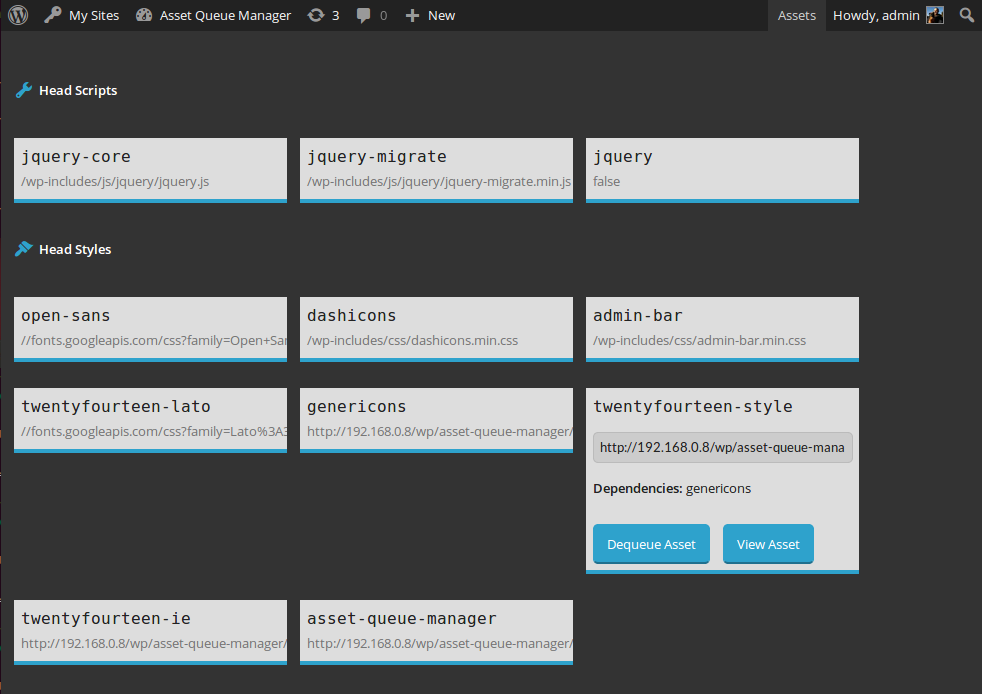
View details about assets enqueued in the head or footer. Dequeue them or view them for copying and minifying on your own.

View details about assets that are being dequeued by this plugin. Requeue them or view them for copying and minifying on your own.
Changelog
1.0.3 (2016-03-10)
- Fix #5: issues with third-party code which extends native types. h/t @AndiDittrich of https://wordpress.org/plugins/enlighter/
1.0.2 (2016-02-17)
- Fix #4: allow assets with dots in the handle to be managed
1.0.1 (2014-12-17)
- Fix critical bug where assets were only dequeued for logged in users with the admin bar present
1.0 (2014-10-23)
- Initial release