

Athena AI Content Assistant
Your AI assistant for effortless content creation directly in WordPress. Generate, rewrite, and enhance your text with the power of Athena AI.
Plugin info
Maintenance & Compatibility
Maintenance score
Maintained • Last updated 117 days ago
Is Athena AI Content Assistant abandoned?
Likely maintained (last update 117 days ago).
Compatibility
Similar & Alternatives
Explore plugins with similar tags, and compare key metrics like downloads, ratings, updates, support, and WP/PHP compatibility.
Description
Athena AI Content Assistant integrates the power of world-class AI models, including OpenAI’s GPT and Google Gemini, directly into your WordPress environment. Whether you prefer the modern Gutenberg block editor or the traditional Classic Editor (TinyMCE), this tool provides a seamless and flexible way to supercharge your workflow. Stop switching between tabs and bring the power of your chosen AI right where you need it—it is your perfect partner for creating high-quality content faster than ever before.
Beyond text generation, the plugin now transforms your editor into a complete creative studio. You can instantly bring your articles to life by generating stunning visuals with Google IMAGEN 3 and 4, DALL-E 2 and 3, or use the new Quick AI Actions to refine your writing in seconds. Simply highlight any text in the editor to access instant commands like shorten, expand, rewrite, or fix grammar, giving you total control over your content’s quality and style with a single click.
Core Features (Free Version)
- Direct Editor Integration: Use a simple command box below the editor on all your Pages to interact with the AI instantly without leaving WordPress.
- Quick AI Actions: Simply highlight any text in the editor to unlock instant tools. Shorten paragraphs, expand ideas, fix grammar, or change the tone with just one click.
- AI Image Generation: Bring your articles to life using DALL-E 3 or Google Imagen 3. Generate illustrations directly into your content or create the perfect Featured Image (which automatically serves as your social media og:image).
- Smart Context Awareness: The AI acts as an intelligent editor. It understands precise prompts—whether you ask to add details or rewrite a section—and executes the change while perfectly preserving the rest of your existing content.
- Multi-Provider Support: Choose the best AI for your needs. Switch between OpenAI (GPT-4o, DALL-E) and Google AI (Gemini, Imagen), including support for the newest Gemini 3 Pro (preview).
- Version History: Never lose a great idea. The plugin automatically saves the original content and every AI-generated version, allowing you to restore any version with a single click.
Premium Modules (Available at wpbase.eu):
Upgrade to unlock the full potential of your AI assistant with our premium modules:
- Post & CPT Expander: Extends the AI console to standard posts and your own custom post types.
- WooCommerce Classic Editor: Brings the power of the AI assistant to your classic WooCommerce product editor.
- Quick Commands: Save your favorite and most-used prompts to reuse them anytime, speeding up your workflow.
- AI SEO Meta (for Yoast): Automatically generate SEO-friendly meta descriptions for your content with one click.
- ACF Expander: Adds AI command functionality directly to your Advanced Custom Fields (Text, Textarea & WYSIWYG).
Find out more about premium modules at wpbase.eu
Stop switching between tabs and bring the power of AI right where you need it. Athena AI Content Assistant is your perfect partner for creating high-quality content faster than ever before.
External Services
This plugin integrates with third-party external services to provide its core functionality. It is important for users to understand what data is shared and with whom.
AI Content Generation (OpenAI / Google AI)
- Service: Depending on your selection in the plugin settings, this plugin sends requests to either the OpenAI API or the Google AI API.
- Purpose: This is the core function of the plugin, used to generate, rewrite, or analyze text based on your commands.
- Data Sent: When you execute a command, the following data is sent to your chosen provider:
- Your API Key for authentication.
- The content of the post or field you are editing (to provide context for the AI).
- The text of the command (prompt) you wrote.
- Privacy Policies: Your usage is subject to the terms and privacy policies of the selected provider. WPbase does not store, log, or have access to any of this data.
- OpenAI:
- Terms of Use: https://openai.com/policies/terms-of-use
- Privacy Policy: https://openai.com/policies/privacy-policy
- API Data Usage Policies: https://openai.com/policies/api-data-usage-policies
- Google AI:
- Terms of Service: https://ai.google.dev/terms
- Privacy Policy: https://policies.google.com/privacy
- OpenAI:
License Activation & Updates (wpbase.eu)
- Service: This plugin connects to a license management server hosted at
wpbase.eu. - Purpose: This is used to activate, deactivate, and validate licenses for premium modules, which enables access to premium features and automatic updates.
- Data Sent: When you activate or deactivate a license for a premium module, the following data is sent to our server:
- Your license key.
- The URL of your website (to identify the instance).
- The unique product ID of the module being activated.
- Privacy Policies:
- Terms and Conditions: https://wpbase.eu/terms-and-conditions/
- Privacy Policy: https://wpbase.eu/privacy-policy/
Installation
Free Version:
- Upload the
athena-ai-content-assistantfolder to the/wp-content/plugins/directory. - Activate the plugin through the ‘Plugins’ menu in WordPress.
- Go to
AI Assistant -> Settingsand enter your OpenAI API key. - The AI Command console will now be available on all your Pages.
Frequently Asked Questions
Yes, this plugin requires an API key from OpenAI. You can obtain one by creating an account on the OpenAI Platform. The plugin sends your content and commands to OpenAI for processing.
When you use the plugin, the following data is sent to your chosen AI provider for processing:
* The content of the post/page you are editing (to provide context for the AI).
* The command (prompt) you write.
* Your API key for authentication.
WPbase does not store, log, or collect any of this data. Your usage is subject to your chosen provider’s policies. For more information, please review their documentation:
* Terms of Use: https://openai.com/policies/terms-of-use
* Privacy Policy: https://openai.com/policies/privacy-policy
* API Data Usage Policies: https://openai.com/policies/api-data-usage-policies
The cost depends entirely on your usage and the model you choose in the plugin settings. OpenAI charges per “token” (roughly, 1,000 tokens is about 750 words). For example, the GPT-4o-mini model is incredibly cost-effective. As of September 2025, you could process approximately 600,000 words of output for just $1 USD. This means you can generate a vast amount of content, like hundreds of articles or thousands of product descriptions, for a very low cost.
The plugin allows you to choose from a list of powerful and efficient models directly in the settings, including:
* OpenAI: GPT-4o, GPT-4o-mini, and other GPT-4/3.5 models.
* Google AI: Gemini 2.5 Pro, Gemini 2.5 Flash, and other Gemini models.
* The list is regularly updated to include the latest models available via API.
* The list is regularly updated to include the latest models available via API.
The core plugin is free and includes the AI command console with full generation capabilities and version history for the ‘Page’ post type.
The plugin is designed to work with the Classic Editor (both Visual and Text/Code modes). This includes support for the main content editor and the Excerpt field. The premium WooCommerce module adds support for the classic product editor.
Review feed
Screenshots

Start with the AI command console located below the editor. Simply describe the content you want to create, or modify existing text with commands like "rewrite this section" or "expand on this topic." Athena AI intelligently preserves your context while making the requested changes.
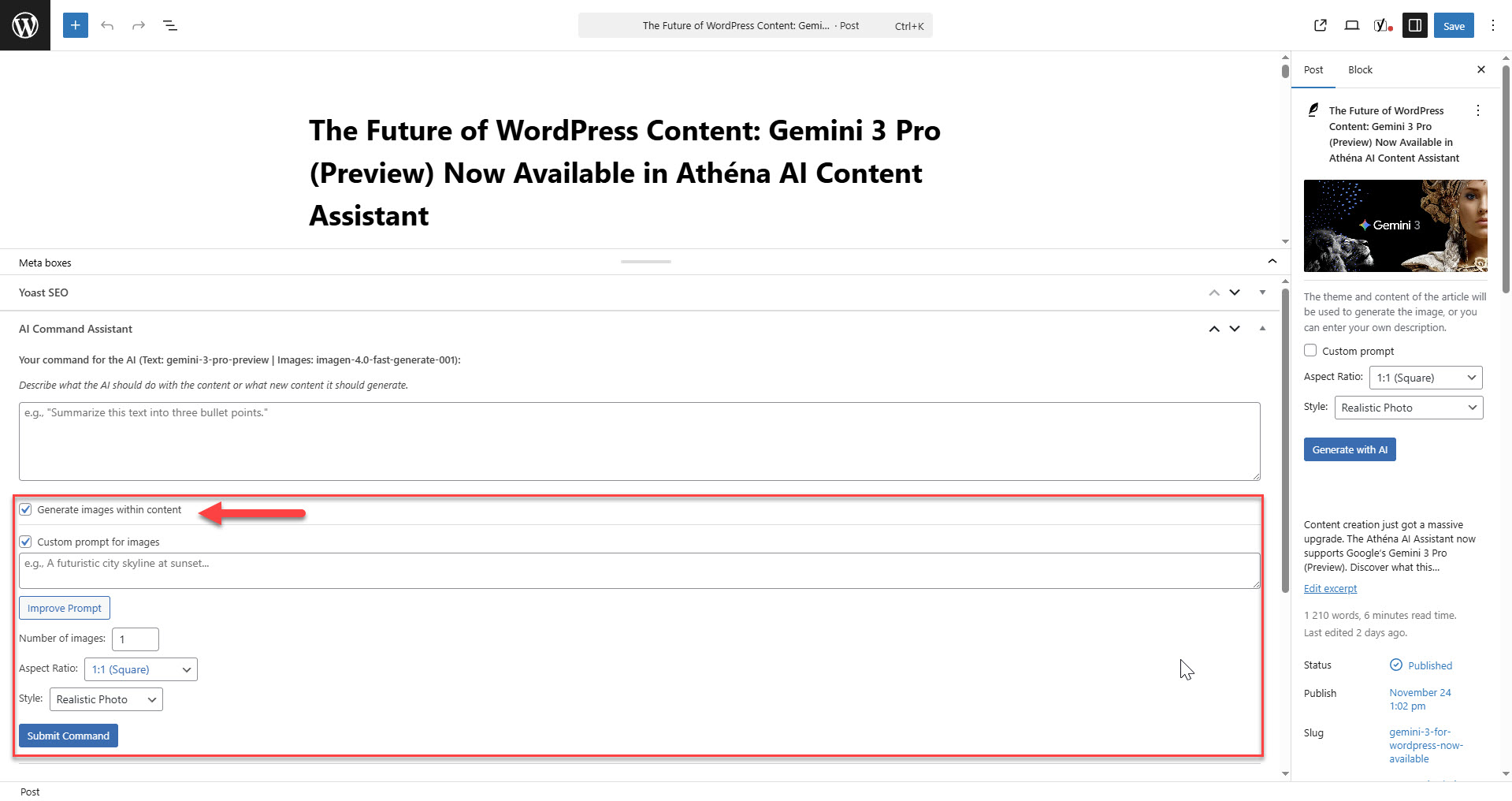
Generate stunning images directly within your content. Let the AI automatically create visuals based on your text context, or provide your own custom prompt. You can even use the built-in "Enhance Prompt" feature to optimize your instructions for the best possible results.
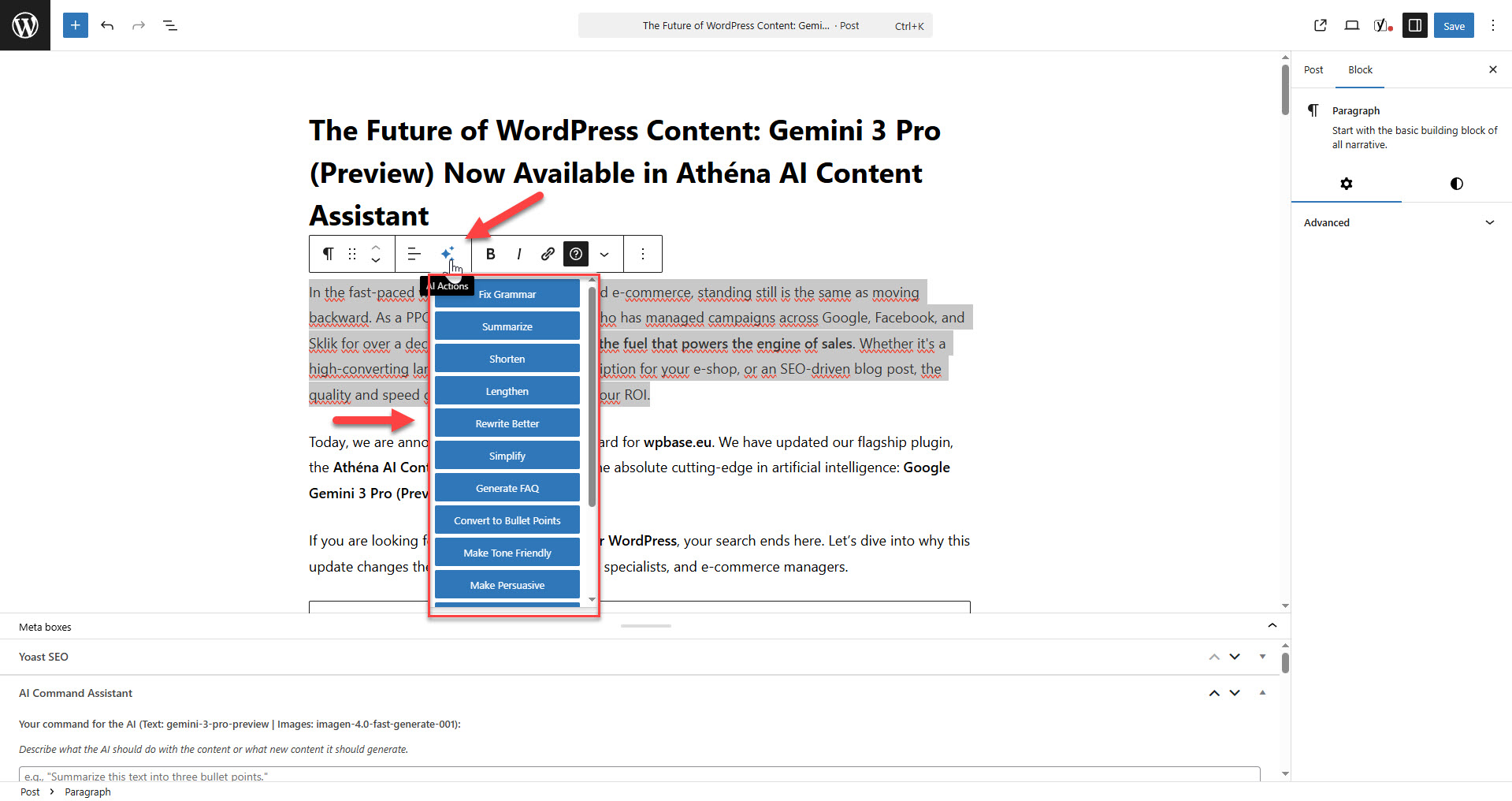
Edit with precision using AI Actions. Simply select any part of your text to rewrite, shorten, or expand it without affecting the rest of the document. You can also generate and insert relevant images exactly where you need them—for example, right above a selected paragraph.
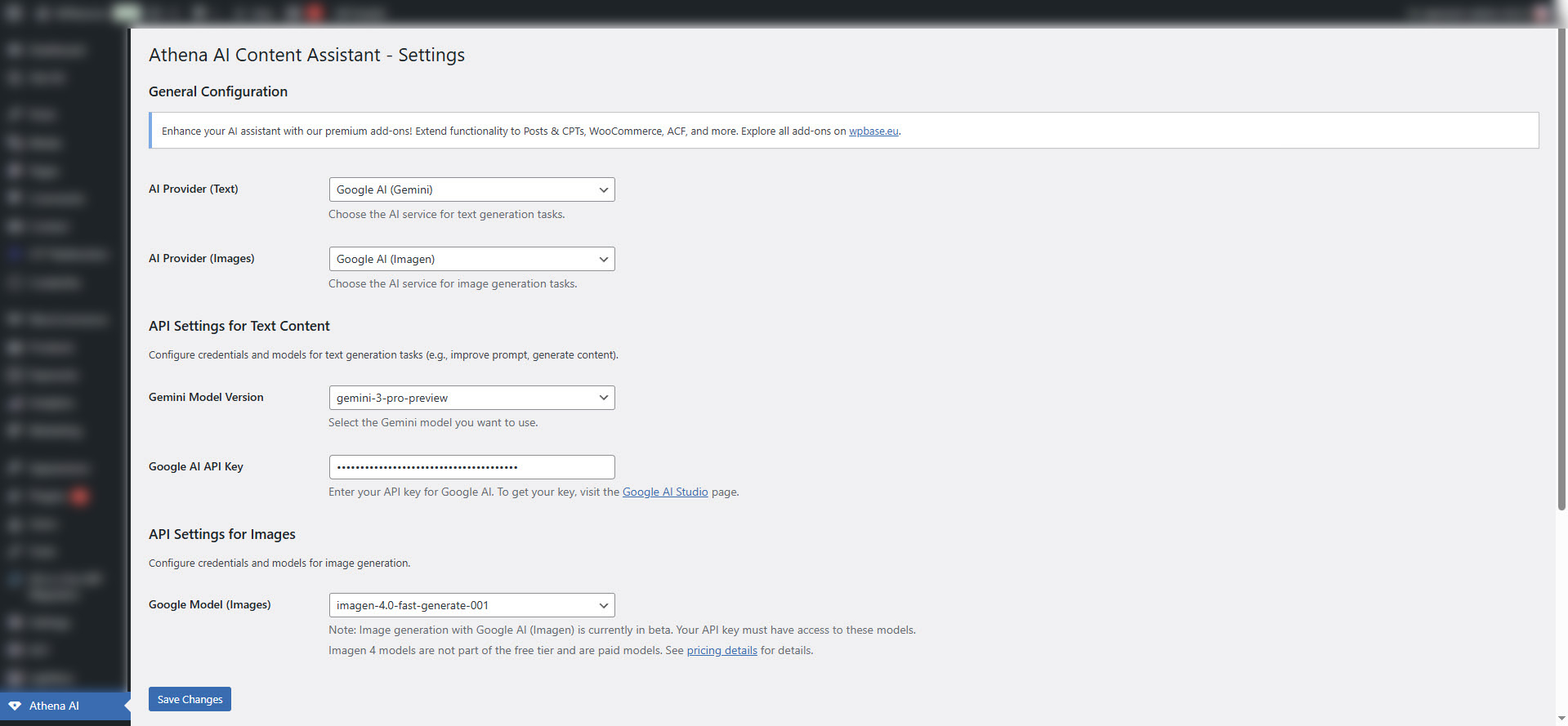
Simple and intuitive setup. Choose your preferred AI provider (OpenAI or Google Gemini), select specific models for text and image generation, and securely enter your API keys to get started in seconds.
Changelog
1.9
- New Feature: Added support for Google AI (Imagen models) for image generation, providing an alternative to OpenAI’s DALL-E.
- New Feature: You can now select your preferred image generation provider (OpenAI or Google) in the settings.
- Enhancement: The AI command box now displays the currently active image model alongside the text model.
1.8
- New Feature: AI Image Generation (DALL-E 2/3 Support)
- New Feature: Generate a “Featured Image” directly from the editor sidebar. The AI automatically uses the post’s title and content for context.
- New Feature: Added an option for a “Custom Prompt” for image generation, allowing for precise control over the output.
- New Feature: Added an “Improve Prompt” button that uses AI to refine your custom image descriptions for better results.
- New Feature: Added a new “AI Action” to the editor toolbar: “Add image before content”, which opens a modal to generate and insert an image directly into your text.
- New Feature: The main command box can now generate images within the content by using a placeholder system.
- New Feature: Added settings for image aspect ratio and artistic style for both featured images and in-content images.
- Enhancement: Redesigned the plugin settings page for improved clarity and user experience.
- Enhancement: Improved AI system prompt to better understand contextual commands (e.g., add, modify, replace) without replacing the entire content.
- Enhancement: Improved content formatting for both Gutenberg and the Classic Editor (TinyMCE) to prevent empty paragraphs and ensure clean HTML.
1.7
- New Feature: Added full support for the Gutenberg Block Editor.
- New Feature: Introduced “AI Actions” toolbar for both Classic (TinyMCE) and Gutenberg editors.
1.6
- Major Refactoring: All premium modules have been converted into standalone plugins. This improves modularity, simplifies installation, and aligns with WordPress best practices.
- Enhancement: Removed shared functions from the core plugin that are now located within their respective add-on plugins.
- Enhancement: Standardized function prefixes and text domains across all plugins for better code quality and to prevent conflicts.
- Enhancement: Updated all
readme.txtfiles to the new standalone plugin format.
1.5.2
- Enhancement: Added support for the new
gemini-3-pro-previewmodel from Google AI. - Enhancement: Set
gemini-3-pro-previewas the default Gemini model.
1.5.1
- Enhancement: General code optimization and refactoring to improve performance and adhere to WordPress coding standards.
- Enhancement: Replaced hardcoded script with standard
wp_enqueue_scriptfor better dependency management. - Fix: Addressed PHPCS warnings related to input sanitization in the license handling logic.
1.5
- New Feature: Added AI command console support for the ‘Excerpt’ field when the ‘Post & CPT Expander’ module is active.
- Enhancement: Implemented specific AI prompting for Excerpt generation to ensure unformatted, single-paragraph output.
- Enhancement: Refactored ‘Quick Commands’ module to support multiple instances on a single page, allowing quick commands to be used with both main content and excerpt AI consoles.
- Fix: Resolved issues with history display and saving for both main content and excerpt command consoles.
- Fix: Corrected an issue where ‘Quick Commands’ module was not displaying due to updated HTML IDs.
- Fix: Ensured proper history saving and loading for the ‘Excerpt’ field by correcting REST API endpoint logic.
- Fix: Corrected meta box registration logic in ‘Post & CPT Expander’ to prevent duplicate meta boxes and ensure correct display.
- Fix: Updated
uninstall.phpto correctly remove excerpt history data.
1.4
- Major Refactoring: Complete internal renaming of all functions, classes, hooks, and database options to use the
athena_ai_prefix. This improves code consistency and prevents conflicts with other plugins. - Fix: Corrected an issue where some premium modules were not appearing on the license page after the initial renaming.
- Fix: Resolved a REST API routing error that occurred after the renaming.
1.3
- New Premium Module: Added support for the “ACF Expander” module, which brings AI command functionality directly into ACF Text, Textarea, and WYSIWYG fields.
- Enhancement: The ACF Expander includes advanced context options, allowing the AI to use the full page content or selectively chosen fields as context for generation.
- Enhancement: Improved module loading logic in the core plugin.
1.2
- New Feature: Added support for Google AI (Gemini models) as an alternative to OpenAI.
- New Feature: Added a settings field to select the desired AI provider (OpenAI or Google AI).
- Enhancement: The AI command box now displays the name of the currently active model.
1.1
- Updated plugin name and slug to
Athena AI Content Assistantfor WordPress.org compliance. - Updated the list of available GPT models to reflect current OpenAI offerings.
- Added a direct link to the OpenAI API keys page in the plugin settings.
1.0.0
- Initial release.