

Plugin info
Maintenance & Compatibility
Maintenance score
Stale • Last updated 184 days ago • 21 reviews
Is Attributes for Blocks abandoned?
Likely maintained (last update 184 days ago).
Compatibility
Similar & Alternatives
Explore plugins with similar tags, and compare key metrics like downloads, ratings, updates, support, and WP/PHP compatibility.
Description
This plugin adds additional advanced inspector controls to Gutenberg blocks that allow to add any custom HTML attributes to the block’s front-end output. This allows you to add inline styles to fine-tune the block’s appearance, set aria attributes to improve your site’s accessibility, add data attributes to integrate with any JavaScript modules or even JavaScript DOM event attributes such as onclick, onchange or onload.
Installation
Install via admin dashboard
- Go to your WordPress admin dashboard -> Plugins.
- Click “Add New”.
- Click “Upload Plugin”.
- Select the
attributes-for-blocks.zipfile. - Click “Install Now”.
- Activate the plugin from WordPress admin dashboard -> Plugins.
Manual install via FTP upload
- Upload the folder “attributes-for-blocks” from
attributes-for-blocks.zipfile to your WordPress installations../wp-content/pluginsfolder. - Activate the plugin from WordPress admin dashboard -> Plugins.
Frequently Asked Questions
In your selected block’s inspector controls (Block settings) scroll all the way to the bottom and click on “Advanced”. It should contain a section called “Additional attributes”.
Type an attribute name into the “Add attribute” field and press “Add” to add an attribute for the block. A new input with the attribute’s name should appear below, into which you can optionally insert the attribute value.
Example attributes: style, title, target, class, id, onclick, data-*, aria-*.
When the current user doesn’t have unfiltered_html capabilities attributes cannot be added and all existing attributes are stripped when the post is updated.
For regular blocks, attributes are added to the block save content’s root element, meaning they will be rendered only on the front end and not in the editor. For dynamic blocks the attributes are added via render_callback function and they may also be applied in the editor, depending if the block is rendered server or client side.
It should work with normal blocks that render a valid WP Element that can utilize the blocks.getSaveContent.extraProps filter as well as dynamic blocks that utilize a render_callback. Third party blocks that do something unorthodox may not work.
Known unsupported blocks
@ prefix in an attribute name is used for “override” mode in this plugin, for Alpine.js attributes use x-on:click instead of @click or use the shorthand syntax with two @ characters instead of one: @@click.
The afb_unsupported_blocks filter can be used in your child theme’s functions.php file to disable block support for adding additional attributes.
add_filter('afb_unsupported_blocks', function($blocks) {
    $blocks[] = 'core/button';
    return $blocks;
});
Blocks with custom attributes may become invalid, depending on which attributes you’ve added. From there you can recover the block without the custom attributes by clicking “Attempt Block Recovery” or keep the block with custom attributes as HTML by choosing “Convert to HTML”. If you don’t want to risk blocks becoming invalid you need to remove all custom attributes before disabling the plugin.
You can modify which roles have the unfiltered_html capability using custom code in your theme’s functions.php file or via a custom plugin. Only grant this capability if you trust the current and future users of that role to not do anything malicious.
add_action('init', function() {
    if($role = get_role('contributor')) {
        $role->add_cap('unfiltered_html');
    }
});
Review feed
This should be native!
This is just Gold
Screenshots
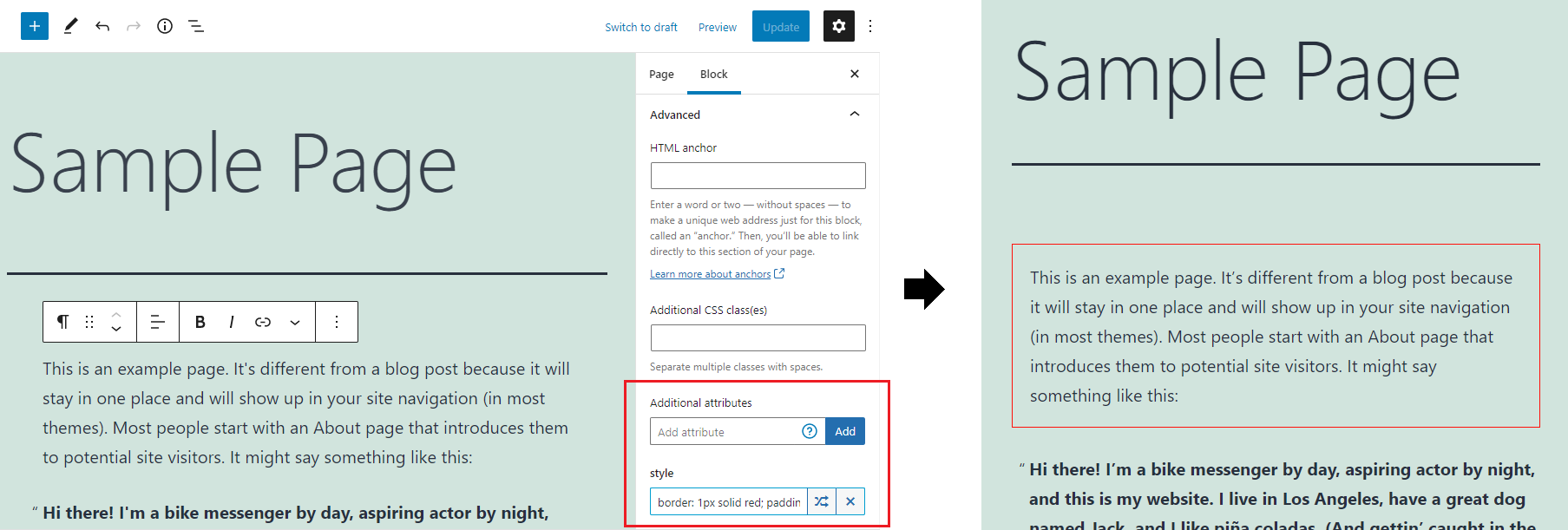
Adding style attribute to paragraph block
Changelog
1.0.12
- Added a donate link on the plugin page – supporters get a 50% off coupon for my brand new WordPress theme.
- Fix potential duplication when merging style attribute values.
- Update
@wordpress/*packages. - Tested with Gutenberg 21.7.0.
1.0.11
- WP 6.8.
1.0.10
- Added
afb_get_attributesfilter, allowing to dynamically modify attributes.
1.0.9
- Try fix issue with
current_user_cancheck inpre_kseswhenSECURE_AUTH_COOKIEisn’t defined.
1.0.8
- Try fix issue with
current_user_cancheck inpre_kseswhen WP pluggable functions aren’t loaded.
1.0.7
- Security update: users without
unfiltered_htmlcapability can no longer add attributes. When a user without the capability updates a post all existing attributes are stripped. Issue discovered by Francesco Carlucci (CVE ID: CVE-2024-8318, CVSS Severity Score: 6.4 (Medium)). The vulnerability made it possible for authenticated attackers, with Contributor-level access and above, to inject arbitrary web scripts in pages that will execute whenever a user accessed an injected page. - Tested up to WordPress 6.6.
- Update
@wordpress/*packages.
1.0.6
- Tested up to WordPress 6.5.
- Fix PHP notice when rendering a block that doesn’t have any attributes.
- Update
@wordpress/*packages.
1.0.5
- Use
WP_HTML_Tag_Processorfor adding HTML attributes. - Remove
afb_sanitize_attribute_keyandafb_sanitize_attribute_valuefilters (now handled byWP_HTML_Tag_Processor). - Use
render_blockfilter to apply attributes instead of overriding block’srender_callback. - Move all PHP code to main file for simplicity.
- Add
$attributeparam toafb_attribute_separatorfilter. - Remove uppercase text transform from attribute input labels, use monospace font for value.
- Add button to edit attributes in a modal for more space.
- Update
@wordpress/*packages. - Regression: for blocks that render multiple root elements attributes are only applied to the first one.
1.0.4
- Add
afb_sanitize_attribute_keyandafb_sanitize_attribute_valuefilters. - Catch errors when using invalid characters in attribute name/value.
- Update
@wordpress/*packages.
1.0.3
- Update
@wordpress/*packages. - Test with WordPress 6.0.
- Convert advanced style attribute editor to TypeScript and refactor.
- Fix duplicate attribute values being output when the block has both JS and PHP render functions.
- Add GitHub link.
- Remove
srcfolder from plugin.
1.0.2
- Add advanced editor for style attribute.
- Remove jQuery.
1.0.1
- Fix special character encoding for dynamic blocks.