

Author WIP Progress Bar
Tested up to 6.7.1 The WIP Progress Bar plugin allows writers and authors to display beautiful progress bars on their WordPress websites via a Widget …
Plugin info
Maintenance & Compatibility
Maintenance score
Possibly abandoned • Last updated 447 days ago • 7 reviews
Is Author WIP Progress Bar abandoned?
Possibly abandoned (last update 447 days ago).
Compatibility
Similar & Alternatives
Explore plugins with similar tags, and compare key metrics like downloads, ratings, updates, support, and WP/PHP compatibility.
Description
The WIP (Work in Progress) Progress Bar is the plugin I wanted as an author for my website. The WIP-Progress Bar creates beautiful progress bars (AKA progress meters) via Widgets or by generating a shortcode. An excellent and fun way to engage with your fans.
The plugin tracks word or page count goals, current word or page count, and calculates the progress by showing the completion percentage and displaying that with a very cool progress bar with multiple colors, animation and other choices to choose from.
The plugin also allows the writer to display a hyperlink, their book cover from the media library, and custom text along with the progress bar.
Installation
- From “add new plugin” Upload the Progress Bar Plugin zipped file to install it.
- Activate the plugin using the ‘Plugins’ menu in your WordPress admin dashboard.
- You can setup the progress bar from the “Appearances” “Widgets” menu.
- You can generate a shortcake to insert a progress bar into a Post or Page by clicking on the “Progress Bar” setting in the menu.
Widget setup video:
How to generate shortcode video:
Frequently Asked Questions
TBD
Review feed
Awesome Job
Screenshots

Example of the Progress Bar.
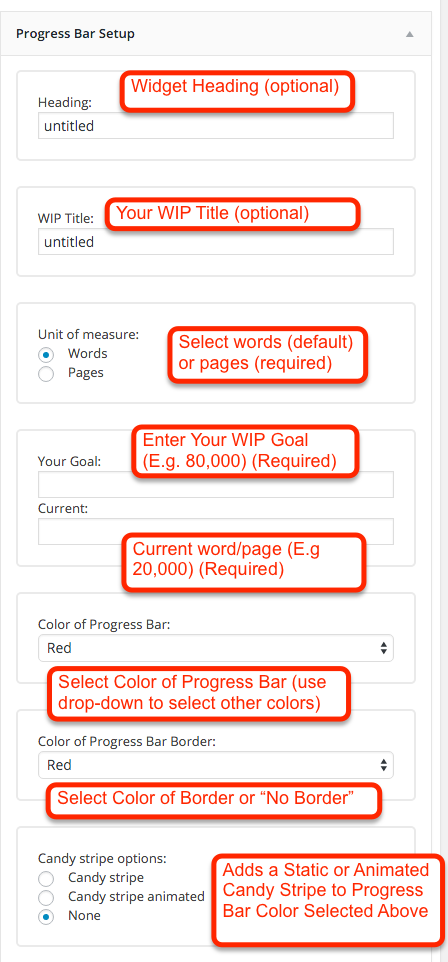
Data that can be entered in widgets to setup progress bar.

More data to setup progress bar.
Changelog
1.0
– Initial Release