

Auto Prune Posts
Auto deletes expires (prunes) posts after a certain amount of time. On a per category basis (single category, or all at once.
Plugin info
Maintenance & Compatibility
Maintenance score
Maintained • Last updated 144 days ago • Support resolved 100% • 10 reviews
Is Auto Prune Posts abandoned?
Likely maintained (last update 144 days ago).
Compatibility
Similar & Alternatives
Explore plugins with similar tags, and compare key metrics like downloads, ratings, updates, support, and WP/PHP compatibility.
Description
Auto deletes expires (prunes) posts or pages after a certain amount of time. On a per category basis (single category, or all at once).
Handy if you want to have posts with a limited timeframe such as offers, coupons etc..
Posts will auto delete on a per category basis: single category OR all categories at once.
All (custom)post types are supported. (CPT support)
Will also trash post attachments.
Sends notification to site admin (can be turned off).
No cronjob needed 🙂
- Coding by: MijnPress.nl Mastodon profile More plugins
- Idea by Nostromo.nl
Installation
- Upload directory
auto_prune_poststo the/wp-content/plugins/directory - Activate the plugin through the ‘Plugins’ menu in WordPress.
- Visit Plugins menu to configure the plugin.
Frequently Asked Questions
https://pluginsupport.mijnpress.nl/ or drop me a tweet to notify me of your support topic over here.
I always check my toots, so mention my name with https://mastodon.social/deck/@ramonfincken and your problem.
Review feed
Throws errors on activation.
Screenshots
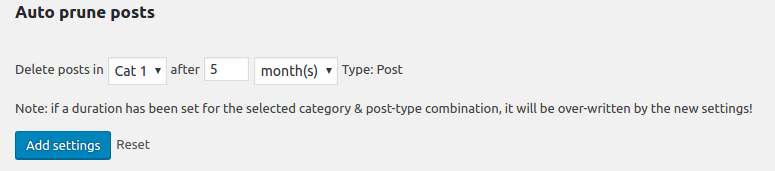
Start overview
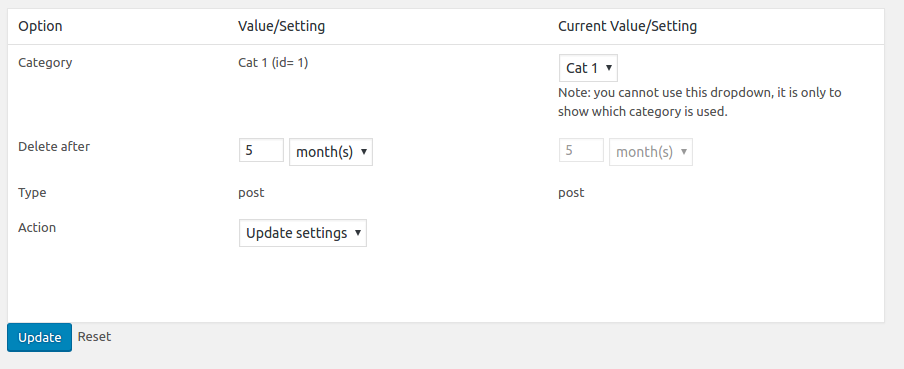
All options, you can update or delete each setting
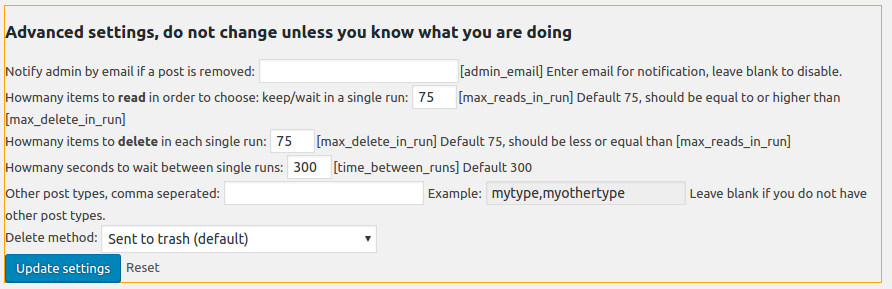
Advanced options
Changelog
3.1.1
Bugfix: Re-added the framework
3.1.0
Change: Removed &prune=true GET option to force run prune using wp-admin as it is false-positively flagged ads CSS by pathstack. Now using a form post button.
3.0.0
Bugfix: XSS in POST types
2.0.0
Bugfix: Added nonces for admin forms (CSRF)
Bugfix: PHP 8 compatibility
1.8.0
Bugfix: PHP 8 compatibility
1.7.0
Bugfix: Menu conflict with bbpress due to permissions
1.6.6
Bugfix: Removed PHP notices
Added: Settings for max deletes per run, and amount between runs
1.6.5
Added: max of 600 deletes per call, 300 sec delay
1.6.4
Bugfix: Changed the init after WP rewrite, due to errors with W3 total cache
1.6.3
Bugfix: Better hook (plugins_loaded instead of wp)
Added: Earlier flush and 20 seconds timeout
1.6.2
Bugfix: All categories now shown when saved
1.6.1
Bugfix: All categories
1.6
Added: All categories support
Bugfix: Only get latest 50 posts (performance fix), every 30 seconds
Changed: Dropdown now on category name (sort)
1.5
Bugfix: Framework did not work on multisite, is_admin() problem.
If anyone could help me with that ? 🙂
1.1
Second release
Added: Custom post type support
Added: Trash OR force delete option
Added: Mail admin if post is deleted
Changed: Init method is now every 30 seconds, all posts are checked.
Added: If you add &prune=true in your admin plugin page the plugin will run manually (force run)
1.0
First release