

AutoListicle: Automatically Update Numbered List Articles
Automatically keep your numbered lists in articles displaying the correct number by using this shortcode [auto-list-number].
Plugin info
Maintenance & Compatibility
Maintenance score
Possibly abandoned • Last updated 497 days ago • 6 reviews
Is AutoListicle: Automatically Update Numbered List Articles abandoned?
Possibly abandoned (last update 497 days ago).
Compatibility
Similar & Alternatives
Explore plugins with similar tags, and compare key metrics like downloads, ratings, updates, support, and WP/PHP compatibility.
Description
Easily keep your listicles with numbered lists updated correctly by using this plugin’s shortcode [auto-list-number]. This will display the number 1 and increment with ever use. Perfect if you write blog posts with steps or “top 10 lists”. This will allow you to easily add items to your lists or move elements around without worrying about updating headings with the correct numbers.
Shortcode Usage examples
Basic usage
[auto-list-number] Item one.
[auto-list-number] Item two.
[auto-list-number] Item three.
Extended example using all shortcode functions.
Here is my list of [auto-list-number display="total"] items.

[auto-list-number] Here is the first item in the list.
[auto-list-number] Make long listicles with ease.
[auto-list-number] You can even have multiple lists in one article.
 [auto-list-number name="my-new-list" after=":" wrapper="span"] My new list (this will start at number one).
 [auto-list-number name="my-new-list" after=":" wrapper="span"] This will be a second item.
[auto-list-number] This item will be number 4.
Shortcode Options
- name (Default: “default”) If your article has multiple lists this will keep track of multiple numbers. If a name isn’t set it will just use the list name of “default”. But if you have multiple numbered lists you want to keep track of you can use a unique name for each list in your article.
- wrapper (Default: null) Great if you want to wrap each number with a span, div or any html tag. By default the wrapper will include the class “auto-list-number”. This can be helpful if you want to style list numbers separately from your headings.
- after (Default: “.”) After a number is displayed a period and space will be displayed by default. This option is great if you want to change this to a colon or remove it all together. Note that you will have to do this each time the shortcode is displayed, you currently can’t set a new default globally. Additionally the default value does not have white space at the end so you’ll need to include a space between the shortcode and the rest of your title by default.
- display (Default: “increase”) This allows you to display a total number from a specific list in your article. For example using [auto-list-number display=”total” list=”new-list”] will display the total number of times [auto-list-number list=”new-list”] is used. Great for adding something like “Here are our 10 tips:” at the top of your article.
Troubleshooting
If you are having trouble with a table of contents plugin you can use the [auto-list-number-force-reset] shortcode to reset your post’s numbers. So ideally if your table of contents was at the top of your post you can put [auto-list-number-force-reset] below it so that all headings are reset to start at 1 again. This way the ToC plugin will loop through 1-4 for example then reset then the headlines can display 1-4 again.
Installation
To install this plugin:
- Download the plugin
- Upload the plugin to the wp-content/plugins directory,
- Go to “plugins” in your WordPress admin, then click activate.
- Add the shortcode [auto-list-number] where you want auto incrementing numbers in your articles (recommended use in headings).
Frequently Asked Questions
Review feed
Screenshots
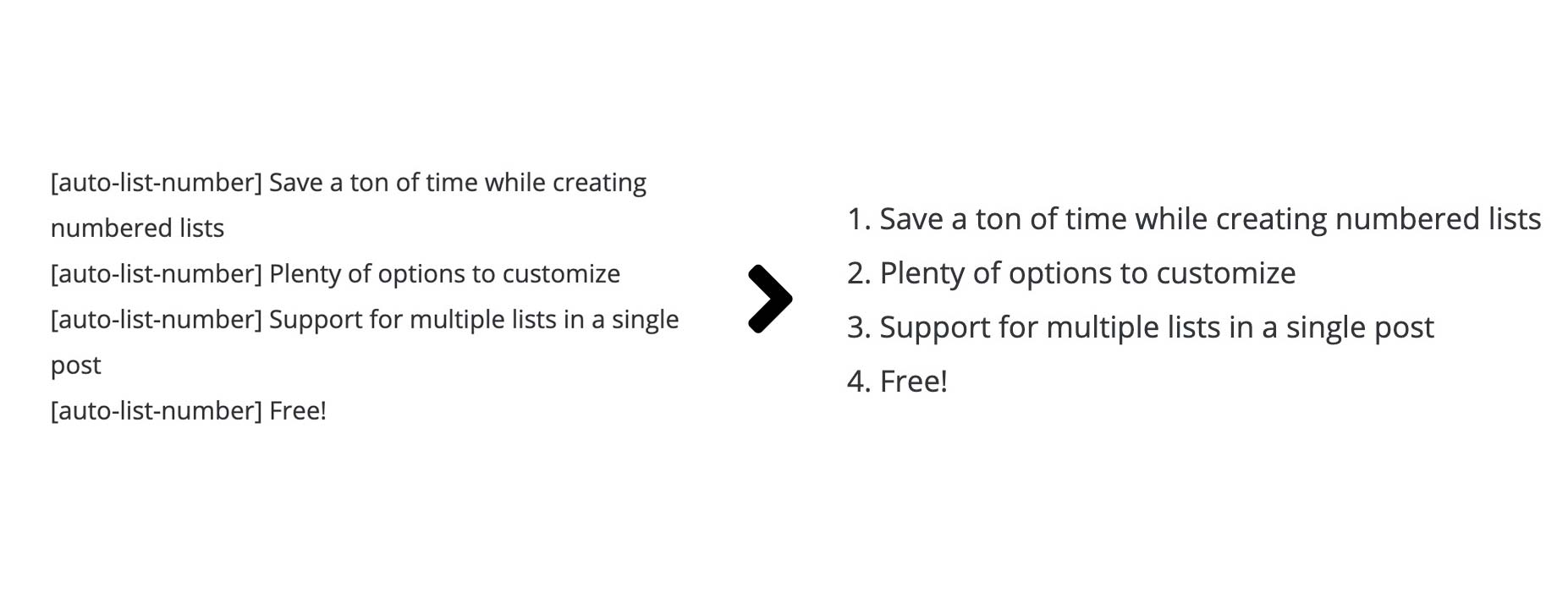
Example of what the shortcode does.
Changelog
1.2.4
- Tested up to WordPress 6.7.
- Security updates.
1.2.3
- Tested up to WordPress 6.3.
1.2.2
- Tested up to WordPress 6.0.
- Added support for capitalized shortcode.
- PHP warning bug fix.
1.2.1
- PHP warning bug fix.
1.2.0
- Bug fixes for Table of Contents plugins, mainly by reseting the numbers each time the_content is called and the addition of the [auto-list-number-force-reset] shortcode.
1.1.4
- Tested up to WordPress 5.9
- PHP warning fix
1.1.3
- Tested up to WordPress 5.7
1.1.2
- Tested up to WordPress 5.4
1.1.1
- Bug fix from previous release
1.1.0
- Ability to display the total of a specific number in your list using [auto-list-number display=”total”].
1.0.0
- Initial Release.