

Plugin info
Maintenance & Compatibility
Maintenance score
Possibly abandoned • Last updated 6075 days ago
Is AVrAmTAR abandoned?
Possibly abandoned (last update 6075 days ago).
Compatibility
Similar & Alternatives
Explore plugins with similar tags, and compare key metrics like downloads, ratings, updates, support, and WP/PHP compatibility.
Description
AVrAmTAR.com is service which allows user to register and upload multiple avatars in their account. After that user will get his unique URL to the dynamic GIF image which will show different avatar (chosen from avatars user have uploaded) each time URL is accessed.
This plugin will add AVrAmTAR.com avatar next to users’ comments on your WP-powered blog.
Installation
- Upload contents of
avramtar.zipto/wp-content/plugins/directory - Activate the plugin through the ‘Plugins’ menu in WordPress
- Enjoy your new plugin
Frequently Asked Questions
I have activated plugin but nothing happens?
Your theme might be incompatible with WP hooks so it won’t display AVrAmTAR avatars. In other words, you need to modify your theme so it can show avatars. You can do that in few simple steps:
- Open
/wp-content/themes/YOURTHEME/header.phpfile and find <head> tag (it might be <head something something..>. - Add this line BELOW <head> tag: <?php avramtar_addcss(); ?>
- If you want avatars to be automatically resized (recommended) then add following line below previous line: <?php avramtar_addjs(); ?>
- Save and close header.php file, then re-upload it.
- Open
/wp-content/themes/YOURTHEME/comments.phpfile and find: <?php comment_text() ?> - Add this line ABOVE it: <a href=”http://www.avramtar.com/” title=”AVrAmTAR avatar”><img src=”<?php echo avramtar_wp(); ?>” class=”avramtar” alt=”AVrAmTAR avatar” /></a>
- Save and close comments.php file, then re-upload it.
How to change dimensions of avatars?
Open /wp-content/plugins/avramtar/avramtar_wp.js and around line 9 find “var _resizeWidth = 65;” Change the number (default: 65) to the width (in pixels) you need. The height of each avatar will be automatically resized to constraint proportions of image.
If you want to define height of avatars and width to be automatically resized, then change value of _resizeWidth to ‘auto’ (with apostrophes) and change value of _resizeHeight to the height (in pixels) you want (w/out apostrophes).
If you want to define both width and height (not recommended) then change both values for _resizeWidth and _resizeHeight to the values (in pixels) you want (w/out apostrophes).
After that, save and re-upload file avramtar_wp.js
How to change default avatar?
Open /wp-content/plugins/avramtar/avramtar.php and around line 33 find “function avramtar_wp($default = '') {”
and then insert full URL to your custom avatar between apostrophes. You will get something like function avramtar_wp($default = 'http://mydomain.net/default-avatar.gif') {
Then save and re-upload file avramtar.php
This plugin messes up my blog in IE6!?
Yes, I know, in most cases it does mess up blog in IE6. That’s because of tableless design of your blog, and IE just can’t handle tableless design without support for CSS2. So, enable CSS2 in IE6. How? Easy! Use set of javascripts found here (http://code.google.com/p/ie7-js/) and add them to the header of your blog and everything should be fine.
…but, WP 2.5+ already has avatars…?
Yes, it does have avatars powered by Gravatar. But this plugin was made before WP 2.5 and it enables dynamic avatars from www.avramtar.com – with each refresh you get different avatar. That’s more fun 🙂
Review feed
Screenshots
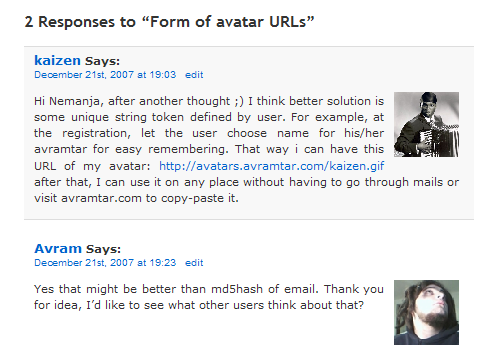
AVrAmTAR plugin in action