

Plugin info
Maintenance & Compatibility
Maintenance score
Possibly abandoned • Last updated 450 days ago • 1 reviews
Is Background Music Manager abandoned?
Possibly abandoned (last update 450 days ago).
Compatibility
Similar & Alternatives
Explore plugins with similar tags, and compare key metrics like downloads, ratings, updates, support, and WP/PHP compatibility.
Description
Background Music Manager allows you to add background music to your WordPress site. The music will play only after user interaction due to modern browser restrictions. You can enable or disable music site-wide or only on the home page, set playback time, loop the track continuously, adjust volume, and upload your own music track.
Features
- Enable/Disable Music: Control the background music across your entire site.
- Home Page Only: Option to play music exclusively on the home page.
- Playback Time: Set the duration (in seconds) for how long the music plays.
- Continuous Playback: Loop the music track continuously.
- Volume Control: Adjust the playback volume from 0.0 (mute) to 1.0 (full volume).
- Upload Music Track: Easily upload your own audio file to be played in the background.
- Admin Notice: Inform administrators about browser restrictions on autoplaying audio.
Installation
-
Upload the Plugin:
- Upload the
background-music-managerfolder to the/wp-content/plugins/directory.
- Upload the
-
Activate the Plugin:
- Go to the Plugins menu in WordPress.
- Locate Background Music Manager and click Activate.
-
Configure Settings:
- Navigate to Settings > Background Music Manager.
- Configure the desired options:
- Enable Music: Turn background music on or off across the site.
- Play Only on Home Page: Enable if you want the music to play only on the home page.
- Playback Time (seconds): Set how long the music should play (0 for infinite).
- Continuous Playback: Enable to loop the track indefinitely.
- Volume (0.0 – 1.0): Adjust the music volume.
- Upload Track: Upload an audio file to be played.
-
Save Changes:
- After configuring the settings, click Save Changes to apply.
Frequently Asked Questions
Modern browsers restrict autoplaying audio to improve user experience. The music will play only after the user interacts with the site, such as clicking or pressing a key.
Ensure that your uploaded audio file is in a supported format like MP3, WAV, or OGG.
Currently, the plugin allows enabling or disabling music site-wide or on the home page. For more granular control, additional customization is required.
Review feed
thx for plugin - Background Music Manager
Screenshots
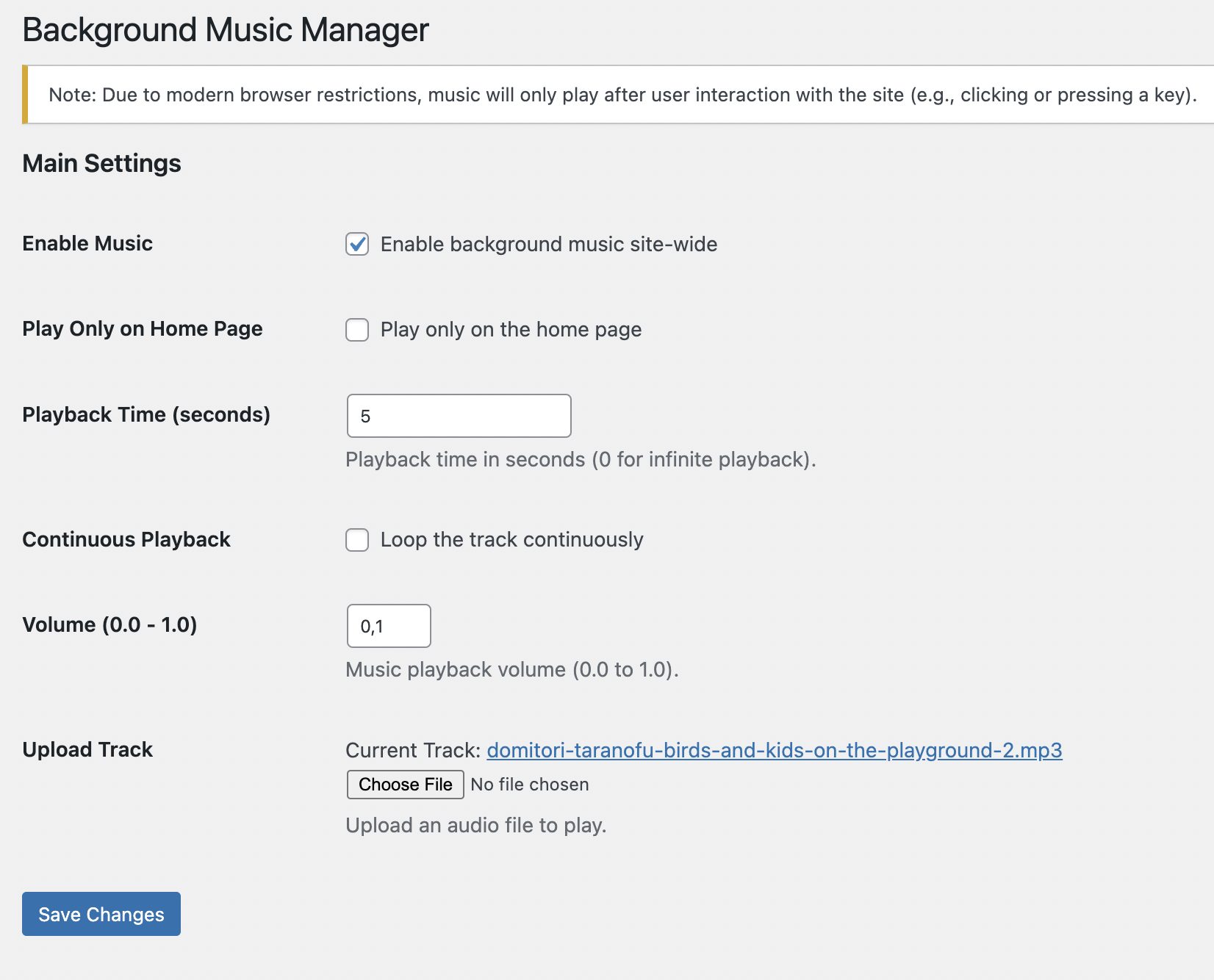
Plugin Settings Page: Configure music playback options.
Changelog
1.0
- Initial release of Background Music Manager.