

Background Slideshow
background, slider, background slideshow, images, post, pages, pictures Requires at least: 3.0 Tested up to: 3.2 Stable tag: trunk Background Slidesh …
Plugin info
Maintenance & Compatibility
Maintenance score
Possibly abandoned • Last updated 5230 days ago • 4 reviews
Is Background Slideshow abandoned?
Possibly abandoned (last update 5230 days ago).
Compatibility
Similar & Alternatives
Explore plugins with similar tags, and compare key metrics like downloads, ratings, updates, support, and WP/PHP compatibility.
Description
Background Slideshow uses jQuery to slide through unlimited full-size background images. Images are being connected with both, posts or pages. You can even decide if you want to let your visitors click on a background image to change to its post/page. Background Slideshow offers some nice features for example:
- jQuery Powered lightweight slideshow
- Nice flewing full-size background images
- Link to post/pages
- Full post-thumbnail support
- Add unlimited images
- Use on your whole blog or only on specific pages/posts
- Choose timeout/animation speed
Installation
- Upload Background Slideshow to your Plugin directory (wp-content/plugins/).
- Activate the Plugin.
- Go to Settings/Background Slideshow and customize the Slideshow to your needs.
- Use placeholder [background] or choose “use on whole blog” within the Settings Page.
- Edit/add a post or page and choose “Feature in Background Slideshow”.
- Add a featured image (Should be a full-size image).
- Finished – See the results!
Frequently Asked Questions
Where can I insert the Background Slideshow?
Insert it anywhere on every post/page you want with the placeholder [background] or choose “use on whole blog” within the Settings Page.
What is perfect Resolution for the Images?
Your resolution should be at least 1024 px width. The bigger the better to fit all desktop resolutions.
Review feed
Screenshots
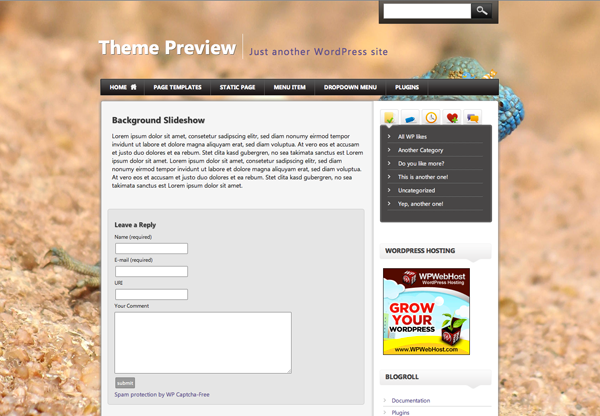
The DEMO with a first test image.

DEMO with another test background image.

Administration Settings
Changelog
1.1
- CSS fixes
1.0
- Background Slideshow available for download.