

Backup/Restore Divi Theme Options
Need to transfer your Divi Theme Options from one Divi Install to another? No Problem Works with: Divi 2.7 (and Below)
Plugin info
Maintenance & Compatibility
Maintenance score
Possibly abandoned • Last updated 3629 days ago • 7 reviews
Is Backup/Restore Divi Theme Options abandoned?
Possibly abandoned (last update 3629 days ago).
Compatibility
Similar & Alternatives
Explore plugins with similar tags, and compare key metrics like downloads, ratings, updates, support, and WP/PHP compatibility.
Description
Need to transfer your Divi Theme Options to another Divi Install?
No Problem.
Backup Theme Options:
- Install this plugin
- Go to Divi > Backup/Restore Theme Options
- Download File
Restore Theme Options:
- Install this plugin
- Go to Divi > Backup/Restore Theme Options
- Upload File
Its that simple.
Requirements
This plugin is designed to work with Divi by Elegant Themes. If you don’t have this theme installed, this plugin likley won’t work.
- Divi by Elegant Themes (Affiliate Link)
Installation
The Easy Way:
- Login to your wp-admin Dashboard
- Click Plugins
- Click “Add New” (up the top)
- Search for “Backup Restore Divi Theme Options”
- Click “Install”
- Click “Activate”
- Navigate to Divi > Backup/Restore Theme Options and begin using the plugin
The Hard Way:
- Find FTP Details to your Website
- Navigate to the /wp-content/plugins/ folder
- Upload the extracted zip folder
backup-restore-divi-theme-optionsto the plugins folder - Login to you WordPress Dashboard
- Click Plugins
- Find “Backup Restore Divi Theme Options”
- Click activate on the plugin.
- Navigate to Divi > Backup/Restore Theme Options and begin using the plugin
Frequently Asked Questions
Do I have to use DiviSpace for this to work?
No, This will work on any Divi/Wordpress Installs.
Will this work with other themes?
No, this was designed for Divi, It may work with other themes by “Elegant Themes” but we’re not sure.
Do you have a github repo of this plugin?
Yes, you can find us at https://github.com/SiteSpace/backup-restore-divi-theme-options
I love this plugin and I want to help make it better
Awesome, We’d love to have you on board, fork us on GitHub, make your changes and submit a pull request, we’ll review it and if we like what we see, we’ll be in contact
https://github.com/SiteSpace/backup-restore-divi-theme-options
Review feed
Saves time
Screenshots
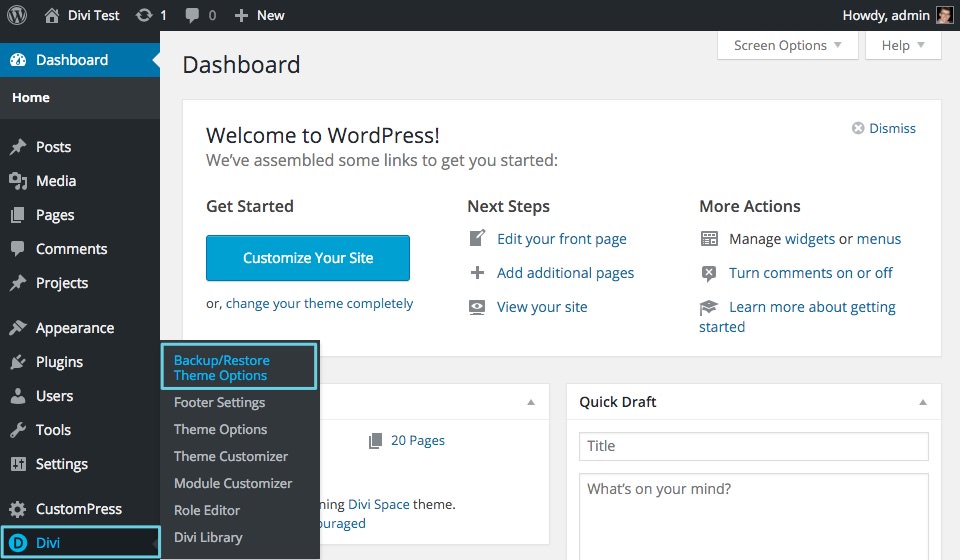
Simple and easy to install
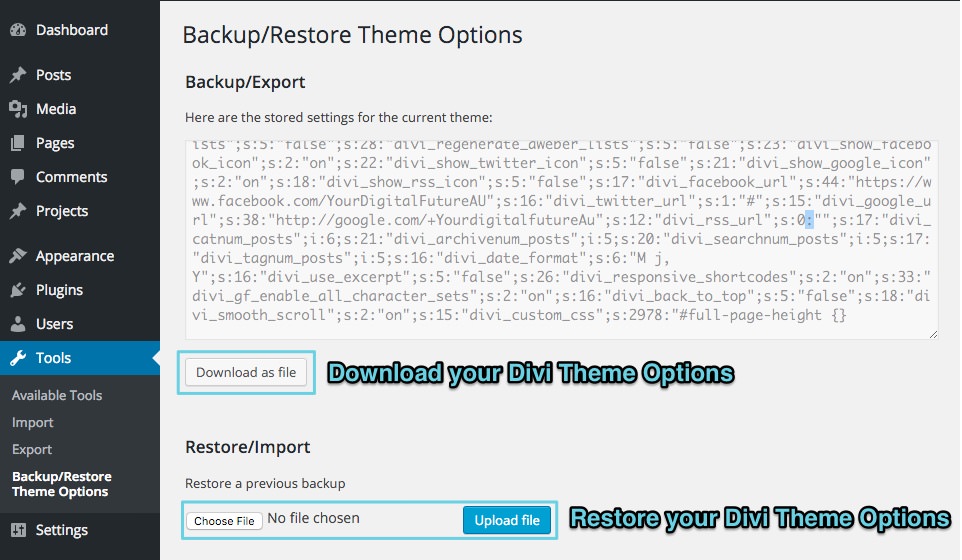
Even more simple to use
Changelog
1.0.3
- Added WordPress 4.5 Support
- Added Divi 2.7 Support
1.0.2
- Cosmetic Updates Only
- Added Screenshots
- Finally worked out how to format plugins properly (It’s my first plugin, Don’t judge)
1.0.1
- Fixed up readme.txt layout and formatted instructions
1.0.0
- First Version, Hopefully no bugs.