

BackWPup – WordPress Backup & Restore Plugin
Create a complete WordPress backup easily. Schedule automatic backups, store securely, and restore effortlessly with the best WordPress backup plugin!
Plugin info
Maintenance & Compatibility
Maintenance score
Maintained • Last updated 128 days ago • Support resolved 81% • 1,313 reviews
Is BackWPup – WordPress Backup & Restore Plugin abandoned?
Likely maintained (last update 128 days ago).
Compatibility
Developers
Languages
Similar & Alternatives
Explore plugins with similar tags, and compare key metrics like downloads, ratings, updates, support, and WP/PHP compatibility.
Description
BackWPup is the most comprehensive backup & restore plugin for WordPress.
🎉 BackWPup 5.5– New Features & Improvements
BackWPup 5.5 is now available! Building on previous releases, it brings back your most‑requested features and delivers a refreshed, more controlled backup experience—shaped by your feedback.
🚀 What’s new in BackWPup?
✅ Archive format per backup: Pick the archive type for each backup (ZIP, TAR, etc.) to match your storage and restore needs.
✅ Archive name per backup: Give each backup a clear, custom filename so they are easy to recognize at a glance.
If you happen to experience any issues with the new version, contact us directly here so we can investigate your case. We are committed to resolving any concerns quickly and are actively working to ensure a smooth experience for everyone.
How It Works: The 3-Step Backup Wizard
-
What – Choose your backup contents through our intuitive setup wizard
-
When – Set your backup schedule (hourly, daily, weekly, or monthly)
-
Where – Select your preferred storage destination(s)
Create comprehensive backups and restore your data with ease!
🌟 The Best WordPress Backup & Restore Plugin
Easily create a complete WordPress backup, store it on external services (such as Dropbox, S3, FTP, Google Drive, OneDrive and more) and restore your backup directly from your WordPress admin, in just a few clicks.
BackWPup is designed for ease of use. Even beginners can create a reliable backup of their WordPress sites with just a few clicks. With BackWPup, you can enjoy peace of mind knowing your data is safe and secure. Whether you are a small business owner or managing a large enterprise, BackWPup is the ultimate solution for protecting your WordPress site.
💎 BackWPup Pro Features
Take your WordPress backups to the next level with BackWPup Pro. Get additional features like:
-
Additional Cloud Storage options (Amazon Glacier, Google Drive, OneDrive, HiDrive).
-
Encrypted backups for enhanced security
-
Custom API keys for Dropbox and SugarSync
-
Standalone restore application for recovery without WordPress access
-
Seamless site migration by restoring to a new URL with BackWPup.
-
Premium support with dedicated ticket system
-
And much more!
Get BackWPup Pro for the complete backup and restore solution.
⏰ Schedule and Manage Backups Easily
With BackWPup, you have full control over your backup process. You can back up your entire WordPress site, including files and database, save them to multiple locations, and easily restore your site from a backup if anything goes wrong. You can choose what to back up, how often to perform backups, and where to store them:
-
Comprehensive Backups: Backup your entire WordPress installation, including the /wp-content/ folder, database and any additional non-WordPress files and folders.
-
Flexible Scheduling: Schedule automatic backups to run hourly, daily, weekly, monthly —with the freedom to pick any specific date in the month
-
Immediate Backups: Instantly run any scheduled backup job with the “Backup Now” button—perfect for on-demand backups before updates or changes.
-
Custom Backup Jobs: Combine files and database into a single job, or set up separate jobs for advanced workflows.
-
Store your backup in different locations:
Free version: Dropbox, Amazon S3, FTP, Rackspace Cloud, Microsoft Azure, SugarSync.
Pro version: Additional storage options including Amazon Glacier, Google Drive, OneDrive and HiDrive Get BackWPup Pro
This flexibility makes BackWPup the best choice for WordPress backup.
🛟 Easily Restore Your WordPress Site
Restore your site effortlessly from a backup with our one-click restore option. To restore a backup, go to the BackWPup plugin settings in your WordPress admin area. Select the backup you wish to restore, click on the three dots menu and click ‘Restore Full Backup’. And the restore is done. This feature ensures that even in the event of data loss or site issues, you can quickly and efficiently restore your site to its previous state.
Access-Free Recovery
Locked out of your dashboard? No problem. The standalone restore app on the Pro version lets you restore your site from any backup, even when you can’t access WordPress. Perfect for emergencies. Get BackWPup Pro
⚡ Improve Your Site’s Reliability and Performance
Did you know that regular backups and database maintenance can improve the performance and reliability of your WordPress site? With BackWPup, you can ensure that your data is always protected and that your site is always running smoothly.
By scheduling regular backups and database maintenance, you can avoid data loss and downtime. BackWPup makes it easy to protect your data and keep your site running at its best.
Even Google recommends regular backups and database maintenance to ensure the reliability and performance of your site. With BackWPup, you can follow best practices and keep your site secure and reliable.
😎 Easy Migration
BackWPup makes migrating your WordPress site simple. Whether you’re switching hosts or moving to a new server, easily export your files and database, then restore everything with just a few clicks—quick and hassle-free. Available only on the Pro version – Get BackWPup Pro
❓ Is BackWPup Free?
You can use BackWPup for free with all its basic features. The free version includes complete backup, scheduling, support for external storage services (like Dropbox, S3, FTP, and more) and restore.
The pro version offers many additional features including more settings, destinations, and of course access to our premium support. Check out our premium plans: https://backwpup.com/#buy
ℹ️ Who Are We?
We are WP Media, the company behind WP Rocket, the best performance plugin for WordPress.
Our mission is to improve the web. We are making it faster with WP Rocket, lighter with Imagify and safer with BackWPup.
👋 Get in Touch!
- Website: backwpup.com
- Contact Us: https://backwpup.com/contact/
🔌 Related Plugins
-
WP Rocket: The best performance plugin to speed up your WordPress website.
-
Imagify: The best image optimization plugin to speed up your website with lighter images.
-
Lazy Load: The best Lazy Load script to reduce the number of HTTP requests and improve the website’s loading time.
-
Heartbeat Control by WP Rocket: Heartbeat Control by WP Rocket: The best plugin to control the WordPress Heartbeat API and reduce CPU usage.
-
RocketCDN: The best CDN plugin for WordPress to propel your content at the speed of light – no matter where your users are located in the world.
-
Increase Max upload file size: The best plugin to increase the upload file size limit to any value with one click.
License: GPLv2 or later
License URI: http://www.gnu.org/licenses/gpl-2.0.html
Installation
WordPress Admin Method
- Go to you administration area in WordPress
Plugins > Add - Look for
BackWPup(use search form) - Click on Install and activate the plugin
FTP Method
- Upload the complete
backwpupfolder to the/wp-content/plugins/directory - Activate the plugin through the ‘Plugins’ menu in WordPress
Pro Version
[You can find a detailed tutorial in the BackWPup documentation]. (https://backwpup.com/docs/install-backwpup-pro-activate-licence/)
Frequently Asked Questions
Restoring backups made with BackWPup can be done multiple ways. Please take a look at our documentation here to learn more.
BackWPup uses WordPress’ own cron job system (WP Cron) to execute scheduled backup jobs. In order for WordPress to “know” when to execute a job, its “inner clock” needs to be set regularly. That happens whenever someone (including yourself) visits your site.
If your site happens to not being visited for a period of time, WordPress’ inner clock gets sort of slow. In that case it takes an extra server-side cron job to regularly call http://your-site.tld/wp-cron.php and tell WordPress what time it is.
A simple way to find out whether WP Cron works as it should on your site is to create a new post and set its publishing date to some point in the future, i.e. 10 minutes from now. Then leave your site (that’s important), come back after 11 minutes and check whether your scheduled post has been published. If not, you’re very likely to have an issue with WP Cron.
That means a backup job has started, but BackWPup doesn’t know where to store the backup files. Please cancel the running job and re-edit its configuration. There should be a Tab “To: …” in your backup job’s configuration. Have you set a backup target correctly?
Solution #1
- Open BackWPup->Settings
- Go to the Informations tab.
- Find Server self connect: in the left column.
- If it says something like (401) Authorisation required in the right column, go to the Network tab and set the username and password for server-side authentication.
- Try again starting the backup job.
Solution #2
- Open wp-config.php and find the line where it says
if ( !defined('ABSPATH') ). - Somewhere before that line add this:
define( 'ALTERNATE_WP_CRON', true );
Solution #3
Not really a solution, but a way to identify the real problem: see remarks on WP Cron at the top.
BackWPup performs a simple HTTP request to the server itself every time you click run now or whenever a backup job starts automatically. The HTTP response test message could mean:
* Your host does not allow loop back connections. (If you know what WP_ALTERNATE_CRON is, try it.)
* Your WordPress root directory or backup directory requires authentication. Set username and password in Settings->Network.
* The Server can’t resolve its own hostname.
* A plugin or theme is blocking the request.
* Other issues related to your individual server and/or WordPress configuration.
Please set CHMOD 775 on the /wp-content/ directory and refresh the BackWPup dashboard. If that doesn’t help, try CHMOD 777. You can revert it to 755 once BackWPup has created its folder.
Go to Settings->General and disable “Display folder sizes on files tab if job edited”. Calculating folder sizes can take a while on sites with many folders.
Try opening the text file in an editor software like Notepad++ (Windows) or TextMate (Mac) to preserve line-breaks.
Go to Settings->Jobs and try a different option for “Reduce server load”.
Yes. Go to your BackWPup temp directory and find a file named backwpup-xyz-working.json where “xyz” is a random string of numbers and characters. Delete that file to cancel the currently running backup job.
Yes. You need to have writing access to the wp-config.php file (usually residing in the root directory of your WordPress installation).
- Open wp-config.php and find the line where it says
if ( !defined('ABSPATH') ). - Somewhere before that line add this:
define( 'WP_TEMP_DIR', '/absolute/path/to/wp/your/temp-dir' ); - Replace
/absolute/path/to/wp/with the absolute path of your WordPress installation andyour/temp-dirwith the path to your new temp directory. - Save the file.
- %d = Two digit day of the month, with leading zeros
- %j = Day of the month, without leading zeros
- %m = Day of the month, with leading zeros
- %n = Representation of the month (without leading zeros)
- %Y = Four digit representation for the year
- %y = Two digit representation of the year
- %a = Lowercase ante meridiem (am) and post meridiem (pm)
- %A = Uppercase ante meridiem (AM) and post meridiem (PM)
- %B = Swatch Internet Time
- %g = Hour in 12-hour format, without leading zeros
- %G = Hour in 24-hour format, without leading zeros
- %h = Hour in 12-hour format, with leading zeros
- %H = Hour in 24-hour format, with leading zeros
- %i = Two digit representation of the minute
- %s = Two digit representation of the second
Review feed
No easy restore option
Free Version too limited in Cloud Support
Trusted for years
Great backup tool
An extensive plugin became a three button plugin
Screenshots
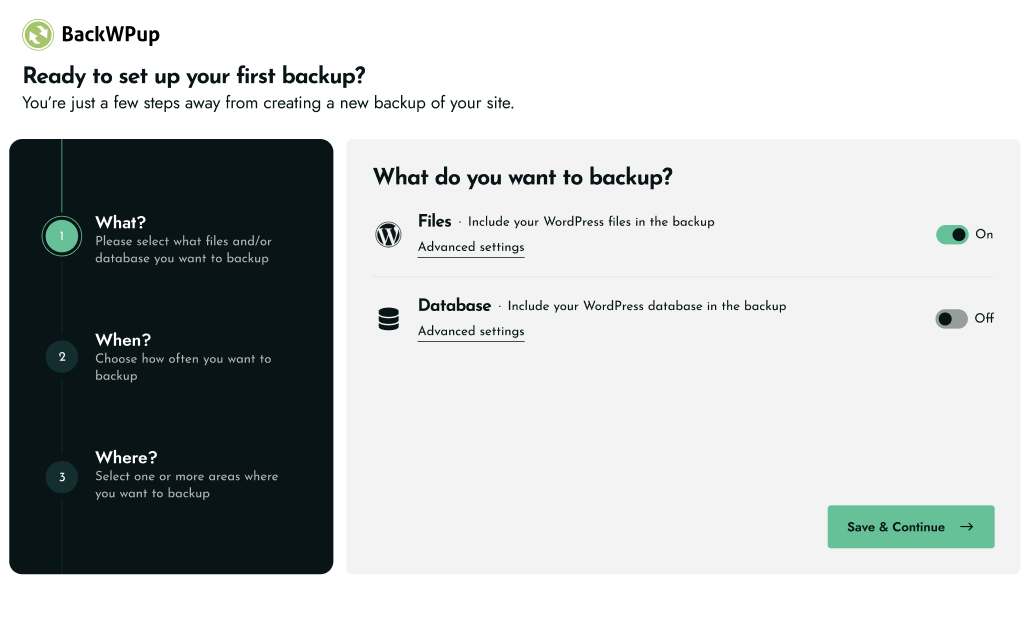
WHAT - Choose your backup contents through our intuitive setup wizard
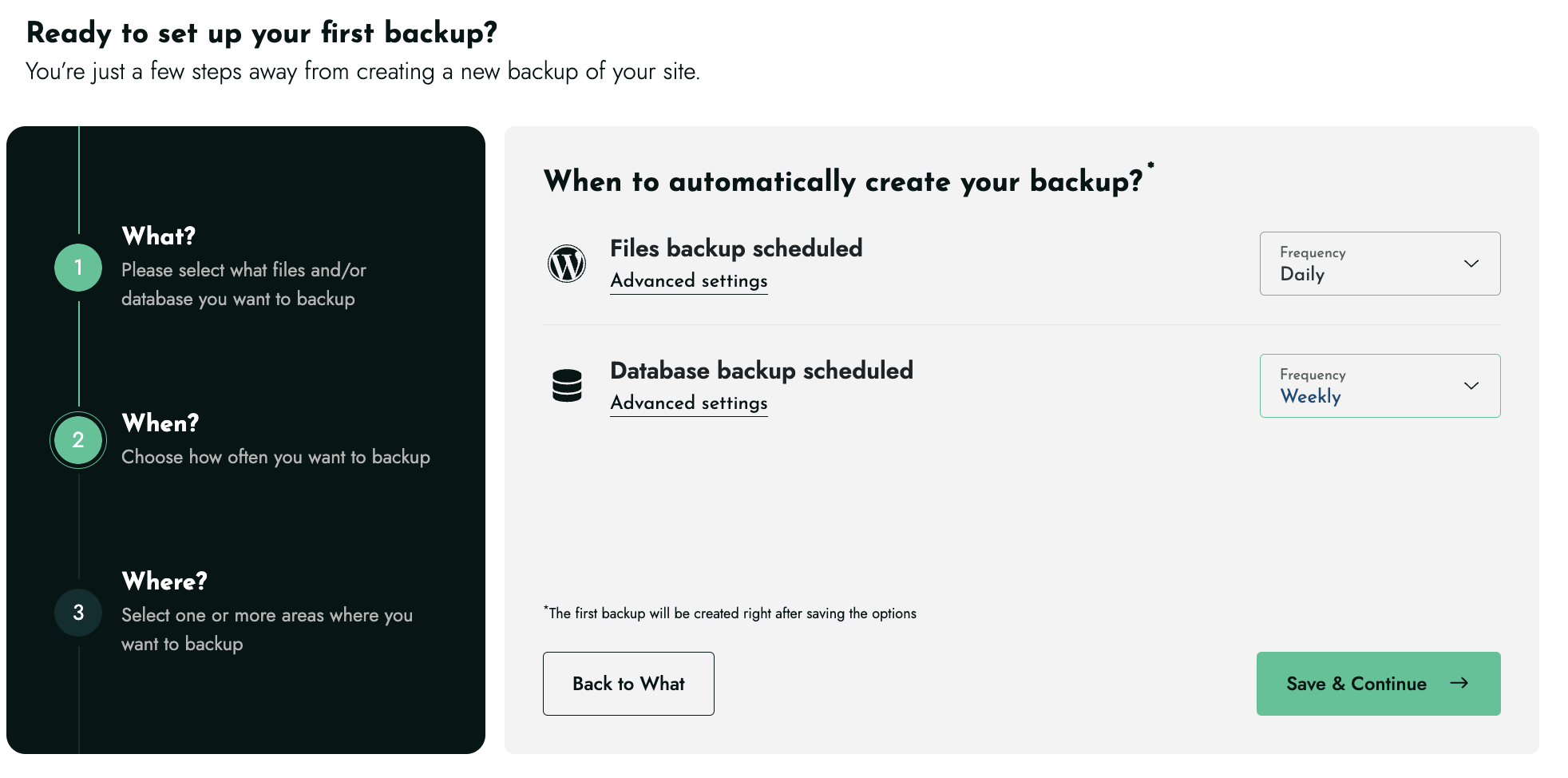
WHEN - Set your backup schedule (hourly, daily, weekly, or monthly)
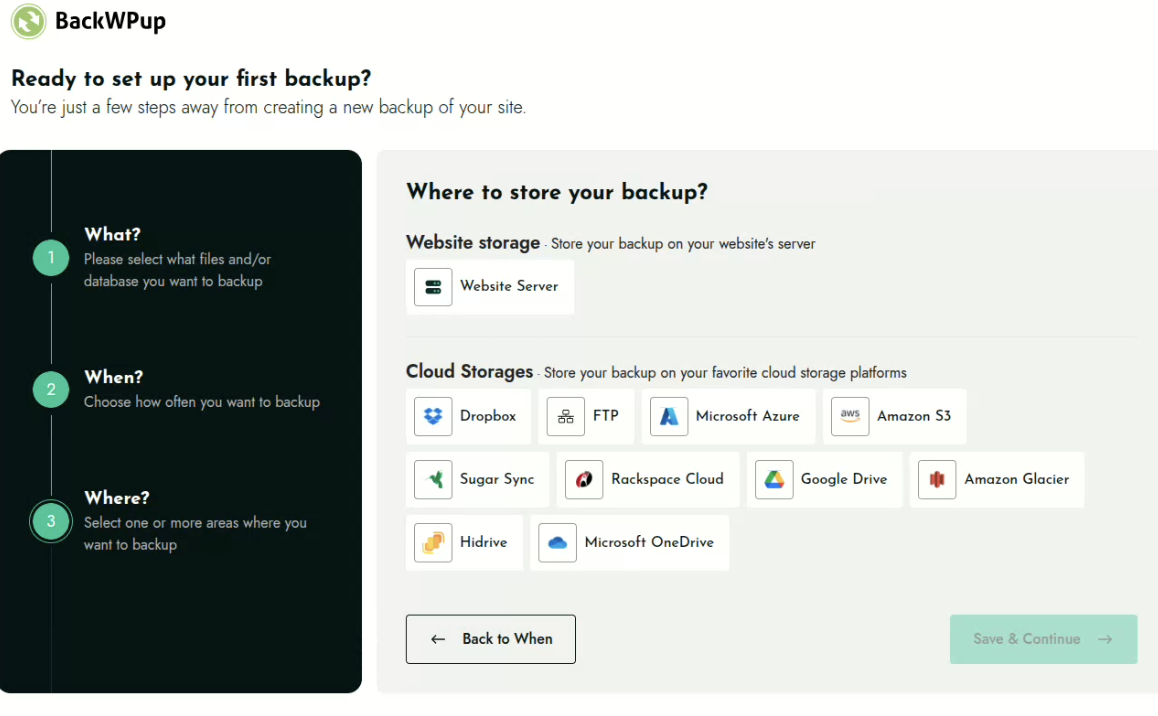
WHERE - Select your preferred storage destination(s)
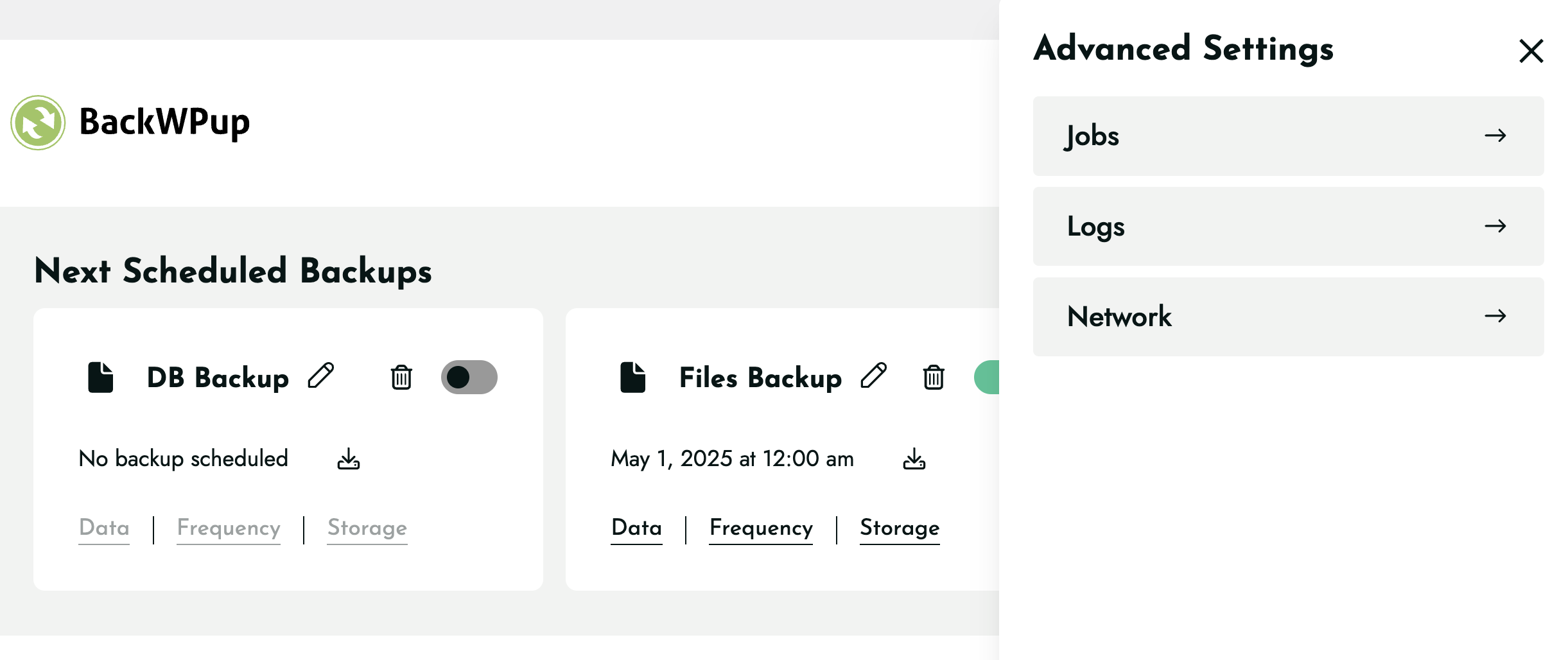
Configure all your backup settings
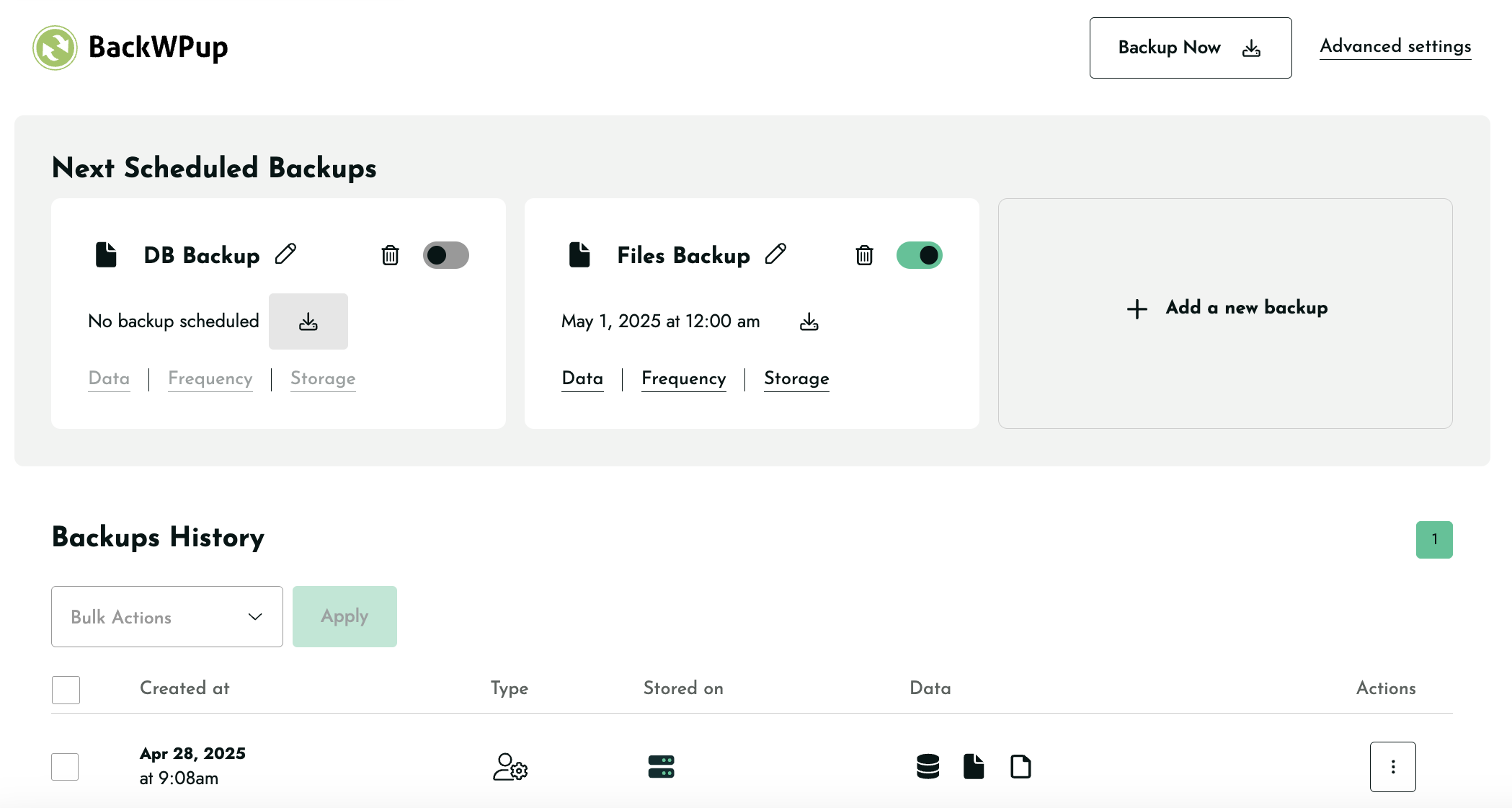
Add new backup, backup history, next scheduled backups all in one place
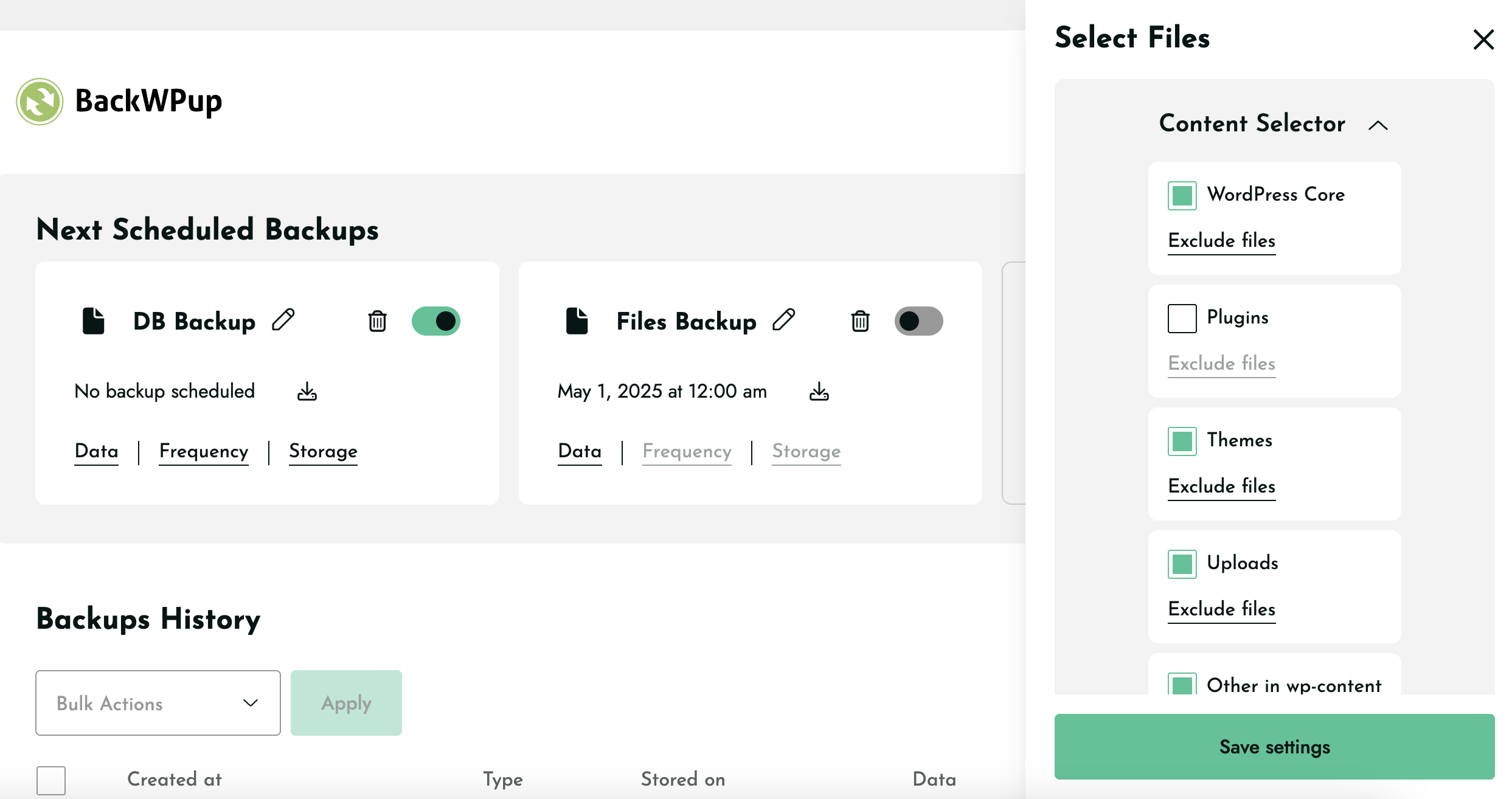
Content selector to exclude or include files for backups
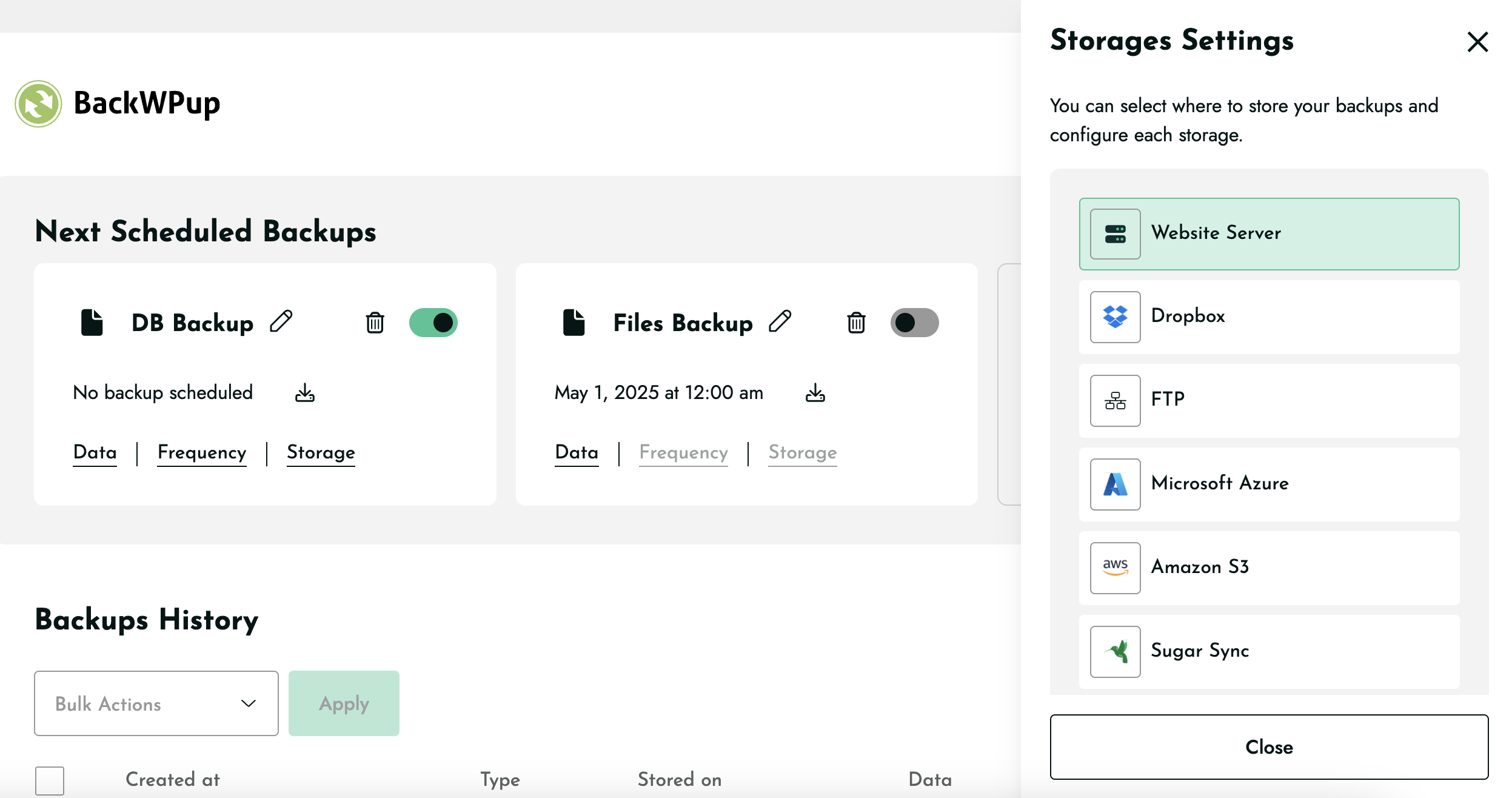
Storage settings to select location to store backups
Changelog
5.6.0
Release date: November 25, 2025
- Enhancement: Introduced WP-CLI support for running backups
- Enhancement: Improved Mixpanel event tracking accuracy
- Added support for triggering backups via link
- Fix: Resolved a compatibility issue with Visual Composer
5.5.2
Release date: November 03, 2025
- Security fix: Safe handling of job attributes concatenated into HTML attributes on the admin UI
- Enhancement: Compatibility with Kinsta hosting with backup rate limits
- Enhancement: Better handling of missing PHP cURL extension
- Enhancement: Improved upload of large backups on HiDrive
- Enhancement: Facilitated diagnosis for support with dedicated tooling
- Fix: Consistently displaying the “Help Us Improve BackWPup!” notice
5.5.1
Release date: October 20, 2025
- Security Fix: Missing Authorization to Sensitive Information Exposure
- Fix: HiDrive backup download partially not working.
- Fix: HiDrive backup not working properly due to major storage issue.
- Fix: Compatibility issue with .donotbackup file and open_basedir environments.
- Fix: Minor UX issues when including files in backups.
- Fix: OneDrive allow users to reauthenticate.
5.5.0
Release date: September 16, 2025
- New Feature: Archive format per backup
- New Feature: Archive name per backup
5.4.1 Release date: September 2, 2025
- Fix: Additional Guzzle Dependency conflicts causing errors.
5.4 Release date: August 20, 2025
- New feature: Add extra files or folders for backups
- Fix: Sending unwanted warning email because of .donotbackup file.
- FIx: Showing cursor pointer on non-clickable elements.
- FIx: Backup downloads are not working for FTP storage.
- Fix: Guzzle Dependency conflict causing errors in backups.
- Fix: The Encrypt archive option is disabled after the update.
- Fix: The backup now icon is closer to the date of scheduled backups.
- Fix: No backup is created for any storage when OneDrive is selected during onboarding.
5.3.2
Release date: August 12, 2025
- Bugfix: Log notification emails were not sent for successful backup
- Removed: Remove unused/deprecated codes
- Enhancement: Refactor the plugin admin notice code
- Bugfix: Save button is not clickable on low browsers window height
- Bugfix: Google Drive & OneDrive API fields not fully visible
- Bugfix: Encryption “Save” button not visible below Asymmetric Key
- Bugfix: Decryption key needed for free plugin
- Enhancement: Storage deselect ux issues
5.3.1
Release date: July 22, 2025
- Bugfix: Default archive format resets to Tar format after update to 5.3
- Bugfix: Updating to 5.3 causes Fatal error due to corrupted data
- Bugfix: License activation fails due to service provider issue
- Bugfix: Upload to FTP backup limit issue on 5.3
5.3.0
Release date: July 14, 2025
- New feature: Backup File & Database together in a single job
- Bugfix: New jobs ignore the global archive format and default to .Tar
- Bugfix: SugarSync error message after authenticating
- Bugfix: Google Drive not working correctly during onboarding
- Enhancement: Show only successful backup entries in the backup history
- Enhancement: Long job title spills outside the pop-up
- Enhancement: Configure backup data settings without selecting it
- Enhancement: Fixed Schedule backup title is too long issue
- Enhancement: Added tooltips for schedule backup icons
- Enhancement: Add new backup UI ux issues
- Enhancement: Improvement of cloud storage code
5.2.3
Release date: May 22, 2025
- Bugfix: Fixed fatal error when both Free and Pro versions are activated together.
5.2.2
Release date: May 20, 2025
- New feature: Deselect Website Server as a default storage destination
- Enhancement: Reduce overall plugin size
- Bugfix: Google Drive does not remain selected
- Bugfix: Plugin interface becomes non-functional & not clickable
- Bugfix: Error during backup for Dropbox storage
- Bugfix: Dropbox authentication error
5.2.1
Release date: April 30, 2025
- Bugfix: Fixed fatal error caused by cal_days_in_month() function on 5.2 for unsupported servers.
5.2.0
Release date: April 29, 2025
- New feature: Add “Backup Now” button to each scheduled job
- Enhancement: Monthly frequency to allow users to select the exact day
- Enhancement: Show the Toast messages on specific actions instead of every actions
5.1.3
Release date: April 23,2025
- Added: Filter to show legacy/disabled jobs
- Added: Notice for legacy disabled jobs
- Enhancement: Replaced Files icon (currently WP logo) with a new file icon
- Enhancement: Adding new jobs moves the existing job placement in the interface
- Enhancement: Increased the default timeout for toast messages
- Bugfix: Old jobs auto disabled for users from v5.0.9 & v5.1.0 to v5.1
- Bugfix: Legacy jobs link not triggering the job
- Bugfix: Clicking “Save & Continue” before the page fully loads skips onboarding
- Bugfix: Added WP default admin styles in the Legacy jobs page
- Bugfix: WordPress timezone changes mess up the frequency feature
- Bugfix: The “Backup Now” error when there’s no job available
- Bugfix: Fix a problem with the encryption Save button doing nothing
- Bugfix: Long load time on clicking Data after adding File job exclusion
- Bugfix: Backup job pencil icon grows smaller with long titles
- Bugfix: Conflict with MainWP child plugin
5.1.2
Release date: April 15,2025
- Enhancement: Display the warning message for customers affected by the bug in 5.1 version of the plugin
5.1.1
- Fixed: Backups created before v5 are no longer deactivated when updating the plugin
5.1.0
Release date: April 07,2025
- New feature: Introduce possibility to add more than two backup jobs
- New feature: Add possibility to set a title for each job
- Enhancement: Rework of the ‘Backup Now’ feature
- Enhancemnet: Make ‘Local Storage’ more descriptive
- Enhancement: Rework of the notices inside the plugin
- Enhancement: Introduce cache busting strategy for static assets inside the plugin
- Enhancement: Make sure not to display the non-existing buckets inside the Amazon S3 storage panel
- Enhancement: Update the phrasing for the restore process page to make it easier to understand
- Bugfix: Fix Dropbox authentication bug
- Bugfix: Fix a problem when excluded files were still included in the backup
- Bugfix: Fix a problem with ‘FTP passive mode’
5.0.9
Release date: March 21, 2025
- Fixed: Huge package size
- Fixed: Files and DB jobs are not separated in certain scenario
5.0.8
Release date: March 20, 2025
- New Feature: Allow to choose storage for specific backup job
- Enhancement: Security enhancements related to unserialize function
- Enhancement: Remove unnecessary strings in the scheduled backup jobs blocks
- Enhancement: Improve welcome banner’s UI
- Bugfix: Make sure not to display backups which were removed using UI in the backup history list
5.0.7
Release date: March 13, 2025
- Added: Hourly frequency for backups
- Added: WPM Apply filters library for better code maintainability
- Fixed: PHP Warning & auto reset advanced settings issue
- Fixed: Closing banner cancels the onboarding issue
- Fixed: Correct the title of Next Schedule Backup
- Changed: Onboarding backup success page notice & redirection
- Changed: “Restore Full Backup” string to “Restore Backup”
5.0.6
Release date: March 10, 2025
- Fixed: Archive file format Tar generation code to handle long file names
- Fixed: Clicking on actions should close other opened sections in Backup History
5.0.5
Release date: March 03, 2025
- Added: Dropdown to allow users to select the Backup file format (zip, tar, tar.gz)
- Added: Show different in-app notices to new & existing users
- Fixed: BackWPUp Menu Visible to All User Roles, Including Subscribers
- Fixed: Database & File backup does not remain selected, automatically becomes off
5.0.4
Release date: feb 13, 2025
- Fixed: Layout issue with theme customizer
- Fixed: API error when the number of backups is equal to 0
- Fixed: Php 8.x deprecated notices
- Removed : “Add new” job button from Job listing
- Fixed: Tooltip text cut off
- Removed: Hover style on disabled elements
- Added: Hover tooltip on storage icons
5.0.3
Release date: feb 07, 2025
- Fixed: Backup is running constantly & can’t be stopped.
- Fixed: Authentication issue for Dropbox, FTP & Azure.
- Added: Custom scheduling option.
- Added: Display history of all backups.
- Added: Custom filter to allow zip and tar.gz compression
- Changed: Changed plugin noticed Message.
5.0.2
Release date: feb 04,2025
- Fixed : Error due to unrecognized cron expression
5.0.1
Release date: feb 04, 2025
- Fixed : Css issues with the new UI
Version 5.0
Release date: Feb 04, 2025
- Complete revamp of the plugin UI
- Changed: Updated dependencies
- Moved Jobs, Logs, Network, license & settings under Advance Settings
- Removed: Jobs, Logs, Backups, Add new job, Settings, Restore & About from the plugin menu
4.1.7
Release date: nov 25, 2024
* Changed : Update dependencies :
** guzzlehttp/guzzle to 7.0
** onedrive-php-sdk to 3.2.0
** microsoft-graph to 1.7.0
4.1.6
Release date: oct 15, 2024
- Changed : Show the Restore feature information notice only for free version users
- Changed : The default format is now .tar
- Fixed : Warnings on the backup script on PHP 8.x when tar format is used
4.1.5
Release date: sept 27, 2024
- Added : Restore feature information notice
- Changed : Upgraded WordPress minimum version to 4.9
- Removed : Remove the EasyCron integration and switch it with WPCron.
- Removed : Remove Database Backup file name & compression options from the UI can be edited via filter (backwpup_generate_dump_filename)
- Fixed : Conflict with WP Hotel Booking from ThimPress
- Changed : Add the default exclude files in a filter. (backwpup_file_exclude)
- Fixed : Use wp translation
4.1.4
Release date: jul 22, 2024
- Ehanced: Store the review notice dismiss as an option
- Fixed: Hide the evaluate notice using css
- Removed: Remove the “Compression” option in Settings > Logs
** Disabled by default, can be enabled with a filter (backwpup_gz_logs) - Fixed: Check if the third parties constants are defined before using them
4.1.3
Release date: Jul 05, 2024
- Changed: Upgraded minimum version to PHP 7.4
- Fixed: Evaluate notice doesn’t dismiss
- Removed: General tab on settings page
** Admin bar: enabled by default, can be disabled with a filter (backwpup_is_in_admin_bar)
** Folder sizes: disabled by default, can be enabled with a filter (backwpup_show_folder_size)
** Protect folders: we protect your folders by default can be disabled with a filter (backwpup_protect_folders)
** Plugin data: we delete all plugin data after its delation by default - Fixed: Fix S3 uploads over 5 Gb
4.1.2
Release date: Jun 27, 2024
- Fixed: Open_basedir restriction on some servers
- Added: Notice to ask users their experience with BackWpUp
4.1.1
Release date: Jun 18, 2024
- Changed: AutoExclude the cache plugin folders from the backup
- Fixed: Problems with the sql dump of the database
- Fixed: Update phpseclib library to fix issues in Windows environment.
4.1.0
Release date: Jun 4, 2024
- Changed: Add Restore to the free version
- Fixed: Improved checking of encrypted archives
- Added (pro): decryption and encryption with WP-CLI of archives
- Fixed (pro): Problems with Asymmetric encryption on restarts
4.0.5
Release date: May 21, 2024
- Fixed (pro): Gdrive oAuth authentication flow
4.0.4
Release date: March 12, 2024
- Fixed: Changed directory structure of BackWPup temporary files to prevent unauthorized access of database backup.
4.0.3
Release date: February 22, 2024
- Fixed: Security issue where FTP passwords were stored in the database in plaintext.
4.0.2
Release date: November 22, 2023
- Fixed: Disallow backups or logs directories from being outside of wp-content directory for security purposes
4.0.1
Release date: October 18, 2023
- Changed (pro): Clarified instructions in the “Path to mysqldump file” field
- Changed: Upgraded minimum version to PHP 7.2.5
- Fixed (pro): Restoring a compressed database backup resulted in a “Could not get size of SQL file” error
- Fixed (pro): 500 error in Restore app, due to missing dependencies
- Fixed (pro): Escaped previously unescaped SQL query
- Fixed (pro): Security issue regarding location of restore files
- Fixed (pro): PHP warning when configuring a wizard with the glacier destination
- Fixed: Missing nonce validation on certain AJAX endpoints
- Fixed: Escaping for values on log output
- Fixed: Escaping of sendmail command
- Fixed: Corrected an invalid URL in the documentation link found in the plugin overview
- Fixed: Various deprecation notices on PHP 8.0+
- Fixed: Issue where webp thumbnail images were not excluded despite enabling the “Don’t backup thumbnails from the site’s uploads folder” option
- Fixed: Ensure validation of logfile parameter during job run
4.0.0
Release Date: November 16, 2022
- Added: Support for additional S3 storage classes
- Added: Support for Glacier Instant Retrieval
- Added: Created backwpup_ftp_use_passive_address filter for when FTP is behind NAT
- Added: Support for object lock in S3 by adding Content-MD5 header
- Added (pro): Include unique IV when encrypting archives
- Added (pro): Default character set fetched from alternative database credentials
- Changed: Upgraded minimum version to PHP 7.2
- Changed (pro): Upgraded Google Drive SDK to V3
- Fixed: Better support for PHP 8
- Fixed: PHP warning when backing up to S3 destination
- Fixed: Unable to download from S3 when using predefined region
- Fixed: Unable to download from SugarSync
- Fixed: Backups downloaded twice from MS Azure
- Fixed: wp-config.php backed up twice when parent folder is included in backup
- Fixed: Text fields too long on SugarSync destination settings
- Fixed: Dropbox runs out of memory when more than 50 files in folder
- Fixed (pro): Authentication of OneDrive when HTTP_REFERER not set.
- Fixed (pro): Displayed creation date of OneDrive backups was incorrect
- Fixed (pro): Disabled mysqldump radio button when binary cannot be found
- Fixed (pro): HiDrive does not detect when refresh token expires
- Removed: Unnecessary AWS and Google library files to save on package size.
Version 3.10.0
Release Date: September 1, 2021
- Added: Support for Dropbox short-lived access tokens
- Fixed (pro): Prevent out of memory error on HiDrive backups
- Fixed (pro): Small files uploaded twice to HiDrive
- Fixed (pro): Fatal error on plugin update if $transient is null
- Fixed (pro): Restore of stored functions, procedures, and triggers
- Fixed: Export of stored functions, procedures, and triggers including delimiters
- Fixed: Support emojis and other 4-byte characters in database dump
- Fixed: PHP 8 deprecation notice in XML export
Version 3.9.0
Release Date: June 14, 2021
- Added (pro): Migrate website to another URL
- Added (pro): Validation for database credentials on restore
- Added: PHP notice for outdated PHP versions less than 7.2
- Fixed (pro): License deactivated on settings save
- Fixed (pro): Corrupted path name in Google Drive destination
- Fixed (pro): Unable to download backup from Google Drive
- Fixed: Unable to connect to custom S3 endpoints
- Fixed: Intermittent error selecting restore strategy
- Fixed: Memory leaks when uploading to S3
- Fixed: PHP 7.4 Deprecation notices
- Fixed: PHP 8 compatibility issues
- Fixed: Remove BackWPup user roles on uninstall in multisite
- Fixed: Correctly handle relative upload paths
- Fixed: Display welcome page even after consent dialog clicked
- Fixed: Exclude non backup files from the backups page
- Fixed: Format dates as ISO-formatted dates instead of binary hex in MySQL backup
- Fixed: Don’t pre-fill database credentials when backing up non-WordPress database
- Fixed: Description of replacement patterns for archive name
- Fixed: Added missing destinations to destination list in about page
- Fixed: Made BackWPup banner local
- Removed: Phone home client
- Removed: Remote admin notices
Version 3.8.0
Release Date: September 21, 2020
- Added: OneDrive destination for Pro version
- Added: HiDrive destination for Pro version
- Added: WordPress 5.5 compatibility
- Added: PHP 7.4 compatibility
- Added: Option to keep BackWPUp data after plugin uninstall
- Added: More default excluded folders and files for BackWPUp
- Fixed: Custom S3 destination return error after Amazon library update
- Fixed: PHP Notice: Undefined index: dbdumpdbcharset
- Fixed: Cannot use variables for the xml file name
- Fixed: Deprecated: Non-static method BackWPup_Admin::admin_css() should not be called statically
- Fixed: Prevent click on overlay disable backup download process
- Fixed: BackWPUp redirects even in the CLI environment
Version 3.7.1
Release Date: March 30, 2020
- Fixed: Error Notices CSS is loaded on all pages and overwrite the color of other plugins notices
- Updated: (Pro) License system update for premium version
Version 3.7.0
Release Date: Nov 27, 2019
- Updated: Raise the minimum PHP version required by BWU to 5.6
- Updated: Microsoft Azure Storage Blob PHP Client Library
- Fixed: S3 custom url not used for bucket selection
- Fixed: S3 malformed error message when authentication credentials are wrong
- Fixed: S3 selecting an invalid service raise no error
- Fixed: Rackspace uses old cacert.pem file
- Fixed: Log page not correcty sorted
- Added: Option to enable or disable the phone home client
Version 3.6.10
Release Date: Jul 8, 2019
- Fixed: Azure Supports https on uploading
- Fixed: Auto remove old backup files not working when archive file name have prefix “backwpup”
- Added: Filter to extend list of S3 destinations
- Removed: S3 multipart upload checkbox, now in destination definition
- Updated: Amazon AWS SDK for S3 services, now PHP 5.5+ is needed
- Added: Filter to extend list of Glacier destinations (Pro version)
- Updated: Amazon AWS SDK for Glacier, now PHP 5.5+ is needed (Pro version)
Version 3.6.9
Release Date: May 7, 2019
- Fixed: Google Drive destination automatically remove old backup files
- Fixed: Do not expose destination data within the manifest file
- Fixed: Update Dropbox Tokens
- Fixed: Restore error: MIME returns html instead of event stream
- Fixed: Log files name are predictable because of weak hash
- Fixed: ZipArchive doesn’t fallback to PclZip in Restore
- Fixed: Session already started could cause issues during ajax calls
- Fixed: Wrong vendor include path for PEAR using MS Azure
- Fixed: Decryption Key prompt when any error occur during the first step of a Restore
- Fixed: Phone home client notice and php 5 issue with php short echo tag
- Fixed: mime_content_type function may not exists prevent backup decryption
- Improve: Restore Log and produce report for user feedback
- Changed: License changed to GPLv2+
Version 3.6.8
Release Date: Feb 25, 2019
- Fixed: Typos in settings job page
- Fixed: Rest API admin note language doesn’t change when changing user language
Version 3.6.7
Release Date: Jan 22, 2019
- Fixed: More margin to dashboard footer to avoid save button unclickable
- Fixed: On folder sync destination folder is not created
- Fixed: Encryption option should not be displayed for syncing job
- Fixed: Restore stuck on file restore step because of file permission issue
- Fixed: “Do not delete files while syncing to destination!” not working
- Tweak: Increase PHP Version from 5.3.2 to 5.3.3
- Tweak: Encryption Settings description and ui improvements
- Tweak: On restore error, include
restore.datfile along with the log when user download the restore log file - Tweak: Lock server to execute same task multiple time when one is already in progress
Version 3.6.6
Release Date: Nov 28, 2018
- Fixed: Files could be excluded from the backup because of incorrect string comparison
Version 3.6.5
Release Date: Nov 23, 2018
- Fixed: Admin notice won’t update correctly
Version 3.6.4
Release Date: Nov 22, 2018
- Fixed: Encrypted backup must force users to download the encryption keys
- Fixed: Warning mime type when a backup is going to be downloaded
- Fixed: Admin Notice in free version is sometimes empty
- Fixed: Random restore error about SQL syntax when restoring a database
- Fixed: Exclude restore directories to be copied during a restore phase
- Fixed: Standalone App has no encryption support
- Fixed: Open basedir, backup dir is not within the allowed path
- Fixed: Unable to download backup file because of mime_content_type function missing in some environment
- Tweak: Encryption Settings UI
- Tweak: Minor translations issues
- Tweak: Remove languages files from the free version, the plugin will use translation.wordpress.org
Version 3.6.3
Release Date: Nov 5, 2018
- Fixed: “Failed to restore file”: file restore progress stop working and jump directly to database restore step
- Fixed: Restore progress stuck on “restoring database” with archive backup contains files only
- Fixed: All config.php files are not in backup archive
Version 3.6.2
Release Date: Oct 17, 2018
- Fixed: Not recognized file extensions get an additional underscore in the file name in zip file
- Fixed: Backup archive file have dot folder contains all web root files
- Fixed: Ftp destination downloader repetitively open a new handler for the source file causing corrupted backup
Version 3.6.1
Release Date: Sep 25, 2018
- Fixed: Backup doesn’t handle special characters correctly
- Fixed: Use of function that doesn’t exists prior to 4.9
- Fixed: Class bryter/helpers/csrf/CSRF.php was not loaded
- Fixed: Backup don’t override old database file in web root
- Fixed: Restore Folder backup won’t download the backup file
- Fixed: Function
owns_backup_archivenot exists, the one isis_backup_archive - Fixed: Some settings page and license api manager strings are missing translation
- Fixed: Incompatibility with php 5.3 in destination folder downloader
- Fixed: fatal error on Amazon Glacier because of an undefined function
- Fixed: Ensure extra files are not overwritten
- Fixed: Cannot delete woocommerce_downloadable_product_permissions table
- Fixed: Incompatibility with php 5.3 in the restore process
Version 3.6.0
Release Date: June 14, 2018
- Added: Pro Feature – Encrypt before sending backups to the cloud
- Fixed: Handling of special Amazon S3 regions such as Google Storage
- Fixed: Downloading of large files encountered PHP memory error
- Improved: Delete pro-only scss files in free version
- Fixed: Version constraints of composer dependencies
- Fixed: Localized strings from restore
- Fixed: Deleting FTP backup resulted in error
- Fixed: openssl_encrypt compatibility with PHP 5.3
Version 3.5.1
Release Date: May 23, 2018
- Fixed: call to a member function close() on null
- Fixed: Cannot use object of type WP_Error as array
- Fixed: Can’t use function return value in write context
- Fixed: Compatibility with PHP 5.3
- Fixed: Decreased size of plugin by purging unneeded files
Version 3.5.0
Release Date: May 16, 2018
- Added: Restore for pro version
- Fixed: stylesheet was being included on frontend
No newline at end of file